


Windows Products
- iPod / iPhone Tools
-
- iPod to Computer Transfer

- iPad to Computer Transfer

- iPhone to Computer Transfer
- iPhone Ringtone Maker
- iPhone SMS Transfer
- iPhone Contact Transfer
- iPhone Call List Transfer
- iPhone iBooks Transfer
- iPhone Photo Transfer
- iPod Mate
- iPhone Mate
- iPad Mate
- DVD to iPod Converter
- DVD to iPhone Converter
- DVD to iPad Converter
- iPod Movie Converter
- iPhone Video Converter
- iPad Video Converter
- iPod to Computer Transfer
- DVD Cloner Tools
- DVD Creator Tools
- Video Converter Tools
-
- Video Converter
- iPod Movie Converter
- iPhone Video Converter
- iPad Video Converter
- Apple TV Video Converter
- Video to Audio Converter
- AVI MPEG Converter
- MP4 Video Converter
- PS3 Video Converter
- PSP Video Converter
- WMV Video Converter
- 3GP Video Converter
- FLV Converter
- MOV Converter
- RM Converter
- Zune Video Converter
- BlackBerry Video Converter
- Mobile Phone Video Converter
- Video Converter
- DVD Ripper Tools
-
- DVD Ripper Platinum
- DVD to iPod Converter
- DVD to iPhone Converter
- DVD to iPad Converter
- DVD to Apple TV Converter
- DVD Audio Ripper
- DVD to MP4 Converter
- DVD to PS3 Converter
- DVD to PSP Converter
- DVD to WMV Converter
- DVD to 3GP Converter
- DVD to AVI Converter
- DVD to DivX Converter
- DVD to Pocket PC Ripper
- DVD to Zune Converter
- DVD to BlackBerry Converter
- DVD to Mobile Phone Converter
- DVD Ripper
- DVD Ripper Platinum
- Audio Tools
- PDF Tools
- Suite Tools
-
- Media Toolkit Ultimate

- DVD Ripper Platinum Suite
- DVD Maker Suite
- iPod Mate
- iPhone Mate
- iPad Mate
- DVD to iPod Suite
- DVD to iPhone Suite
- DVD to iPad Suite
- DVD to Apple TV Suite
- DVD to Audio Suite
- DVD to MP4 Suite
- DVD to AVI Suite
- DVD to PS3 Suite
- DVD to PSP Suite
- DVD to WMV Suite
- DVD to 3GP Suite
- DVD to Zune Suite
- DVD to BlackBerry Suite
- DVD to Mobile Phone Suite
- Media Toolkit Ultimate
Mac Products
- iPod / iPhone Tools
-
- iPod to Computer Transfer
- iPhone to Computer Transfer
- iPad to Computer Transfer
- iPhone Ringtone Maker
- iPhone SMS Transfer
- iPhone Contact Transfer
- iPhone Call List Transfer
- iPhone iBooks Transfer
- iPhone Photo Transfer
- iPod Mate for Mac
- iPhone Mate for Mac
- iPad Mate for Mac
- DVD to iPod Converter for Mac
- DVD to iPhone Converter for Mac
- DVD to iPad Converter for Mac
- iPod Video Converter for Mac
- iPhone Video Converter for Mac
- iPad Video Converter for Mac
- iPod to Computer Transfer
- DVD Cloner / Creator Tools
- Video Converter Tools
-
- Video Converter for Mac
- iPod Video Converter for Mac
- iPhone Video Converter for Mac
- iPad Video Converter for Mac
- Apple TV Video Converter for Mac
- Video to Audio Converter for Mac
- MP4 Converter for Mac
- FLV Converter for Mac
- PSP Video Converter for Mac
- BlackBerry Converter for Mac
- Mobile Phone Converter for Mac
- DVD Ripper Tools
- PDF Tools
- Suite Tools
-
- Mac DVD Toolkit
- DVD Ripper Suite for Mac
- DVD Maker Suite for Mac
- iPod Mate for Mac
- iPhone Mate for Mac
- iPad Mate for Mac
- DVD to iPod Suite for Mac
- DVD to iPhone Suite for Mac
- DVD to iPad Suite for Mac
- DVD to Apple TV Suite for Mac
- DVD to Audio Suite for Mac
- DVD to MP4 Suite for Mac
- DVD to FLV Suite for Mac
- DVD to PSP Suite for Mac
- DVD to BlackBerry Suite for Mac
- DVD to Mobile Phone Suite Mac
- Mac DVD Toolkit
3herosoft iPod Video Converter for Mac


DivX format is a high compression ratio video so that you can enjoy it online smoothly, because it occupies smaller space than other HD video such as DVD. The common video player: Windows Media Player, Quick Time player can play this format video. Actually, iPod player can play lots of audio and video files, but it can not play DivX directly, so you need to Convert DivX to your iPod. 3herosoft iPod Video Converter for Mac should be your wise choice, because it can convert many formats videos and batch conversion will save your time.
 Easily convert AVI, MPEG, WMV, DivX, MOV, RM, VOB to iPod video MP4
-
Convert to iPod music MP3, M4A, WAV from WMA, RA, OGG, AAC, AC3, MP2
-
Support iPod touch, iPod nano, iPod classic, and iPhone 3G




Convert video DivX to iPod MP4 files and watch DivX video files on iPod touch. The article listed below will offer you a best solution on how to convert video DivX to iPod MP4 files with 3herosoft iPod Video Converter for Mac for Mac step by step. Completely solve the problem about iPod can not play DivX video files. See more details as follows:
 Step1: Load Video Files
Free download 3herosoft iPod Video Converter for Mac, install and run it. Directly click "Add" button on toolbar to search DivX files on your Mac, then select the DivX video files and press the "Open" button to add DivX files into this software. If you buy this DivX to iPod Converter for Mac, diverse functions await you to have a try.
Tips: you can also load video from Mac by choosing "Add" in the "File" menu.

 Step2: Choose output format
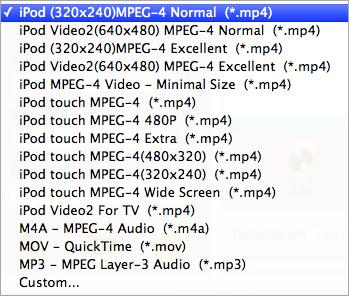
Choose the proper video format for specifying DivX files, you can click "Profile" drop-down list in the "General" panel, you can see many video format are shown in the list. Please select iPod(320*240) MPEG-4 Normal (*.mp4) to output iPod MP4 video for Divx files. Tip: If you select iPod format (*.mp4) in "Profile" drop-down menu, the software will output mp4 file playable on your iPod.
 Step3: Set some settings
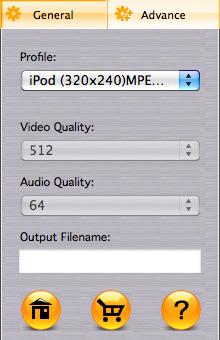
1)After selecting certain output format, you can choose "General" tab on the right top which will show its general standard. You may set "Video Quality", "Audio Quality", "Output filename" by clicking "General" button.
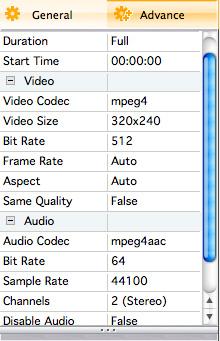
After that, you can also choose "Advance" tab on the right column which will show its advanced standard. You may set "Start Time", "Video Size", "Bit rate" by clicking certain settings.
 Step4: Start to DivX to iPod conversion
Click "Browse..." and select a target destination for saving iPod MP4 files on Mac. And check the DivX files in the list totally. When it is done, you then press "Convert" to start DivX to iPod MP4 conversion. A few minutes later, All DivX files are converted to iPod MP4 video files successfully.

|
Hot Tags: |
||||
 Buy 3herosoft iPod Video Converter for Mac $25.oo
 Download 3herosoft iPod Video Converter for Mac For Intel For PowerPC 8.87MB
