


Windows Products
- iPod / iPhone Tools
-
- iPod to Computer Transfer

- iPad to Computer Transfer

- iPhone to Computer Transfer
- iPhone Ringtone Maker
- iPhone SMS Transfer
- iPhone Contact Transfer
- iPhone Call List Transfer
- iPhone iBooks Transfer
- iPhone Photo Transfer
- iPod Mate
- iPhone Mate
- iPad Mate
- DVD to iPod Converter
- DVD to iPhone Converter
- DVD to iPad Converter
- iPod Movie Converter
- iPhone Video Converter
- iPad Video Converter
- iPod to Computer Transfer
- DVD Cloner Tools
- DVD Creator Tools
- Video Converter Tools
-
- Video Converter
- iPod Movie Converter
- iPhone Video Converter
- iPad Video Converter
- Apple TV Video Converter
- Video to Audio Converter
- AVI MPEG Converter
- MP4 Video Converter
- PS3 Video Converter
- PSP Video Converter
- WMV Video Converter
- 3GP Video Converter
- FLV Converter
- MOV Converter
- RM Converter
- Zune Video Converter
- BlackBerry Video Converter
- Mobile Phone Video Converter
- Video Converter
- DVD Ripper Tools
-
- DVD Ripper Platinum
- DVD to iPod Converter
- DVD to iPhone Converter
- DVD to iPad Converter
- DVD to Apple TV Converter
- DVD Audio Ripper
- DVD to MP4 Converter
- DVD to PS3 Converter
- DVD to PSP Converter
- DVD to WMV Converter
- DVD to 3GP Converter
- DVD to AVI Converter
- DVD to DivX Converter
- DVD to Pocket PC Ripper
- DVD to Zune Converter
- DVD to BlackBerry Converter
- DVD to Mobile Phone Converter
- DVD Ripper
- DVD Ripper Platinum
- Audio Tools
- PDF Tools
- Suite Tools
-
- Media Toolkit Ultimate

- DVD Ripper Platinum Suite
- DVD Maker Suite
- iPod Mate
- iPhone Mate
- iPad Mate
- DVD to iPod Suite
- DVD to iPhone Suite
- DVD to iPad Suite
- DVD to Apple TV Suite
- DVD to Audio Suite
- DVD to MP4 Suite
- DVD to AVI Suite
- DVD to PS3 Suite
- DVD to PSP Suite
- DVD to WMV Suite
- DVD to 3GP Suite
- DVD to Zune Suite
- DVD to BlackBerry Suite
- DVD to Mobile Phone Suite
- Media Toolkit Ultimate
Mac Products
- iPod / iPhone Tools
-
- iPod to Computer Transfer
- iPhone to Computer Transfer
- iPad to Computer Transfer
- iPhone Ringtone Maker
- iPhone SMS Transfer
- iPhone Contact Transfer
- iPhone Call List Transfer
- iPhone iBooks Transfer
- iPhone Photo Transfer
- iPod Mate for Mac
- iPhone Mate for Mac
- iPad Mate for Mac
- DVD to iPod Converter for Mac
- DVD to iPhone Converter for Mac
- DVD to iPad Converter for Mac
- iPod Video Converter for Mac
- iPhone Video Converter for Mac
- iPad Video Converter for Mac
- iPod to Computer Transfer
- DVD Cloner / Creator Tools
- Video Converter Tools
-
- Video Converter for Mac
- iPod Video Converter for Mac
- iPhone Video Converter for Mac
- iPad Video Converter for Mac
- Apple TV Video Converter for Mac
- Video to Audio Converter for Mac
- MP4 Converter for Mac
- FLV Converter for Mac
- PSP Video Converter for Mac
- BlackBerry Converter for Mac
- Mobile Phone Converter for Mac
- DVD Ripper Tools
- PDF Tools
- Suite Tools
-
- Mac DVD Toolkit
- DVD Ripper Suite for Mac
- DVD Maker Suite for Mac
- iPod Mate for Mac
- iPhone Mate for Mac
- iPad Mate for Mac
- DVD to iPod Suite for Mac
- DVD to iPhone Suite for Mac
- DVD to iPad Suite for Mac
- DVD to Apple TV Suite for Mac
- DVD to Audio Suite for Mac
- DVD to MP4 Suite for Mac
- DVD to FLV Suite for Mac
- DVD to PSP Suite for Mac
- DVD to BlackBerry Suite for Mac
- DVD to Mobile Phone Suite Mac
- Mac DVD Toolkit
3herosoft PS3 Video Converter


You have some QuickTime(*.mov) movie file that you would like to play on your PS3. However, MOV files are not compatible with PS3 systems. You must first convert the MOV file to an accepted format for playback on PS3 system. 3herosoft PS3 Video Converter is released under the background of calling for converting video into video MP4 format, etc. HD video. Under its help, to import MOV files into PS3 becomes quite easily.
 Convert WMV, MOV, AVI, MKV, MPEG-2 TS, VOB, RM, 3GP to PS3 MP4
 -
Extract audio MP3, M4A and AAC from AVI, MKV, MP4, MOV, WMV, and 3GP
-
Convert WAV, WMA, AC3, MP2 and other audios to MP3, AAC, and M4A




3herosoft PS3 Video Converter is a welcomed MOV to PS3 Converter, at them same time it collects many other functions to help you enjoy you video on PS3 player. And this article will guide you how to convert MOV video to MP4 for playing on PS3 system.
 Step1: Load MOV files
In the main interface, click the “Add Video ?button to load the MOV files or video directory that you wish to convert to the program list. In the pop-up dialogue box, select the MOV or MOV directory that your wish to convert, and then click "Open" to load the MOV files.
Tips: Moreover, by selecting the ?strong>File > Add?option or the ?strong>Add DirectShow files ?in the right-click menu on the program list, you can also add MOV files to the program list.
 Step2: Set profile
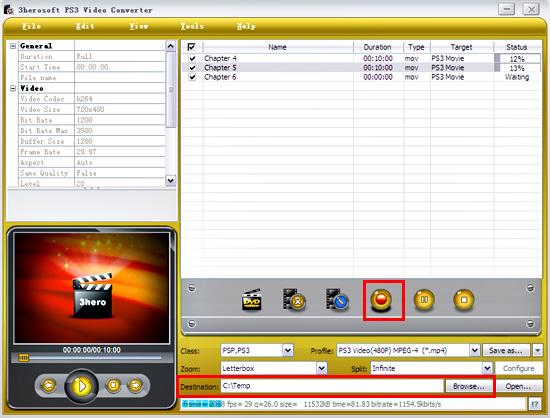
In "Profile" drop down list box, you may select output format "PS3 Video(*.mp4)". Or click the "Class" and choose "PSP,PS3" option then you can fast and easily select video format "PS3 Video(*.mp4)" in "Profile" Combox for converting.
Tips: By repeating the previous operation, you can set different profiles for different programs.
 Step3: Select output folder and start to convert
Set the path that you wish to save the output programs. You can set the “Destination?in output control panel on the main interface to save the converted files. You can also set the “Zoom?and “Split?for the output files on the output control panel.
After setting, click the “Encode?button on the main interface to start the conversion of the programs checked in the program list. During conversion, you can track the conversion progress in the program list until the end of conversion.
Moreover, during conversion, you can click the “Pause?button on the main interface to pause the conversion, or the “Stop?button to stop the conversion.
|
Hot Tags: |
||||
 Buy 3herosoft PS3 Video Converter $25.oo
 Download 3herosoft PS3 Video Converter 6.32MB
