


Windows Products
- iPod / iPhone Tools
-
- iPod to Computer Transfer

- iPad to Computer Transfer

- iPhone to Computer Transfer
- iPhone Ringtone Maker
- iPhone SMS Transfer
- iPhone Contact Transfer
- iPhone Call List Transfer
- iPhone iBooks Transfer
- iPhone Photo Transfer
- iPod Mate
- iPhone Mate
- iPad Mate
- DVD to iPod Converter
- DVD to iPhone Converter
- DVD to iPad Converter
- iPod Movie Converter
- iPhone Video Converter
- iPad Video Converter
- iPod to Computer Transfer
- DVD Cloner Tools
- DVD Creator Tools
- Video Converter Tools
-
- Video Converter
- iPod Movie Converter
- iPhone Video Converter
- iPad Video Converter
- Apple TV Video Converter
- Video to Audio Converter
- AVI MPEG Converter
- MP4 Video Converter
- PS3 Video Converter
- PSP Video Converter
- WMV Video Converter
- 3GP Video Converter
- FLV Converter
- MOV Converter
- RM Converter
- Zune Video Converter
- BlackBerry Video Converter
- Mobile Phone Video Converter
- Video Converter
- DVD Ripper Tools
-
- DVD Ripper Platinum
- DVD to iPod Converter
- DVD to iPhone Converter
- DVD to iPad Converter
- DVD to Apple TV Converter
- DVD Audio Ripper
- DVD to MP4 Converter
- DVD to PS3 Converter
- DVD to PSP Converter
- DVD to WMV Converter
- DVD to 3GP Converter
- DVD to AVI Converter
- DVD to DivX Converter
- DVD to Pocket PC Ripper
- DVD to Zune Converter
- DVD to BlackBerry Converter
- DVD to Mobile Phone Converter
- DVD Ripper
- DVD Ripper Platinum
- Audio Tools
- PDF Tools
- Suite Tools
-
- Media Toolkit Ultimate

- DVD Ripper Platinum Suite
- DVD Maker Suite
- iPod Mate
- iPhone Mate
- iPad Mate
- DVD to iPod Suite
- DVD to iPhone Suite
- DVD to iPad Suite
- DVD to Apple TV Suite
- DVD to Audio Suite
- DVD to MP4 Suite
- DVD to AVI Suite
- DVD to PS3 Suite
- DVD to PSP Suite
- DVD to WMV Suite
- DVD to 3GP Suite
- DVD to Zune Suite
- DVD to BlackBerry Suite
- DVD to Mobile Phone Suite
- Media Toolkit Ultimate
Mac Products
- iPod / iPhone Tools
-
- iPod to Computer Transfer
- iPhone to Computer Transfer
- iPad to Computer Transfer
- iPhone Ringtone Maker
- iPhone SMS Transfer
- iPhone Contact Transfer
- iPhone Call List Transfer
- iPhone iBooks Transfer
- iPhone Photo Transfer
- iPod Mate for Mac
- iPhone Mate for Mac
- iPad Mate for Mac
- DVD to iPod Converter for Mac
- DVD to iPhone Converter for Mac
- DVD to iPad Converter for Mac
- iPod Video Converter for Mac
- iPhone Video Converter for Mac
- iPad Video Converter for Mac
- iPod to Computer Transfer
- DVD Cloner / Creator Tools
- Video Converter Tools
-
- Video Converter for Mac
- iPod Video Converter for Mac
- iPhone Video Converter for Mac
- iPad Video Converter for Mac
- Apple TV Video Converter for Mac
- Video to Audio Converter for Mac
- MP4 Converter for Mac
- FLV Converter for Mac
- PSP Video Converter for Mac
- BlackBerry Converter for Mac
- Mobile Phone Converter for Mac
- DVD Ripper Tools
- PDF Tools
- Suite Tools
-
- Mac DVD Toolkit
- DVD Ripper Suite for Mac
- DVD Maker Suite for Mac
- iPod Mate for Mac
- iPhone Mate for Mac
- iPad Mate for Mac
- DVD to iPod Suite for Mac
- DVD to iPhone Suite for Mac
- DVD to iPad Suite for Mac
- DVD to Apple TV Suite for Mac
- DVD to Audio Suite for Mac
- DVD to MP4 Suite for Mac
- DVD to FLV Suite for Mac
- DVD to PSP Suite for Mac
- DVD to BlackBerry Suite for Mac
- DVD to Mobile Phone Suite Mac
- Mac DVD Toolkit
3herosoft MP4 Video Converter for Mac


" I was wondering how to convert my movie files into MP4 that will work in my iPod Touch... does anyone know maybe a site or program my Mac might have to convert the file? I've been looking for an answer for a really long time because my download movies that won't anywhere on my computer. If you can help that would be great! Thanks " ----from YAHOO! ANSWERS. No matter you own iPod, iPod touch, iPhone, PSP, Apple TV, Archos, iRiver, Creative Zen, PS3 or other portable MP4 players, you will find 3herosoft MP4 Converter for Mac is made just for you to turn movies into .mp4 playable on these devices.
 Convert any video format to MPEG-4, AVC/HD, XviD(AVI), MP4, etc
-
Extract M4A, AAC or MP3 audio from popular audio/video formats
-
Convert video/audio for iPod, iPod touch, iPhone, Apple TV, PSP, PS3, etc




The following will show you a step by step guides to complete movies to MP4 format conversion on Mac. Before doing this video conversion, you need to download Intel version or PowerPC version of 3herosoft MP4 Converter for Mac and run it on your Mac computer.
 Step1: Load Video Files
Click "Add" button on the toolbar or "File > Add" to load movie files from your Mac, then select the video files and press the "Open" button to load files into this software.

 Step2: Choose output format
Choose the file you want to convert, click "Profile" drop-down button at the left side of the main interface to choose the formats you need, the software allows setting different output formats according to different files.
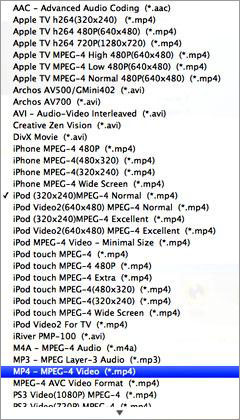 Step3: Convert
Clicking the "Browse..." button or directly enter a path in "Destination" drop down list box, select the title or chapter you want to convert and start conversion by clicking "convert" button.

1)Define the output profile list
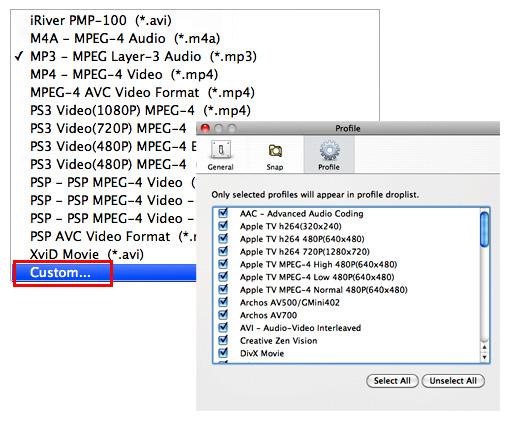
You can define the output profile list to show only the most commonly used formats. Click "Custom..." in "Profile" drop-down list, check the formats you want to list in "Profile" pop-up window. Close the window and you will save much time in finding them in the whole list.
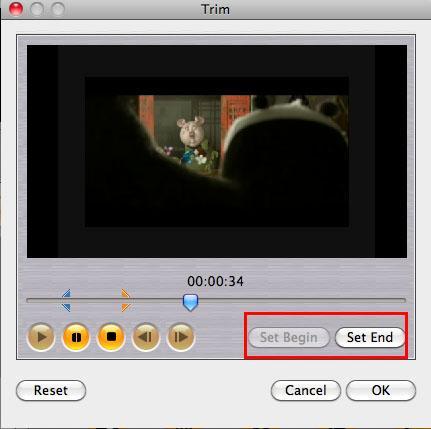
Before converting, you can trim your favorite segments to make a unique video. Select the video, click the "Trim" button on the toolbar and choose the beginning and end of the segment as you wish.
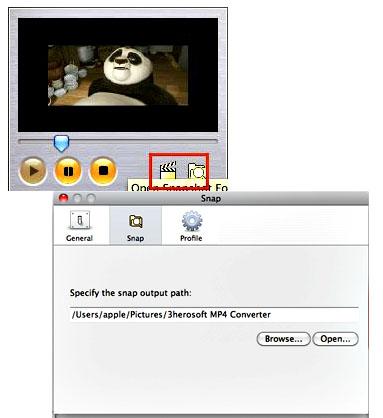
You are capable to make a stylish album using the snapshots taken from the video with this software. Click "Snapshot" button at the left top of the main interface to take snapshot when playing the video and save as BMP, click "Open Snapshot Folder" to check the snapshot. You can also define the destination in your hard disk to save the snapshots at "Snap" tab in "3herosoft MP4 Converter for Mac> Preferences".
|
Hot Tags: |
||||
 Buy 3herosoft MP4 Converter for Mac $25.oo
 Download 3herosoft MP4 Converter for Mac For Intel For PowerPC 8.89MB
