


Windows Products
- iPod / iPhone Tools
-
- iPod to Computer Transfer

- iPad to Computer Transfer

- iPhone to Computer Transfer
- iPhone Ringtone Maker
- iPhone SMS Transfer
- iPhone Contact Transfer
- iPhone Call List Transfer
- iPhone iBooks Transfer
- iPhone Photo Transfer
- iPod Mate
- iPhone Mate
- iPad Mate
- DVD to iPod Converter
- DVD to iPhone Converter
- DVD to iPad Converter
- iPod Movie Converter
- iPhone Video Converter
- iPad Video Converter
- iPod to Computer Transfer
- DVD Cloner Tools
- DVD Creator Tools
- Video Converter Tools
-
- Video Converter
- iPod Movie Converter
- iPhone Video Converter
- iPad Video Converter
- Apple TV Video Converter
- Video to Audio Converter
- AVI MPEG Converter
- MP4 Video Converter
- PS3 Video Converter
- PSP Video Converter
- WMV Video Converter
- 3GP Video Converter
- FLV Converter
- MOV Converter
- RM Converter
- Zune Video Converter
- BlackBerry Video Converter
- Mobile Phone Video Converter
- Video Converter
- DVD Ripper Tools
-
- DVD Ripper Platinum
- DVD to iPod Converter
- DVD to iPhone Converter
- DVD to iPad Converter
- DVD to Apple TV Converter
- DVD Audio Ripper
- DVD to MP4 Converter
- DVD to PS3 Converter
- DVD to PSP Converter
- DVD to WMV Converter
- DVD to 3GP Converter
- DVD to AVI Converter
- DVD to DivX Converter
- DVD to Pocket PC Ripper
- DVD to Zune Converter
- DVD to BlackBerry Converter
- DVD to Mobile Phone Converter
- DVD Ripper
- DVD Ripper Platinum
- Audio Tools
- PDF Tools
- Suite Tools
-
- Media Toolkit Ultimate

- DVD Ripper Platinum Suite
- DVD Maker Suite
- iPod Mate
- iPhone Mate
- iPad Mate
- DVD to iPod Suite
- DVD to iPhone Suite
- DVD to iPad Suite
- DVD to Apple TV Suite
- DVD to Audio Suite
- DVD to MP4 Suite
- DVD to AVI Suite
- DVD to PS3 Suite
- DVD to PSP Suite
- DVD to WMV Suite
- DVD to 3GP Suite
- DVD to Zune Suite
- DVD to BlackBerry Suite
- DVD to Mobile Phone Suite
- Media Toolkit Ultimate
Mac Products
- iPod / iPhone Tools
-
- iPod to Computer Transfer
- iPhone to Computer Transfer
- iPad to Computer Transfer
- iPhone Ringtone Maker
- iPhone SMS Transfer
- iPhone Contact Transfer
- iPhone Call List Transfer
- iPhone iBooks Transfer
- iPhone Photo Transfer
- iPod Mate for Mac
- iPhone Mate for Mac
- iPad Mate for Mac
- DVD to iPod Converter for Mac
- DVD to iPhone Converter for Mac
- DVD to iPad Converter for Mac
- iPod Video Converter for Mac
- iPhone Video Converter for Mac
- iPad Video Converter for Mac
- iPod to Computer Transfer
- DVD Cloner / Creator Tools
- Video Converter Tools
-
- Video Converter for Mac
- iPod Video Converter for Mac
- iPhone Video Converter for Mac
- iPad Video Converter for Mac
- Apple TV Video Converter for Mac
- Video to Audio Converter for Mac
- MP4 Converter for Mac
- FLV Converter for Mac
- PSP Video Converter for Mac
- BlackBerry Converter for Mac
- Mobile Phone Converter for Mac
- DVD Ripper Tools
- PDF Tools
- Suite Tools
-
- Mac DVD Toolkit
- DVD Ripper Suite for Mac
- DVD Maker Suite for Mac
- iPod Mate for Mac
- iPhone Mate for Mac
- iPad Mate for Mac
- DVD to iPod Suite for Mac
- DVD to iPhone Suite for Mac
- DVD to iPad Suite for Mac
- DVD to Apple TV Suite for Mac
- DVD to Audio Suite for Mac
- DVD to MP4 Suite for Mac
- DVD to FLV Suite for Mac
- DVD to PSP Suite for Mac
- DVD to BlackBerry Suite for Mac
- DVD to Mobile Phone Suite Mac
- Mac DVD Toolkit
3herosoft iPhone Video Converter


I got several classic videos from my friend, and I want to put them onto my iPhone so that I can watch it when I’m at school. I’ve searched a lot on how convert video to iPhone, and found I need to get an iPhone Video Converter to convert them to iPhone." To answer this question, I will introduce the third party program to solve problem you encounter with above--3herosoft iPhone Video Converter can easily convert videos to H.264 that can be playable well on your iPhone.
 Convert AVI, MPEG, WMV, DivX, RM, MOV, RMVB, MP4 to iPhone MP4, H.264
-
Convert audios like WMA, WAV, M4A, AAC to iPhone music MP3
-
Rip iPhone music MP3 from videos such as AVI, FLV, WMV, MP4, MOV




3herosoft iPhone Video Converter is an all-in-one solution to convert video in all popular formats to iPhone H.264 video. With 3herosoft iPhone Video Converter, you easily convert MPEG, DivX, XviD, MOV, rm, rmvb, WMV, AVI, etc. to iPhone H.264 video in MP4 high quality format. The conversion speed is also excellent. Now follow this guide step by step to learn how to convert video to iPhone H.264.
 Step1: Load Video Files
Run 3herosoft iPhone Video Converter software and load your video from computer.
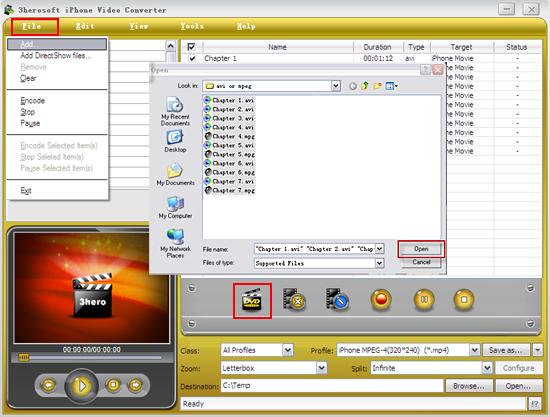
1) In the "File" menu choose "Add" or "Add DirectShow files" option to load video files.
2)Click "Add" button and select video files on computer, then press "Open" button for loading files.
 Step2: Set output files format
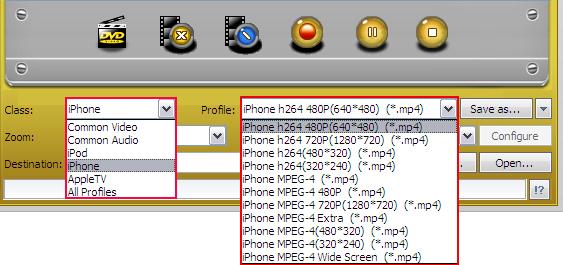
In "Profile" drop down list box, you may select output ?strong>*iPhone h.264". Or search exact profile by "Class->iPhone" and select output format "iPhone h.264" in "Profile" list.
 Step3: Set the saving path and start conversion
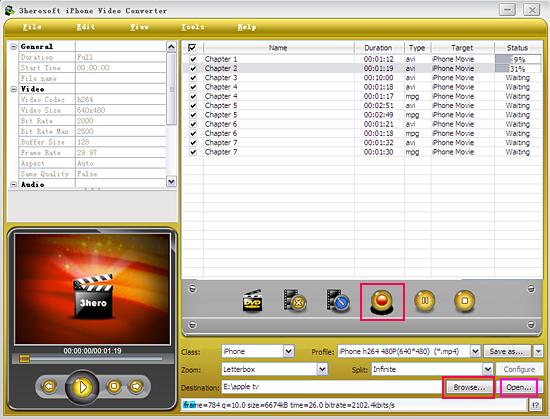
After you set the saving destination on your computer by clicking "Browse" button, select files or chapters you want to convert and start conversion by clicking red button.
 Step4: Put the converted files to iPhone
And then you will get targeted format's files that are ready to be put on your iPhone. But how do you put the video files you ripped on iPhone? The way is as follows:
(1) Please click "Open" button (as picture shows above) after the conversion is completed.
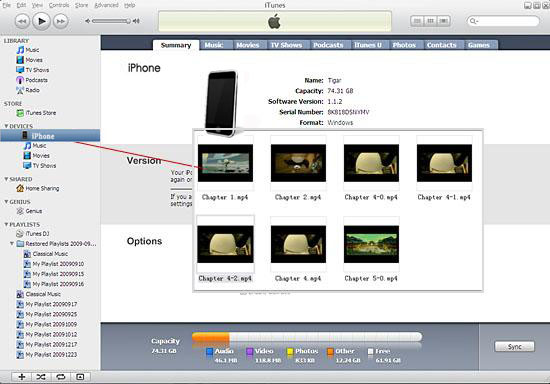
(2) Find the converted file in the destination folder and pull it to your iTunes.
(3) Drag the file onto the iPhone logo in the iTunes and then release the mouse when "+" appears around the cursor. The file will be transferred to iPhone automatically.
Finally, you are able to enjoy your favourite movies on your iPhone breezily!
Without using iTunes, you can also achieve to transfer these converted files to iPhone successfully with our product--3herosoft iPhone to Computer Transfer.
It's wonderful and cool, with the assistance of 3herosoft iPhone Video Converter, an iPod MP4 Converter, easy to use, fast in speed, excellent in quality and reasonable in price. you can fast and easily convert video movie to iPhone, convert video file to iPhone, and rip movie to iPhone.
|
Hot Tags: |
||||
 Buy 3herosoft iPhone Video Converter $25.oo
 Download 3herosoft iPhone Video Converter 15.24MB
