


Windows Products
- iPod / iPhone Tools
- DVD Cloner Tools
- DVD Creator Tools
- Video Converter Tools
- DVD Ripper Tools
- Audio Tools
- PDF Tools
- Suite Tools

Mac Products
3herosoft iPhone to Computer Transfer


"Wanna share your favorite pictures on computer with your friends? Maybe you should copy pictures from computer to iPhone 3G first. Of course, iTunes can do that for you, but it's not the only way. I think you have the right to know the more easier and faster way. Here has a professional third party program named 3herosoft iPhone to Computer Transfer, which can provide a better way to copy pictures with high speed."
 Transfer pictures from iPhone to computer for backup
-
Copy pictures from computer to iPhone without using iTunes
-
Import variable files from iPhone to iTunes (iTunes 10.6 supported now)




3herosoft iPhone to Computer Transfer is a powerful tool to copy pictures from computer to iPhone 3G. And using Filter and Quick Search function, you can select the photos you want to copy quickly. The following step-by-step guide will tell you how to copy pictures from computer to iPhone 3G in details.
 Step1: Run 3herosoft iPhone to Computer Transfer after your installation.
 Launch this iPhone transfer software and connect your iPhone to your computer. Then you can see your iPhone on the desktop -- an iPhone icon with your iPhone's name under it. Then familiarize your feelings with its interface. All information about your iPhone, such as type, capacity, version, serial number and format, will be shown on the main interface.
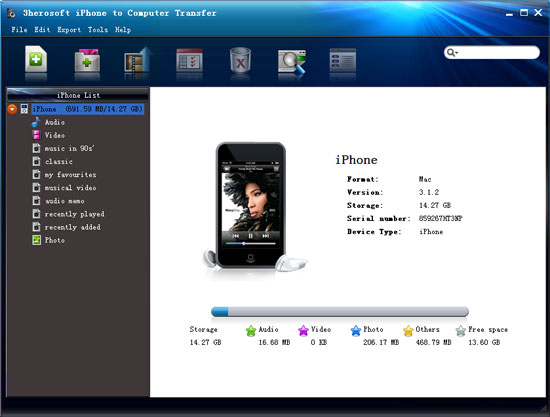 Step2: Select picture files you want to copy
Locate the library/playlist in which you want to copy pictures from computer to iPhone 3G. Click the " Add files to iPod/iPhone " button in the top- tool icon, then select the required picture files in the dialog that opens and start to copy pictures from computer to iPhone 3G.
If you want to add all the files in a folder, please click the "Add Folder to iPod/iPhone" button to copy, and then locate the folder and transfer all the files to iPhone 3G.

 Step3: Start to copy pictures from computer to iPhone 3G
When everything is done, then press the "Open" button in the dialog box. And all the selected pictures will be copied to your iPhone 3G with fast speed and excellent image quality. With this step, you can also copy all of files such as video, TV Shows, songs and podcasts etc. to iPod/iPhone.

|
Hot Tags: |
||||
 Buy 3herosoft iPhone to Computer Transfer $20.oo
 Download 3herosoft iPhone to Computer Transfer 5.82MB
