


Windows Products
- iPod / iPhone Tools
-
- iPod to Computer Transfer

- iPad to Computer Transfer

- iPhone to Computer Transfer
- iPhone Ringtone Maker
- iPhone SMS Transfer
- iPhone Contact Transfer
- iPhone Call List Transfer
- iPhone iBooks Transfer
- iPhone Photo Transfer
- iPod Mate
- iPhone Mate
- iPad Mate
- DVD to iPod Converter
- DVD to iPhone Converter
- DVD to iPad Converter
- iPod Movie Converter
- iPhone Video Converter
- iPad Video Converter
- iPod to Computer Transfer
- DVD Cloner Tools
- DVD Creator Tools
- Video Converter Tools
-
- Video Converter
- iPod Movie Converter
- iPhone Video Converter
- iPad Video Converter
- Apple TV Video Converter
- Video to Audio Converter
- AVI MPEG Converter
- MP4 Video Converter
- PS3 Video Converter
- PSP Video Converter
- WMV Video Converter
- 3GP Video Converter
- FLV Converter
- MOV Converter
- RM Converter
- Zune Video Converter
- BlackBerry Video Converter
- Mobile Phone Video Converter
- Video Converter
- DVD Ripper Tools
-
- DVD Ripper Platinum
- DVD to iPod Converter
- DVD to iPhone Converter
- DVD to iPad Converter
- DVD to Apple TV Converter
- DVD Audio Ripper
- DVD to MP4 Converter
- DVD to PS3 Converter
- DVD to PSP Converter
- DVD to WMV Converter
- DVD to 3GP Converter
- DVD to AVI Converter
- DVD to DivX Converter
- DVD to Pocket PC Ripper
- DVD to Zune Converter
- DVD to BlackBerry Converter
- DVD to Mobile Phone Converter
- DVD Ripper
- DVD Ripper Platinum
- Audio Tools
- PDF Tools
- Suite Tools
-
- Media Toolkit Ultimate

- DVD Ripper Platinum Suite
- DVD Maker Suite
- iPod Mate
- iPhone Mate
- iPad Mate
- DVD to iPod Suite
- DVD to iPhone Suite
- DVD to iPad Suite
- DVD to Apple TV Suite
- DVD to Audio Suite
- DVD to MP4 Suite
- DVD to AVI Suite
- DVD to PS3 Suite
- DVD to PSP Suite
- DVD to WMV Suite
- DVD to 3GP Suite
- DVD to Zune Suite
- DVD to BlackBerry Suite
- DVD to Mobile Phone Suite
- Media Toolkit Ultimate
Mac Products
- iPod / iPhone Tools
-
- iPod to Computer Transfer
- iPhone to Computer Transfer
- iPad to Computer Transfer
- iPhone Ringtone Maker
- iPhone SMS Transfer
- iPhone Contact Transfer
- iPhone Call List Transfer
- iPhone iBooks Transfer
- iPhone Photo Transfer
- iPod Mate for Mac
- iPhone Mate for Mac
- iPad Mate for Mac
- DVD to iPod Converter for Mac
- DVD to iPhone Converter for Mac
- DVD to iPad Converter for Mac
- iPod Video Converter for Mac
- iPhone Video Converter for Mac
- iPad Video Converter for Mac
- iPod to Computer Transfer
- DVD Cloner / Creator Tools
- Video Converter Tools
-
- Video Converter for Mac
- iPod Video Converter for Mac
- iPhone Video Converter for Mac
- iPad Video Converter for Mac
- Apple TV Video Converter for Mac
- Video to Audio Converter for Mac
- MP4 Converter for Mac
- FLV Converter for Mac
- PSP Video Converter for Mac
- BlackBerry Converter for Mac
- Mobile Phone Converter for Mac
- DVD Ripper Tools
- PDF Tools
- Suite Tools
-
- Mac DVD Toolkit
- DVD Ripper Suite for Mac
- DVD Maker Suite for Mac
- iPod Mate for Mac
- iPhone Mate for Mac
- iPad Mate for Mac
- DVD to iPod Suite for Mac
- DVD to iPhone Suite for Mac
- DVD to iPad Suite for Mac
- DVD to Apple TV Suite for Mac
- DVD to Audio Suite for Mac
- DVD to MP4 Suite for Mac
- DVD to FLV Suite for Mac
- DVD to PSP Suite for Mac
- DVD to BlackBerry Suite for Mac
- DVD to Mobile Phone Suite Mac
- Mac DVD Toolkit
3herosoft MPEG to DVD Burner


Actually you would appreciate the classic segment of movie rather that watch the longest one and create the clips into new DVD. And even you love to make DVD collection more personlized or unique one. So in order to make the your own DVD, 3herosoft MPEG to DVD Burner allows you to customize your DVD: create sections for your DVD, choose a DVD menu from various templates, set menu topics, and insert background music and pictures.
 Burn MPEG, MPEG-4, MPG, MPEG-2, DAT, M2V, VOB, to movie DVD
-
Burn MP4, DAT, VOB, M2V, MPEG, MPG to DVD folder or ISO image file
-
Create DVD movie disc with optional DVD menu editing




Follow this tutorial of 3herosoft MPEG to DVD Burner, users can easily make their DVDs more personalize and unique in DVD creating from MPEG videos: by creating DVD menu, clipping video segments, editing video, or adding audio and subtitles before creating.
 1: Create DVD menu
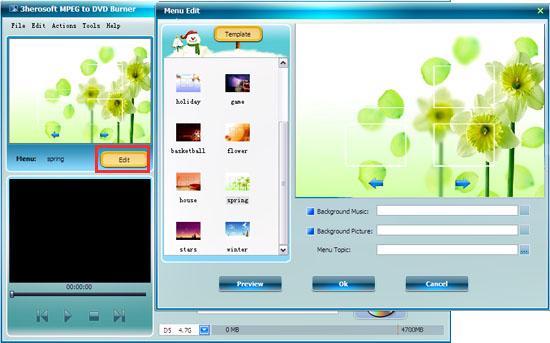
 Click "Edit" button on the menu panel, "Menu Edit" window pops up. Choose your favorite template to create a menu or you can change the template, add background music/picture, title and opening film to your menu.
Tips:If you don't want any menu, click "No menu".
 2: Trim video file
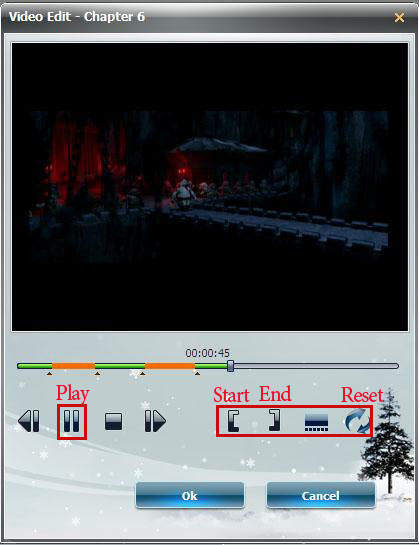
1) Choose a video file in the file list, then click "Edit" button the toolbar to open "Video Edit" window.
2) Click "Play" button to play the video, when it comes to the very start point you want, click "Set Start Point" button to set it as the start point, and set the end point in the same way. Then a new segment is added into the segment list below.
3) In the interface, the "Pencil" icon will appear in front of this file list.

 3.Customize the output modes
 Check the file and click the "Resize Method" combo-box. There are 3 choices for you:
Letterbox: add black stripes to fit the output aspect ratio.
Pan and Scan: crop frame to fit the output aspect ratio.
Full Screen: stretch and compress frame to fit the output aspect ratio.
 4: Preview video
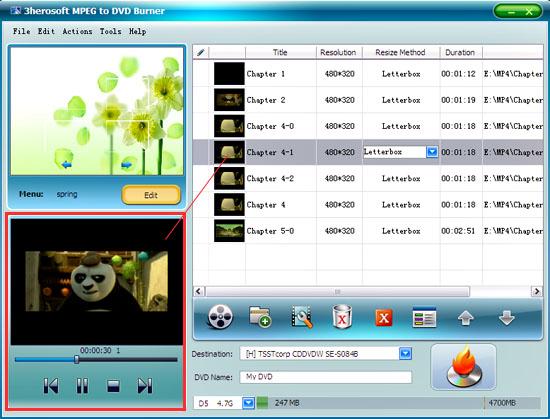
In this screen, when you have choosen a certain video chapter in the interface, then click "Play" button to preview video content that you can easily find your favourite parts, or look through the quality of image and audio.
 5: Customize the output modes
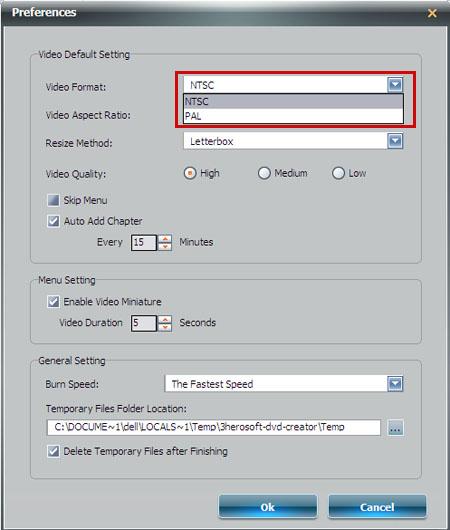
Choose the "Preferences" option on the top "Tools" menu, and you can set output file modes as "NTSC" or "PAL" by clicking "Video Format" box in the "Preferences" and other settings before burning.
|
Hot Tags: |
||||
 Buy 3herosoft MPEG to DVD Burner $22.oo
 Download 3herosoft MPEG to DVD Burner 14.10MB
