


Windows Products
- iPod / iPhone Tools
-
- iPod to Computer Transfer

- iPad to Computer Transfer

- iPhone to Computer Transfer
- iPhone Ringtone Maker
- iPhone SMS Transfer
- iPhone Contact Transfer
- iPhone Call List Transfer
- iPhone iBooks Transfer
- iPhone Photo Transfer
- iPod Mate
- iPhone Mate
- iPad Mate
- DVD to iPod Converter
- DVD to iPhone Converter
- DVD to iPad Converter
- iPod Movie Converter
- iPhone Video Converter
- iPad Video Converter
- iPod to Computer Transfer
- DVD Cloner Tools
- DVD Creator Tools
- Video Converter Tools
-
- Video Converter
- iPod Movie Converter
- iPhone Video Converter
- iPad Video Converter
- Apple TV Video Converter
- Video to Audio Converter
- AVI MPEG Converter
- MP4 Video Converter
- PS3 Video Converter
- PSP Video Converter
- WMV Video Converter
- 3GP Video Converter
- FLV Converter
- MOV Converter
- RM Converter
- Zune Video Converter
- BlackBerry Video Converter
- Mobile Phone Video Converter
- Video Converter
- DVD Ripper Tools
-
- DVD Ripper Platinum
- DVD to iPod Converter
- DVD to iPhone Converter
- DVD to iPad Converter
- DVD to Apple TV Converter
- DVD Audio Ripper
- DVD to MP4 Converter
- DVD to PS3 Converter
- DVD to PSP Converter
- DVD to WMV Converter
- DVD to 3GP Converter
- DVD to AVI Converter
- DVD to DivX Converter
- DVD to Pocket PC Ripper
- DVD to Zune Converter
- DVD to BlackBerry Converter
- DVD to Mobile Phone Converter
- DVD Ripper
- DVD Ripper Platinum
- Audio Tools
- PDF Tools
- Suite Tools
-
- Media Toolkit Ultimate

- DVD Ripper Platinum Suite
- DVD Maker Suite
- iPod Mate
- iPhone Mate
- iPad Mate
- DVD to iPod Suite
- DVD to iPhone Suite
- DVD to iPad Suite
- DVD to Apple TV Suite
- DVD to Audio Suite
- DVD to MP4 Suite
- DVD to AVI Suite
- DVD to PS3 Suite
- DVD to PSP Suite
- DVD to WMV Suite
- DVD to 3GP Suite
- DVD to Zune Suite
- DVD to BlackBerry Suite
- DVD to Mobile Phone Suite
- Media Toolkit Ultimate
Mac Products
- iPod / iPhone Tools
-
- iPod to Computer Transfer
- iPhone to Computer Transfer
- iPad to Computer Transfer
- iPhone Ringtone Maker
- iPhone SMS Transfer
- iPhone Contact Transfer
- iPhone Call List Transfer
- iPhone iBooks Transfer
- iPhone Photo Transfer
- iPod Mate for Mac
- iPhone Mate for Mac
- iPad Mate for Mac
- DVD to iPod Converter for Mac
- DVD to iPhone Converter for Mac
- DVD to iPad Converter for Mac
- iPod Video Converter for Mac
- iPhone Video Converter for Mac
- iPad Video Converter for Mac
- iPod to Computer Transfer
- DVD Cloner / Creator Tools
- Video Converter Tools
-
- Video Converter for Mac
- iPod Video Converter for Mac
- iPhone Video Converter for Mac
- iPad Video Converter for Mac
- Apple TV Video Converter for Mac
- Video to Audio Converter for Mac
- MP4 Converter for Mac
- FLV Converter for Mac
- PSP Video Converter for Mac
- BlackBerry Converter for Mac
- Mobile Phone Converter for Mac
- DVD Ripper Tools
- PDF Tools
- Suite Tools
-
- Mac DVD Toolkit
- DVD Ripper Suite for Mac
- DVD Maker Suite for Mac
- iPod Mate for Mac
- iPhone Mate for Mac
- iPad Mate for Mac
- DVD to iPod Suite for Mac
- DVD to iPhone Suite for Mac
- DVD to iPad Suite for Mac
- DVD to Apple TV Suite for Mac
- DVD to Audio Suite for Mac
- DVD to MP4 Suite for Mac
- DVD to FLV Suite for Mac
- DVD to PSP Suite for Mac
- DVD to BlackBerry Suite for Mac
- DVD to Mobile Phone Suite Mac
- Mac DVD Toolkit
3herosoft DVD to iPhone Converter


"Actually classic movie has classic music interlude or signifcant dialogue, so you want to extract these wonderful audio to play on your iPhone as favourites. You have to need a third party program to convert DVD to MP3 formats for playback. As your honest friend, I recommend a powerful tool- 3herosoft DVD to iPhone Converter which can help you extract audio (*.mp3) from DVD that can be played well on your iPhone. Just has a few clicks for OK. Don't hesitate and order this product with your savings right now."
 Convert DVD movies to iPhone MPEG-4, MP4 formats
-
Extract audio from DVD movie to iPhone music MP3, WAV and M4A
-
Save time by converting two or more files simultaneously




3herosoft DVD to iPhone Converter transforms your DVD movie collection to fit into your iPhone. It can easily extract audio from DVD into MP3, AAC, M4A format. And the following article will guide you how to extract background music from DVD to play on you iPhone. Now, you can listen to your digital favorites music at your fingertips!
 Step1: Load DVD Movie
Download 3herosoft DVD to iPhone Converter and run it. Insert DVD into CD-Rom and Load your DVD by choosing "Add DVD Folder" in the "File" menu or directly pressing the "Open DVD" button in the main interface, then select your DVD Drive in the pop-up window and press the "Open" button.
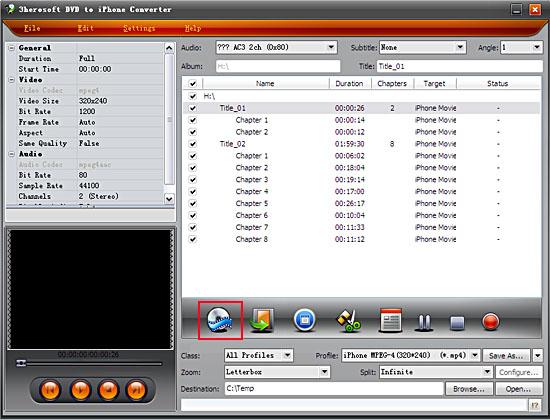 Step2: Set output files format
In "Profile" drop down list box, you may select output format "*.mp3". Or search exact profile by "Class->Common Audio" selecting. The software allows to set various output formats supported by iPod or iPhone.
 Step3: Set the destination and start conversion
After you set the saving destination by clicking "Browse" button, select the title or chapter you want to convert and start conversion by clicking red button
 Step4: Transfer DVD music to iPhone
And then you will get targeted format's files that are ready to be put on your iPhone. But how do you transfer the audio files you ripped on iPhone? The way is as follows:
(1) Please click "Open" button after the conversion is completed.
(2) Find the converted file in the destination folder and pull it to your iTunes.
(3) Drag the file onto the iPhone logo in the iTunes and then release the mouse when "+" appears around the cursor. The file will be transferred to iPhone automatically.
Finally, you are able to enjoy your favourite music on your iPhone breezily!

|
Hot Tags: |
||||
 Buy 3herosoft DVD to iPhone Converter $28.oo
 Download 3herosoft DVD to iPhone Converter 4.87MB
