


Windows Products
- iPod / iPhone Tools
-
- iPod to Computer Transfer

- iPad to Computer Transfer

- iPhone to Computer Transfer
- iPhone Ringtone Maker
- iPhone SMS Transfer
- iPhone Contact Transfer
- iPhone Call List Transfer
- iPhone iBooks Transfer
- iPhone Photo Transfer
- iPod Mate
- iPhone Mate
- iPad Mate
- DVD to iPod Converter
- DVD to iPhone Converter
- DVD to iPad Converter
- iPod Movie Converter
- iPhone Video Converter
- iPad Video Converter
- iPod to Computer Transfer
- DVD Cloner Tools
- DVD Creator Tools
- Video Converter Tools
-
- Video Converter
- iPod Movie Converter
- iPhone Video Converter
- iPad Video Converter
- Apple TV Video Converter
- Video to Audio Converter
- AVI MPEG Converter
- MP4 Video Converter
- PS3 Video Converter
- PSP Video Converter
- WMV Video Converter
- 3GP Video Converter
- FLV Converter
- MOV Converter
- RM Converter
- Zune Video Converter
- BlackBerry Video Converter
- Mobile Phone Video Converter
- Video Converter
- DVD Ripper Tools
-
- DVD Ripper Platinum
- DVD to iPod Converter
- DVD to iPhone Converter
- DVD to iPad Converter
- DVD to Apple TV Converter
- DVD Audio Ripper
- DVD to MP4 Converter
- DVD to PS3 Converter
- DVD to PSP Converter
- DVD to WMV Converter
- DVD to 3GP Converter
- DVD to AVI Converter
- DVD to DivX Converter
- DVD to Pocket PC Ripper
- DVD to Zune Converter
- DVD to BlackBerry Converter
- DVD to Mobile Phone Converter
- DVD Ripper
- DVD Ripper Platinum
- Audio Tools
- PDF Tools
- Suite Tools
-
- Media Toolkit Ultimate

- DVD Ripper Platinum Suite
- DVD Maker Suite
- iPod Mate
- iPhone Mate
- iPad Mate
- DVD to iPod Suite
- DVD to iPhone Suite
- DVD to iPad Suite
- DVD to Apple TV Suite
- DVD to Audio Suite
- DVD to MP4 Suite
- DVD to AVI Suite
- DVD to PS3 Suite
- DVD to PSP Suite
- DVD to WMV Suite
- DVD to 3GP Suite
- DVD to Zune Suite
- DVD to BlackBerry Suite
- DVD to Mobile Phone Suite
- Media Toolkit Ultimate
Mac Products
- iPod / iPhone Tools
-
- iPod to Computer Transfer
- iPhone to Computer Transfer
- iPad to Computer Transfer
- iPhone Ringtone Maker
- iPhone SMS Transfer
- iPhone Contact Transfer
- iPhone Call List Transfer
- iPhone iBooks Transfer
- iPhone Photo Transfer
- iPod Mate for Mac
- iPhone Mate for Mac
- iPad Mate for Mac
- DVD to iPod Converter for Mac
- DVD to iPhone Converter for Mac
- DVD to iPad Converter for Mac
- iPod Video Converter for Mac
- iPhone Video Converter for Mac
- iPad Video Converter for Mac
- iPod to Computer Transfer
- DVD Cloner / Creator Tools
- Video Converter Tools
-
- Video Converter for Mac
- iPod Video Converter for Mac
- iPhone Video Converter for Mac
- iPad Video Converter for Mac
- Apple TV Video Converter for Mac
- Video to Audio Converter for Mac
- MP4 Converter for Mac
- FLV Converter for Mac
- PSP Video Converter for Mac
- BlackBerry Converter for Mac
- Mobile Phone Converter for Mac
- DVD Ripper Tools
- PDF Tools
- Suite Tools
-
- Mac DVD Toolkit
- DVD Ripper Suite for Mac
- DVD Maker Suite for Mac
- iPod Mate for Mac
- iPhone Mate for Mac
- iPad Mate for Mac
- DVD to iPod Suite for Mac
- DVD to iPhone Suite for Mac
- DVD to iPad Suite for Mac
- DVD to Apple TV Suite for Mac
- DVD to Audio Suite for Mac
- DVD to MP4 Suite for Mac
- DVD to FLV Suite for Mac
- DVD to PSP Suite for Mac
- DVD to BlackBerry Suite for Mac
- DVD to Mobile Phone Suite Mac
- Mac DVD Toolkit
3herosoft iPhone to Computer Transfer for Mac


"I have registered to order an iPad, but now I wonder how to transfer or copy my iPhone movies, songs or photos to iPad. P.S. I use Mac OS. Are you also confused by the above problem?" Here is iPhone to iPad Transfer is a practical tool for Mac iPad users. 3herosoft iPhone to computer transfer for Mac can assist Mac iPad users to fast transfer or move iPhone, movies, songs, photos or playlist to iPad.Thanks to its easy-to-navigation interface, it is easy and convenient for you to manage your iPhone or iPad.
 Move iPhone music/video to iPad, transfer iPhone to iPad
-
Transfer music/videos to iPhone, backup iPhone files on Mac
-
Support iPad, iPad 2, iPhone, iPhone 3GS, iPhone 4, iPhone 4S (iOS 5 and iTunes 10.6)




iPad have great advantages for playing music and movie. In your spare time, use iPad watch movie or surf website will be a fantastic thing. Maybe your iPhone has saved so many music or videos, and you wanna move iPhone music/videos to iPad. Focus on 3herosoft iPhone to computer Transfer for Mac and move iPhone music/videos to iPad step by step:
 Step1: Connect iPhone to Mac
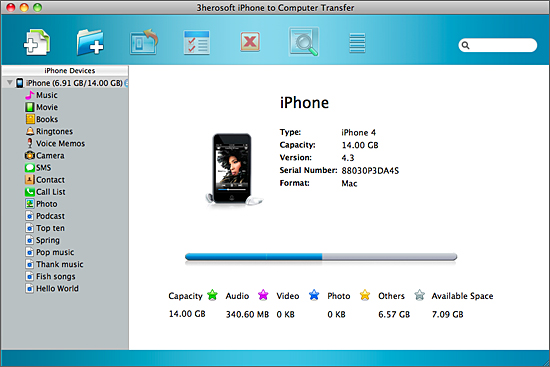
Free download 3herosoft iPhone to computer Transfer for Mac and run it. Connect iPhone to Mac, and all info about iPhone device such as Type, Capacity, Version, Serial Number, Format, etc. are shown in the interface. Also every iPhone library folder you can easily enter and look through any files for management.
 Step2: Transfer iPhone music/videos to iTunes library
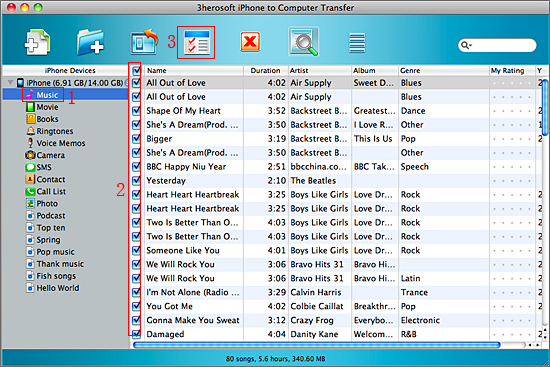
1)Open iPhone "music" or "movie" library, all music/videos files are shown in the interface.
2) Select the music or movie files you wanna transfer and check them totally, press "Add checked files to iTunes library" button in the toolbar, or choose "export files to iTunes" option in the top "export" menu. Several minutes later, all the music and videos are transferred into iTunes library.
 Step3: Sync music/videos to iPad
1) Run the iTunes, and view the transferred music/videos files in the iTunes "music" and "movie" library.
2) Connect iPad to Mac, you may see the iPad icon will appear in the iTunes library list. And then click iPad icon, all iPad library item will be shown, select music or movie option and check "Sync music files" or " Sync movie files" in the panel, at last press "Apply" button to start music or movies to iPad transferring.

|
Hot Tags: |
||||
 Buy 3herosoft iPhone to Computer Transfer for Mac $25.oo
 Download 3herosoft iPhone to Computer Transfer for Mac 5.50MB
