


Windows Products
- iPod / iPhone Tools
-
- iPod to Computer Transfer

- iPad to Computer Transfer

- iPhone to Computer Transfer
- iPhone Ringtone Maker
- iPhone SMS Transfer
- iPhone Contact Transfer
- iPhone Call List Transfer
- iPhone iBooks Transfer
- iPhone Photo Transfer
- iPod Mate
- iPhone Mate
- iPad Mate
- DVD to iPod Converter
- DVD to iPhone Converter
- DVD to iPad Converter
- iPod Movie Converter
- iPhone Video Converter
- iPad Video Converter
- iPod to Computer Transfer
- DVD Cloner Tools
- DVD Creator Tools
- Video Converter Tools
-
- Video Converter
- iPod Movie Converter
- iPhone Video Converter
- iPad Video Converter
- Apple TV Video Converter
- Video to Audio Converter
- AVI MPEG Converter
- MP4 Video Converter
- PS3 Video Converter
- PSP Video Converter
- WMV Video Converter
- 3GP Video Converter
- FLV Converter
- MOV Converter
- RM Converter
- Zune Video Converter
- BlackBerry Video Converter
- Mobile Phone Video Converter
- Video Converter
- DVD Ripper Tools
-
- DVD Ripper Platinum
- DVD to iPod Converter
- DVD to iPhone Converter
- DVD to iPad Converter
- DVD to Apple TV Converter
- DVD Audio Ripper
- DVD to MP4 Converter
- DVD to PS3 Converter
- DVD to PSP Converter
- DVD to WMV Converter
- DVD to 3GP Converter
- DVD to AVI Converter
- DVD to DivX Converter
- DVD to Pocket PC Ripper
- DVD to Zune Converter
- DVD to BlackBerry Converter
- DVD to Mobile Phone Converter
- DVD Ripper
- DVD Ripper Platinum
- Audio Tools
- PDF Tools
- Suite Tools
-
- Media Toolkit Ultimate

- DVD Ripper Platinum Suite
- DVD Maker Suite
- iPod Mate
- iPhone Mate
- iPad Mate
- DVD to iPod Suite
- DVD to iPhone Suite
- DVD to iPad Suite
- DVD to Apple TV Suite
- DVD to Audio Suite
- DVD to MP4 Suite
- DVD to AVI Suite
- DVD to PS3 Suite
- DVD to PSP Suite
- DVD to WMV Suite
- DVD to 3GP Suite
- DVD to Zune Suite
- DVD to BlackBerry Suite
- DVD to Mobile Phone Suite
- Media Toolkit Ultimate
Mac Products
- iPod / iPhone Tools
-
- iPod to Computer Transfer
- iPhone to Computer Transfer
- iPad to Computer Transfer
- iPhone Ringtone Maker
- iPhone SMS Transfer
- iPhone Contact Transfer
- iPhone Call List Transfer
- iPhone iBooks Transfer
- iPhone Photo Transfer
- iPod Mate for Mac
- iPhone Mate for Mac
- iPad Mate for Mac
- DVD to iPod Converter for Mac
- DVD to iPhone Converter for Mac
- DVD to iPad Converter for Mac
- iPod Video Converter for Mac
- iPhone Video Converter for Mac
- iPad Video Converter for Mac
- iPod to Computer Transfer
- DVD Cloner / Creator Tools
- Video Converter Tools
-
- Video Converter for Mac
- iPod Video Converter for Mac
- iPhone Video Converter for Mac
- iPad Video Converter for Mac
- Apple TV Video Converter for Mac
- Video to Audio Converter for Mac
- MP4 Converter for Mac
- FLV Converter for Mac
- PSP Video Converter for Mac
- BlackBerry Converter for Mac
- Mobile Phone Converter for Mac
- DVD Ripper Tools
- PDF Tools
- Suite Tools
-
- Mac DVD Toolkit
- DVD Ripper Suite for Mac
- DVD Maker Suite for Mac
- iPod Mate for Mac
- iPhone Mate for Mac
- iPad Mate for Mac
- DVD to iPod Suite for Mac
- DVD to iPhone Suite for Mac
- DVD to iPad Suite for Mac
- DVD to Apple TV Suite for Mac
- DVD to Audio Suite for Mac
- DVD to MP4 Suite for Mac
- DVD to FLV Suite for Mac
- DVD to PSP Suite for Mac
- DVD to BlackBerry Suite for Mac
- DVD to Mobile Phone Suite Mac
- Mac DVD Toolkit
3herosoft iPod to Computer Transfer for Mac


Happened to meet difficulty with iTunes? As an app of Apple, iTunes sometimes brings us some troubles. Unlike iTunes, 3herosoft iPod to Computer Transfer for Mac is the efficient software for you to transfer iPod videos to Mac for backup. It will help you backup videos on iPods to Mac without iTunes. It can easily move video from iPod to Mac for backup, transfer video to iPod, even transfer video, music, and podcast to iTunes library. You just need to connect iPod to Mac, and then select the video files you need to move. "
 Transfer music/video/podcast/photo between all sorts of iPod/iPhone and Mac
 -
Transfer, copy media files from iPod/iPhone to iTunes
-
Support all Mac OS, iPods, iPhone, even iOS 5 and iTunes 10.6




For those distressed users who have trouble on transferring iPod video to Mac, here are suggestions and tutorial to guide you achieving in the easy way. To find a professional Mac iPod Transfer, 3herosoft iPod to Computer Transfer for Mac will be your priority and follow the tutorial then you will soon stay out of the trouble.
 Step1: Install and launch the software
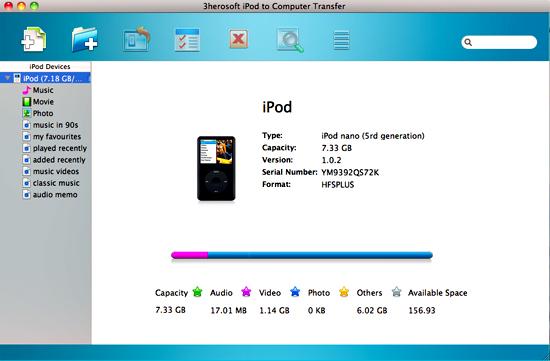
Launch this Mac iPod Transfer software and connect your iPod to your Mac. Then you can see your iPod on the desktop -- an iPod icon with your iPod's name under it. Then familiarize yourself with its interface. All information about your iPod, such as type, capacity, version, serial number, and format, will be shown on the main interface.
 Step2: Select video and transfer to Mac
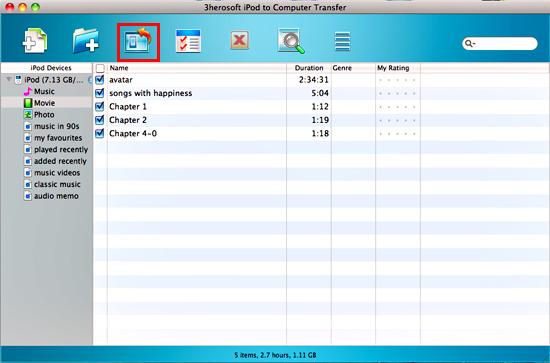
1)Open "Movie" option in iPod list. All these video files are shown in browser.
2)Find video you want to transfer and check them. Besides video files, it also can be photo, music, podcast or TV program for exporting to Mac.
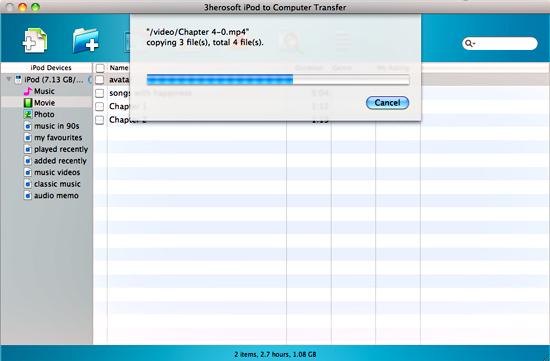
3)Click the "Export checked files to local" button, select the folder that you want to export videos to in the pop-up dialog box. Then click "Save" button to transfer iPod video to Mac for backup.
|
Hot Tags: |
||||
 Buy 3herosoft iPod to Computer Transfer for Mac $28.oo
 Download 3herosoft iPod to Computer Transfer for Mac 5.40MB
