


Windows Products
- iPod / iPhone Tools
- DVD Cloner Tools
- DVD Creator Tools
- Video Converter Tools
- DVD Ripper Tools
- Audio Tools
- PDF Tools
- Suite Tools

Mac Products
3herosoft iPod Movie Converter


As a file extension for the QuickTime multimedia file format, MOV plays an important role in the current digital life. But the MOV files can not play on iPod directly because of the limit of file formats. So if you want to put MOV on iPod, firstly you have to convert MOV to MP4 or MPEG-4 format which is recognizable by iPod or iPhone. And I deem personally that 3herosoft iPod Movie Converter will be your prior choice!
 Convert AVI, MPEG, WMV, DivX, RM, MOV, RMVB, MP4 to iPod MPEG-4 video
-
Convert audios like MP3, WMA, WAV, M4A, AAC to iPod music MP3
-
Extract iPod music MP3 from videos such as AVI, FLV, WMV, MP4, MOV




The step-by-step tutorial shows you how to convert MOV to iPod video. You can use 3herosoft iPod Movie Converter to convert all QuickTime MOV videos to iPod playable videos (MP4 or MPEG-4). Then your iPod Touch can play all MOV videos, what a wonderful multimedia miracle. Common video editing functions are also provided by 3herosoft iPod Movie Converter you can customize the output videos to best fit for your watching on iPod.
 Step1: Load Video Files
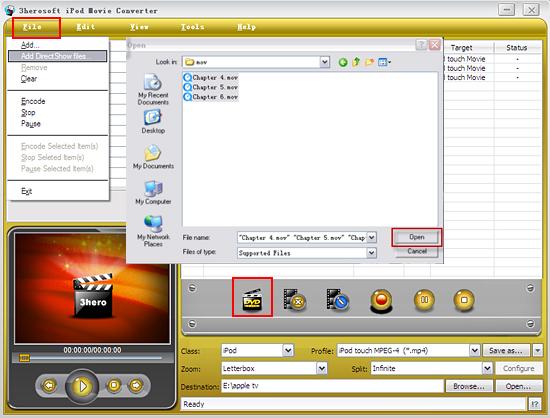
Download 3herosoft iPod Movie Converter and run it. Load your video from computer by choosing "Add..." or "Add DirectShow files" in the "File" menu or directly pressing the "Add" button in the main interface, then select your MOV video files in the pop-up window and press the "Open" button.
 Step2: Set output files format
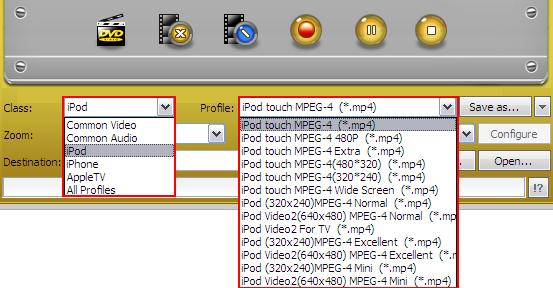
In "Profile" drop down list box, you may select output format ?strong>*.mp4". Or search exact profile by "Class->iPod" selecting, you can also highlight certain file you want to convert:
 Step3: Set the destination and start conversion
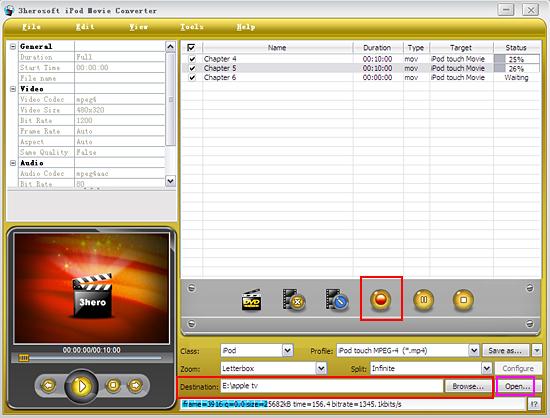
After you set the saving destination by clicking "Browse" button, select the title or chapter you want to convert and start conversion by clicking red button.
 Step3: Put the converted files to iPod
And then you will get targeted format's files that are ready to be put on your iPod. But how do you put the video files you ripped on iPod? The way is as follows:
(1) Please click "Open" button (as picture shows above) after the conversion is completed.
(2) Find the converted file in the destination folder and pull it to your iTunes.
(3) Drag the file onto the iPod logo in the iTunes and then release the mouse when "+" appears around the cursor. The file will be transferred to iPod automatically.
Finally, you are able to enjoy your favourite movies on your iPod breezily!
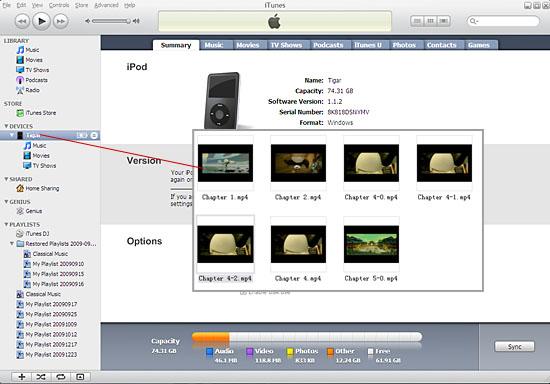
Without iTunes, you can also transfer these converted files to iPod easily with our product--3herosoft iPod to Computer Transfer.
In a word, 3herosoft iPod Movie Converter is an iPod MP4 Converter that is easy to use, fast in speed, excellent in quality and reasonable in price. It enables you to fast and easily convert MOV video to iPod, convert MOV video file to iPod, and rip MOV movie to iPod.
|
Hot Tags: |
||||
 Buy 3herosoft iPod Movie Converter $25.oo
 Download 3herosoft iPod Movie Converter 15.24MB
