


Windows Products
- iPod / iPhone Tools
-
- iPod to Computer Transfer

- iPad to Computer Transfer

- iPhone to Computer Transfer
- iPhone Ringtone Maker
- iPhone SMS Transfer
- iPhone Contact Transfer
- iPhone Call List Transfer
- iPhone iBooks Transfer
- iPhone Photo Transfer
- iPod Mate
- iPhone Mate
- iPad Mate
- DVD to iPod Converter
- DVD to iPhone Converter
- DVD to iPad Converter
- iPod Movie Converter
- iPhone Video Converter
- iPad Video Converter
- iPod to Computer Transfer
- DVD Cloner Tools
- DVD Creator Tools
- Video Converter Tools
-
- Video Converter
- iPod Movie Converter
- iPhone Video Converter
- iPad Video Converter
- Apple TV Video Converter
- Video to Audio Converter
- AVI MPEG Converter
- MP4 Video Converter
- PS3 Video Converter
- PSP Video Converter
- WMV Video Converter
- 3GP Video Converter
- FLV Converter
- MOV Converter
- RM Converter
- Zune Video Converter
- BlackBerry Video Converter
- Mobile Phone Video Converter
- Video Converter
- DVD Ripper Tools
-
- DVD Ripper Platinum
- DVD to iPod Converter
- DVD to iPhone Converter
- DVD to iPad Converter
- DVD to Apple TV Converter
- DVD Audio Ripper
- DVD to MP4 Converter
- DVD to PS3 Converter
- DVD to PSP Converter
- DVD to WMV Converter
- DVD to 3GP Converter
- DVD to AVI Converter
- DVD to DivX Converter
- DVD to Pocket PC Ripper
- DVD to Zune Converter
- DVD to BlackBerry Converter
- DVD to Mobile Phone Converter
- DVD Ripper
- DVD Ripper Platinum
- Audio Tools
- PDF Tools
- Suite Tools
-
- Media Toolkit Ultimate

- DVD Ripper Platinum Suite
- DVD Maker Suite
- iPod Mate
- iPhone Mate
- iPad Mate
- DVD to iPod Suite
- DVD to iPhone Suite
- DVD to iPad Suite
- DVD to Apple TV Suite
- DVD to Audio Suite
- DVD to MP4 Suite
- DVD to AVI Suite
- DVD to PS3 Suite
- DVD to PSP Suite
- DVD to WMV Suite
- DVD to 3GP Suite
- DVD to Zune Suite
- DVD to BlackBerry Suite
- DVD to Mobile Phone Suite
- Media Toolkit Ultimate
Mac Products
- iPod / iPhone Tools
-
- iPod to Computer Transfer
- iPhone to Computer Transfer
- iPad to Computer Transfer
- iPhone Ringtone Maker
- iPhone SMS Transfer
- iPhone Contact Transfer
- iPhone Call List Transfer
- iPhone iBooks Transfer
- iPhone Photo Transfer
- iPod Mate for Mac
- iPhone Mate for Mac
- iPad Mate for Mac
- DVD to iPod Converter for Mac
- DVD to iPhone Converter for Mac
- DVD to iPad Converter for Mac
- iPod Video Converter for Mac
- iPhone Video Converter for Mac
- iPad Video Converter for Mac
- iPod to Computer Transfer
- DVD Cloner / Creator Tools
- Video Converter Tools
-
- Video Converter for Mac
- iPod Video Converter for Mac
- iPhone Video Converter for Mac
- iPad Video Converter for Mac
- Apple TV Video Converter for Mac
- Video to Audio Converter for Mac
- MP4 Converter for Mac
- FLV Converter for Mac
- PSP Video Converter for Mac
- BlackBerry Converter for Mac
- Mobile Phone Converter for Mac
- DVD Ripper Tools
- PDF Tools
- Suite Tools
-
- Mac DVD Toolkit
- DVD Ripper Suite for Mac
- DVD Maker Suite for Mac
- iPod Mate for Mac
- iPhone Mate for Mac
- iPad Mate for Mac
- DVD to iPod Suite for Mac
- DVD to iPhone Suite for Mac
- DVD to iPad Suite for Mac
- DVD to Apple TV Suite for Mac
- DVD to Audio Suite for Mac
- DVD to MP4 Suite for Mac
- DVD to FLV Suite for Mac
- DVD to PSP Suite for Mac
- DVD to BlackBerry Suite for Mac
- DVD to Mobile Phone Suite Mac
- Mac DVD Toolkit
3herosoft DVD to iPod Converter

"Nice and cool! Easily convert your DVD to high-definition *.mp4 or even H.264." It is the first DVD to iPod Converter that can convert DVD to MP4 or MPEG-4 for playback on iPod. Really practical! And 3herosoft DVD to iPod Converter also supports diverse input formats including DVD-5, DVD-9 and IFO image files. Offered with so optimal profiles and featured functions, you'll always find a perfect solution to put individual DVD movies on your iPod.
 Convert movie DVD to iPod video compatible formats
- Rip music or audio from movie DVD to iPod
-
Support batch process to enhance the converting speed




Want to watch your favorite movies on your iPod? Well, the iTunes Store offers thousands of movies to buy. However, you can use our DVD to iPod Converter to easily convert each of your favorite movies from DVD to iPod without paying on iTunes.
This document will guide you how to put DVD movie on your iPod using 3herosoft DVD to iPod Converter, a professional conversion tool for both iPod/iPhone video and audio.
 Step1: Load DVD movie
Download 3herosoft DVD to iPod Converter and run it. Load your DVD by choosing "Add DVD Folder" in the "File" menu or directly pressing the "Open DVD" button in the main interface, then select your DVD Drive in the pop-up window and press the "OK" button.
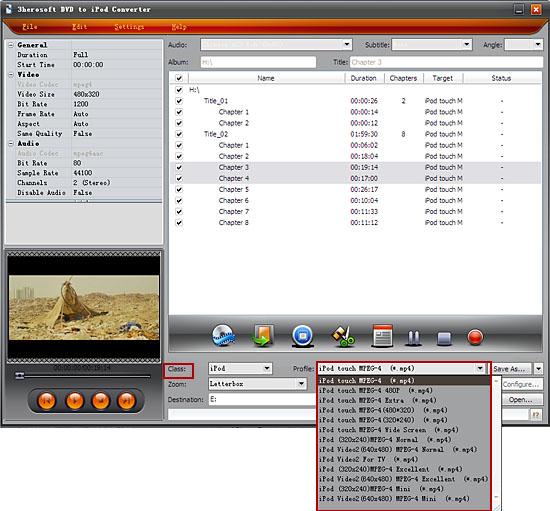
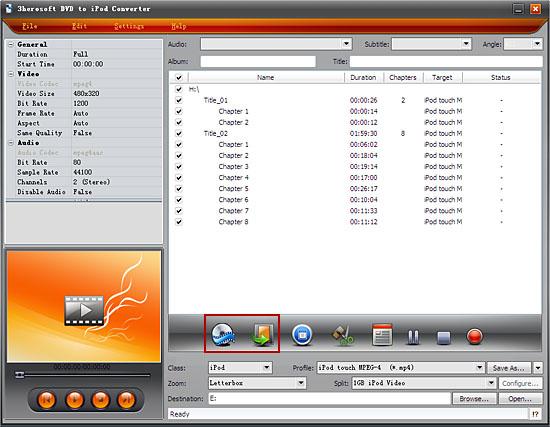 Step2: Set output files format
In "Profile" drop down list box, you may select output format. Or search exact profile by "Class" selecting. The software allows to set various output formats supported by iPod or iPhone.
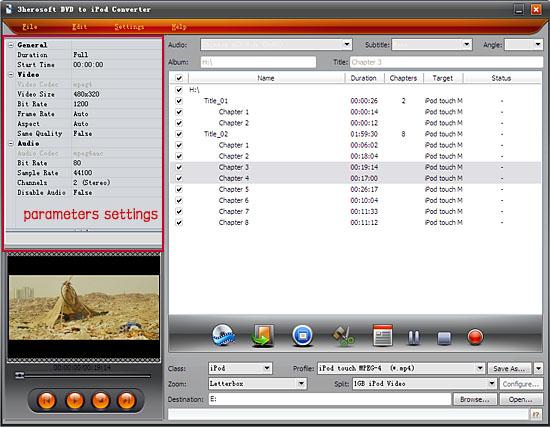
you can set "Bit Rate" by choosing the rate given, such as "512". And the higher "Bit Rate" you choose, the better the picture you will get. Certainly, you can keep all the above options default without any change.
 Step3: Set the destination and start conversion
After you set the saving destination by clicking "Browse" button, select the title or chapter you want to convert and start conversion by clicking red button.
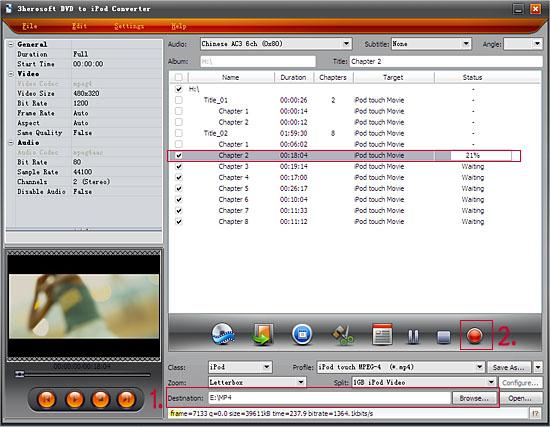
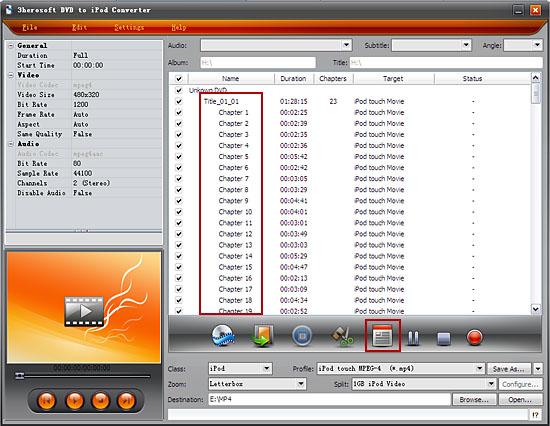
If you want to convert just a chapter, here is the way: After your DVD is loaded into the program, please select the file name and click the "Show Chapters" button in the main interface and then you will see all the chapters within this file. Please select the chapter you want to convert and do the same way with red button clicking.
 Step4: Put DVD on iPod
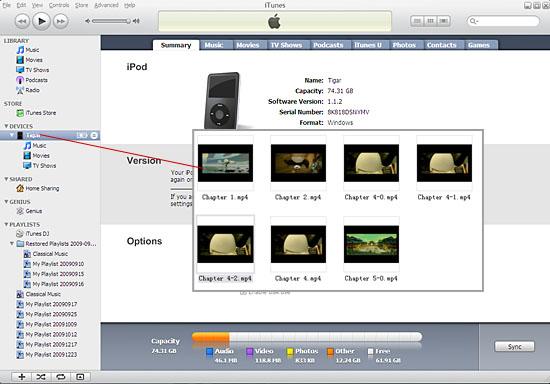
And then you will get targeted format's files that are ready to be put on your iPod. But how do you put the video files you ripped on iPod? The way is as follows:
(1) Please click "Open" button after the conversion is completed.
(2) Find the converted file in the destination folder and pull it to your iTunes.
(3) Drag the file onto the iPod logo in the iTunes and then release the mouse when "+" appears around the cursor. The file will be transferred to iPod automatically.
Finally, you are able to enjoy your favourite movies on your iPod breezily!
|
Hot Tags: |
||||
 Buy 3herosoft DVD to iPod Converter $28.oo
 Download 3herosoft DVD to iPod Converter 5.03MB
