


Windows Products
- iPod / iPhone Tools
-
- iPod to Computer Transfer

- iPad to Computer Transfer

- iPhone to Computer Transfer
- iPhone Ringtone Maker
- iPhone SMS Transfer
- iPhone Contact Transfer
- iPhone Call List Transfer
- iPhone iBooks Transfer
- iPhone Photo Transfer
- iPod Mate
- iPhone Mate
- iPad Mate
- DVD to iPod Converter
- DVD to iPhone Converter
- DVD to iPad Converter
- iPod Movie Converter
- iPhone Video Converter
- iPad Video Converter
- iPod to Computer Transfer
- DVD Cloner Tools
- DVD Creator Tools
- Video Converter Tools
-
- Video Converter
- iPod Movie Converter
- iPhone Video Converter
- iPad Video Converter
- Apple TV Video Converter
- Video to Audio Converter
- AVI MPEG Converter
- MP4 Video Converter
- PS3 Video Converter
- PSP Video Converter
- WMV Video Converter
- 3GP Video Converter
- FLV Converter
- MOV Converter
- RM Converter
- Zune Video Converter
- BlackBerry Video Converter
- Mobile Phone Video Converter
- Video Converter
- DVD Ripper Tools
-
- DVD Ripper Platinum
- DVD to iPod Converter
- DVD to iPhone Converter
- DVD to iPad Converter
- DVD to Apple TV Converter
- DVD Audio Ripper
- DVD to MP4 Converter
- DVD to PS3 Converter
- DVD to PSP Converter
- DVD to WMV Converter
- DVD to 3GP Converter
- DVD to AVI Converter
- DVD to DivX Converter
- DVD to Pocket PC Ripper
- DVD to Zune Converter
- DVD to BlackBerry Converter
- DVD to Mobile Phone Converter
- DVD Ripper
- DVD Ripper Platinum
- Audio Tools
- PDF Tools
- Suite Tools
-
- Media Toolkit Ultimate

- DVD Ripper Platinum Suite
- DVD Maker Suite
- iPod Mate
- iPhone Mate
- iPad Mate
- DVD to iPod Suite
- DVD to iPhone Suite
- DVD to iPad Suite
- DVD to Apple TV Suite
- DVD to Audio Suite
- DVD to MP4 Suite
- DVD to AVI Suite
- DVD to PS3 Suite
- DVD to PSP Suite
- DVD to WMV Suite
- DVD to 3GP Suite
- DVD to Zune Suite
- DVD to BlackBerry Suite
- DVD to Mobile Phone Suite
- Media Toolkit Ultimate
Mac Products
- iPod / iPhone Tools
-
- iPod to Computer Transfer
- iPhone to Computer Transfer
- iPad to Computer Transfer
- iPhone Ringtone Maker
- iPhone SMS Transfer
- iPhone Contact Transfer
- iPhone Call List Transfer
- iPhone iBooks Transfer
- iPhone Photo Transfer
- iPod Mate for Mac
- iPhone Mate for Mac
- iPad Mate for Mac
- DVD to iPod Converter for Mac
- DVD to iPhone Converter for Mac
- DVD to iPad Converter for Mac
- iPod Video Converter for Mac
- iPhone Video Converter for Mac
- iPad Video Converter for Mac
- iPod to Computer Transfer
- DVD Cloner / Creator Tools
- Video Converter Tools
-
- Video Converter for Mac
- iPod Video Converter for Mac
- iPhone Video Converter for Mac
- iPad Video Converter for Mac
- Apple TV Video Converter for Mac
- Video to Audio Converter for Mac
- MP4 Converter for Mac
- FLV Converter for Mac
- PSP Video Converter for Mac
- BlackBerry Converter for Mac
- Mobile Phone Converter for Mac
- DVD Ripper Tools
- PDF Tools
- Suite Tools
-
- Mac DVD Toolkit
- DVD Ripper Suite for Mac
- DVD Maker Suite for Mac
- iPod Mate for Mac
- iPhone Mate for Mac
- iPad Mate for Mac
- DVD to iPod Suite for Mac
- DVD to iPhone Suite for Mac
- DVD to iPad Suite for Mac
- DVD to Apple TV Suite for Mac
- DVD to Audio Suite for Mac
- DVD to MP4 Suite for Mac
- DVD to FLV Suite for Mac
- DVD to PSP Suite for Mac
- DVD to BlackBerry Suite for Mac
- DVD to Mobile Phone Suite Mac
- Mac DVD Toolkit
3herosoft iPhone to Computer Transfer for Mac


Many iPhone users like to spend their spare time watching movies on their iPhone 3G. And before that, you may need to put movie to iPhone firstly. I'm pretty sure you can do this with iTunes' help. But I think the pursuit of efficiency can't make you satisfied with iTunes. So here, I will tell you a simpler method-3herosoft iPhone to Computer Transfer for Mac that is the professional iPhone transfer tool, can meet your demands. It allows you to put movie to iPhone without removing your original files.
 Transfer music/video/podcast/photo between all sorts of iPod/iPhone and Mac
 -
Transfer, copy media files from iPod/iPhone to iTunes
-
Support all Mac OS, iPods, iPhone, even iOS 5 and iTunes 10.6




This iPhone to Mac Transfer is a professional tool to put movies to iPhone 3G. In this paragraph below will tell you how to put movies to iPhone in an easy way without using iTunes!
Attention: iPhone and iTunes have supported for many video formats, including M4V, MP4, MOV, MPEG-4, h264 and audio format such as MP3, WAV, AAC, Apple lossless, AIFF. If your video can not transfer successfully, make sure the video or audio format can be suitable for the iPhone supported. If not, firstly you should use 3herosoft iPhone Video Converter for Mac software to convert video or audio to the right format for your file backup on Mac.
 Step1: Install and launch the software
Download this movie to iPhone transfer software on Mac, install and run it. Once you connect iPhone to Mac with Apple USB cable, all info about iPhone device such as Type, Capacity, Version, Serial Number, Format, etc. In the left panel, all iPhone library folders are displayed under the iPhone list including Music, Movie, Photo, etc. If you purchase this movie to iPhone software and get the full version, use it without any limitations.
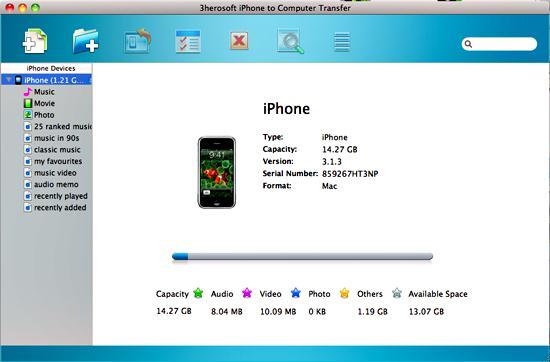 Step2: Check video you want to transfer
In this screen, you should choose "Movie" item in the iPhone list, then click "Add files to iPod/iPhone" button to transfer. Now a dialogbox pops up and you can locate and check movies from your Mac.
If you want to add all the files in a folder, please press " Add Folder to iPod / iPhone" button or choose "File > Add folder to list" option and then locate the folder and transfer movies files to iPhone.
 Step3: Put movies iPhone
When everything is done, then press the "Open" button in the dialogbox. After that, the selected movie is added to the iPhone without iTunes right now! With this step, you can also copy all of files such as pictures, TV Shows, and podcasts etc. to iPod/iPhone.

|
Hot Tags: |
||||
 Buy 3herosoft iPhone to Computer Transfer for Mac $25.oo
 Download 3herosoft iPhone to Computer Transfer for Mac 5.50MB
