


Windows Products
- iPod / iPhone Tools
-
- iPod to Computer Transfer

- iPad to Computer Transfer

- iPhone to Computer Transfer
- iPhone Ringtone Maker
- iPhone SMS Transfer
- iPhone Contact Transfer
- iPhone Call List Transfer
- iPhone iBooks Transfer
- iPhone Photo Transfer
- iPod Mate
- iPhone Mate
- iPad Mate
- DVD to iPod Converter
- DVD to iPhone Converter
- DVD to iPad Converter
- iPod Movie Converter
- iPhone Video Converter
- iPad Video Converter
- iPod to Computer Transfer
- DVD Cloner Tools
- DVD Creator Tools
- Video Converter Tools
-
- Video Converter
- iPod Movie Converter
- iPhone Video Converter
- iPad Video Converter
- Apple TV Video Converter
- Video to Audio Converter
- AVI MPEG Converter
- MP4 Video Converter
- PS3 Video Converter
- PSP Video Converter
- WMV Video Converter
- 3GP Video Converter
- FLV Converter
- MOV Converter
- RM Converter
- Zune Video Converter
- BlackBerry Video Converter
- Mobile Phone Video Converter
- Video Converter
- DVD Ripper Tools
-
- DVD Ripper Platinum
- DVD to iPod Converter
- DVD to iPhone Converter
- DVD to iPad Converter
- DVD to Apple TV Converter
- DVD Audio Ripper
- DVD to MP4 Converter
- DVD to PS3 Converter
- DVD to PSP Converter
- DVD to WMV Converter
- DVD to 3GP Converter
- DVD to AVI Converter
- DVD to DivX Converter
- DVD to Pocket PC Ripper
- DVD to Zune Converter
- DVD to BlackBerry Converter
- DVD to Mobile Phone Converter
- DVD Ripper
- DVD Ripper Platinum
- Audio Tools
- PDF Tools
- Suite Tools
-
- Media Toolkit Ultimate

- DVD Ripper Platinum Suite
- DVD Maker Suite
- iPod Mate
- iPhone Mate
- iPad Mate
- DVD to iPod Suite
- DVD to iPhone Suite
- DVD to iPad Suite
- DVD to Apple TV Suite
- DVD to Audio Suite
- DVD to MP4 Suite
- DVD to AVI Suite
- DVD to PS3 Suite
- DVD to PSP Suite
- DVD to WMV Suite
- DVD to 3GP Suite
- DVD to Zune Suite
- DVD to BlackBerry Suite
- DVD to Mobile Phone Suite
- Media Toolkit Ultimate
Mac Products
- iPod / iPhone Tools
-
- iPod to Computer Transfer
- iPhone to Computer Transfer
- iPad to Computer Transfer
- iPhone Ringtone Maker
- iPhone SMS Transfer
- iPhone Contact Transfer
- iPhone Call List Transfer
- iPhone iBooks Transfer
- iPhone Photo Transfer
- iPod Mate for Mac
- iPhone Mate for Mac
- iPad Mate for Mac
- DVD to iPod Converter for Mac
- DVD to iPhone Converter for Mac
- DVD to iPad Converter for Mac
- iPod Video Converter for Mac
- iPhone Video Converter for Mac
- iPad Video Converter for Mac
- iPod to Computer Transfer
- DVD Cloner / Creator Tools
- Video Converter Tools
-
- Video Converter for Mac
- iPod Video Converter for Mac
- iPhone Video Converter for Mac
- iPad Video Converter for Mac
- Apple TV Video Converter for Mac
- Video to Audio Converter for Mac
- MP4 Converter for Mac
- FLV Converter for Mac
- PSP Video Converter for Mac
- BlackBerry Converter for Mac
- Mobile Phone Converter for Mac
- DVD Ripper Tools
- PDF Tools
- Suite Tools
-
- Mac DVD Toolkit
- DVD Ripper Suite for Mac
- DVD Maker Suite for Mac
- iPod Mate for Mac
- iPhone Mate for Mac
- iPad Mate for Mac
- DVD to iPod Suite for Mac
- DVD to iPhone Suite for Mac
- DVD to iPad Suite for Mac
- DVD to Apple TV Suite for Mac
- DVD to Audio Suite for Mac
- DVD to MP4 Suite for Mac
- DVD to FLV Suite for Mac
- DVD to PSP Suite for Mac
- DVD to BlackBerry Suite for Mac
- DVD to Mobile Phone Suite Mac
- Mac DVD Toolkit
3herosoft iPod to Computer Transfer
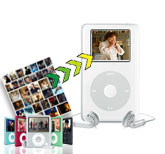

"I got an iPod Touch today and my computer has my favorite pictures on it so I decided to sync pictures to iPod Touch on my computer without iTunes. I have tried some times but it doesn't works! How come trying to sync with photos isn't working? Are there any programs for help? Thanks! " Windows does not sync pictures to iPod Touch directly. And here is best transfer we recommeded to you for syncing pictures to iPod Touch on Windows--3herosoft iPod to Computer Transfer.
 Transfer pictures from iPod to computer for backup
 -
Put pictures from computer to iPod without iTunes
-
Sync iPod picture library to iTunes (iTunes 10.6 supported now)




3herosoft iPod to Computer Transfer software is a good choice that enables you to sync pictures (including video, music, TVShow) to iPod Touch at high speed. It's specially designed for syncing, copying even transferring files from computer, iPhone or camera. With installation of iTunes, you can even transfer or copy your files between iPod and iPhone.
 Step1: Install 3herosoft iPod to Computer Transfer and Run it
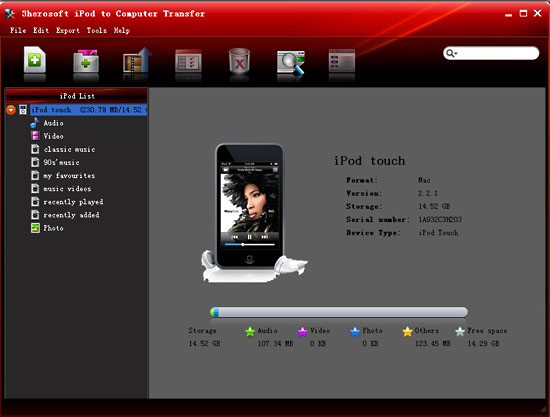
Launch this iPod transfer software and connect your iPod to your computer. Then you can see your iPod on the desktop -- an iPod icon with your iPod's name under it. Then familiarize yourself with its interface. All information about your iPod, such as type, capacity, version, serial number, and format, will be shown on the main interface.
Tip: All functions for iPod are applicable to iPhone as well except for the photo management.
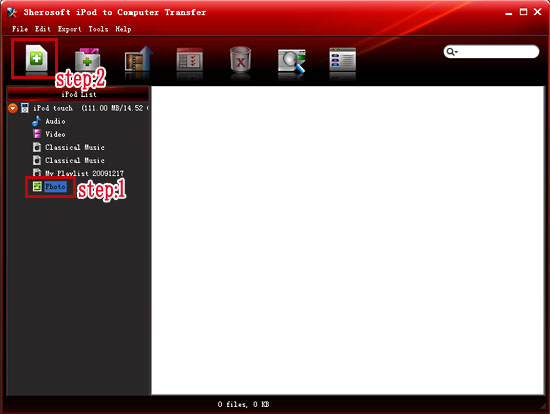
 Step2: Select pictures you want to put
In this screen, just select and check the pictures from computer you want to put to your iPod, and then click the "Add Files to iPod/iPhone" button to transfer the pictures to iPod for OK.
If you want to add all the files in a folder, please click the "Add folder to iPod/iPhone" button and then locate the folder on your computer and transfer the whole folder to iPod.
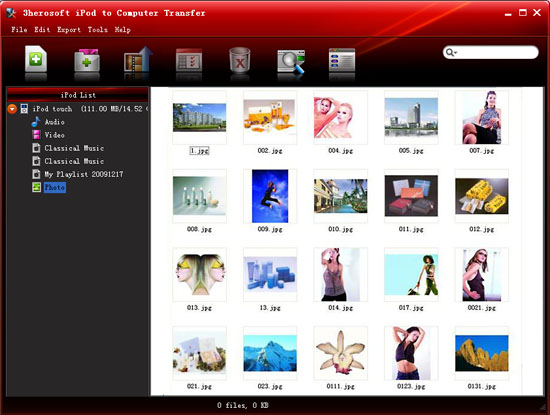
 Step3: Put pictures to iPod touch
 After it is done, then press the "OK" button in the dialogbox. After that, the selected pictures are put to the iPod with fast speed right now! With this step, you can also backup or copy music, TV Shows, videos, pictures and podcasts etc. from your computer to iPod/iPhone.
|
Hot Tags: |
||||
 Buy 3herosoft iPod to Computer Transfer $25.oo
 Download 3herosoft iPod to Computer Transfer 5.77MB
