


Windows Products
- iPod / iPhone Tools
-
- iPod to Computer Transfer

- iPad to Computer Transfer

- iPhone to Computer Transfer
- iPhone Ringtone Maker
- iPhone SMS Transfer
- iPhone Contact Transfer
- iPhone Call List Transfer
- iPhone iBooks Transfer
- iPhone Photo Transfer
- iPod Mate
- iPhone Mate
- iPad Mate
- DVD to iPod Converter
- DVD to iPhone Converter
- DVD to iPad Converter
- iPod Movie Converter
- iPhone Video Converter
- iPad Video Converter
- iPod to Computer Transfer
- DVD Cloner Tools
- DVD Creator Tools
- Video Converter Tools
-
- Video Converter
- iPod Movie Converter
- iPhone Video Converter
- iPad Video Converter
- Apple TV Video Converter
- Video to Audio Converter
- AVI MPEG Converter
- MP4 Video Converter
- PS3 Video Converter
- PSP Video Converter
- WMV Video Converter
- 3GP Video Converter
- FLV Converter
- MOV Converter
- RM Converter
- Zune Video Converter
- BlackBerry Video Converter
- Mobile Phone Video Converter
- Video Converter
- DVD Ripper Tools
-
- DVD Ripper Platinum
- DVD to iPod Converter
- DVD to iPhone Converter
- DVD to iPad Converter
- DVD to Apple TV Converter
- DVD Audio Ripper
- DVD to MP4 Converter
- DVD to PS3 Converter
- DVD to PSP Converter
- DVD to WMV Converter
- DVD to 3GP Converter
- DVD to AVI Converter
- DVD to DivX Converter
- DVD to Pocket PC Ripper
- DVD to Zune Converter
- DVD to BlackBerry Converter
- DVD to Mobile Phone Converter
- DVD Ripper
- DVD Ripper Platinum
- Audio Tools
- PDF Tools
- Suite Tools
-
- Media Toolkit Ultimate

- DVD Ripper Platinum Suite
- DVD Maker Suite
- iPod Mate
- iPhone Mate
- iPad Mate
- DVD to iPod Suite
- DVD to iPhone Suite
- DVD to iPad Suite
- DVD to Apple TV Suite
- DVD to Audio Suite
- DVD to MP4 Suite
- DVD to AVI Suite
- DVD to PS3 Suite
- DVD to PSP Suite
- DVD to WMV Suite
- DVD to 3GP Suite
- DVD to Zune Suite
- DVD to BlackBerry Suite
- DVD to Mobile Phone Suite
- Media Toolkit Ultimate
Mac Products
- iPod / iPhone Tools
-
- iPod to Computer Transfer
- iPhone to Computer Transfer
- iPad to Computer Transfer
- iPhone Ringtone Maker
- iPhone SMS Transfer
- iPhone Contact Transfer
- iPhone Call List Transfer
- iPhone iBooks Transfer
- iPhone Photo Transfer
- iPod Mate for Mac
- iPhone Mate for Mac
- iPad Mate for Mac
- DVD to iPod Converter for Mac
- DVD to iPhone Converter for Mac
- DVD to iPad Converter for Mac
- iPod Video Converter for Mac
- iPhone Video Converter for Mac
- iPad Video Converter for Mac
- iPod to Computer Transfer
- DVD Cloner / Creator Tools
- Video Converter Tools
-
- Video Converter for Mac
- iPod Video Converter for Mac
- iPhone Video Converter for Mac
- iPad Video Converter for Mac
- Apple TV Video Converter for Mac
- Video to Audio Converter for Mac
- MP4 Converter for Mac
- FLV Converter for Mac
- PSP Video Converter for Mac
- BlackBerry Converter for Mac
- Mobile Phone Converter for Mac
- DVD Ripper Tools
- PDF Tools
- Suite Tools
-
- Mac DVD Toolkit
- DVD Ripper Suite for Mac
- DVD Maker Suite for Mac
- iPod Mate for Mac
- iPhone Mate for Mac
- iPad Mate for Mac
- DVD to iPod Suite for Mac
- DVD to iPhone Suite for Mac
- DVD to iPad Suite for Mac
- DVD to Apple TV Suite for Mac
- DVD to Audio Suite for Mac
- DVD to MP4 Suite for Mac
- DVD to FLV Suite for Mac
- DVD to PSP Suite for Mac
- DVD to BlackBerry Suite for Mac
- DVD to Mobile Phone Suite Mac
- Mac DVD Toolkit
3herosoft iPod to Computer Transfer


"When I updated iPod touch with newly operating system--iOS 5, I download many classic books for enriching the iBooks place. But in reality, I have a hobby to read books when I answer the telephone using my iPhone. So a professional software that help me copy ePub books from iPod touch to iPhone will be my first consideration." Now we recommend a third-party program named 3herosoft iPod to Computer Transfer can help you out of this trouble completely. It can not only transfer the iPod books to local, but can get the sync books between the iPod and iTunes.
 Transfer books from iPod to computer for backup
 -
Transfer books from iPod touch to iTunes
-
Sync iPod touch books to iPhone 4G ( iTunes 10 supported now)




Wanna achieve the transferring books between iPod touch and iPhone with 3herosoft iPod to Computer Transfer, and the following tutorials will show you how to easily transfer ePub books from iPod touch to iPhone fast and easily.
 Step1: Download the software and connect iPod touch with computer
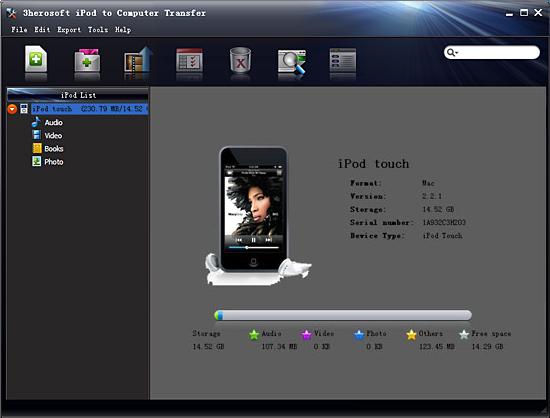
Run the iPod to Computer Transfer software and connect your iPod touch to your computer. All information about your iPod touch, such as Type, Capacity, Version, Serial Number, and Format, will be shown on the main interface. Moreover, all the items of iPod list can also be displayed on the left panel of the interface.
Tip: All functions for iPod are applicable to iPhone as well except for the photo management.
 Step2: Export books from iPod touch to iTunes
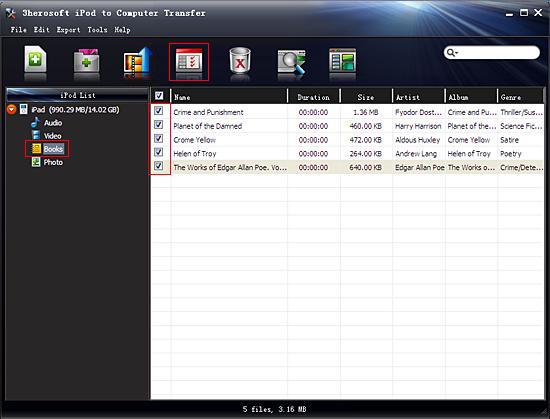
1) Open the "Books" library that you want to transfer. All these files are shown in file browser.
2) Find the files you want to transfer and check them. Make sure tick appeared that is shown in the picture below.
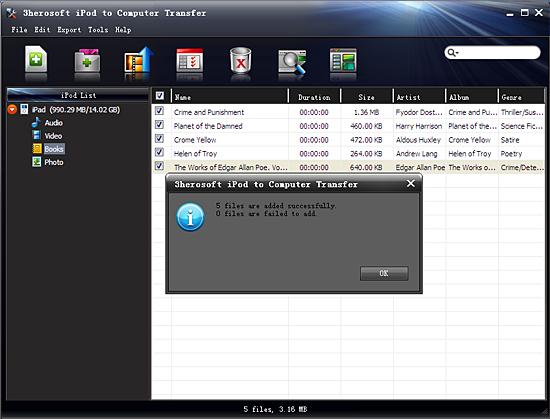
3) Click the "Export->Export to iTunes" on the top-menu, or directly click the highlighted button (show as picture below) to export. And select the directory folder to save the iPod files. Then you will see the copy progress in the pop-up dialogbox.
4)After a few minutes, the selected books can be transferred successfully from iPod to iTunes without any files lost.
 Steps: Sync books to iPhone
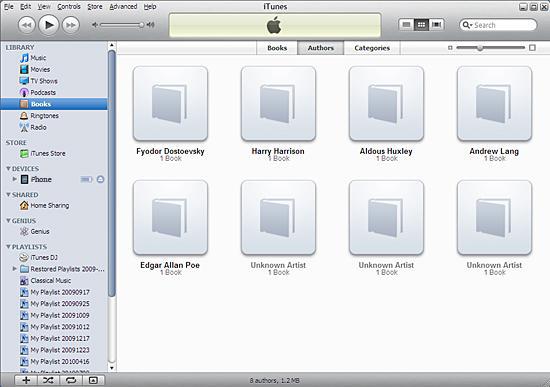
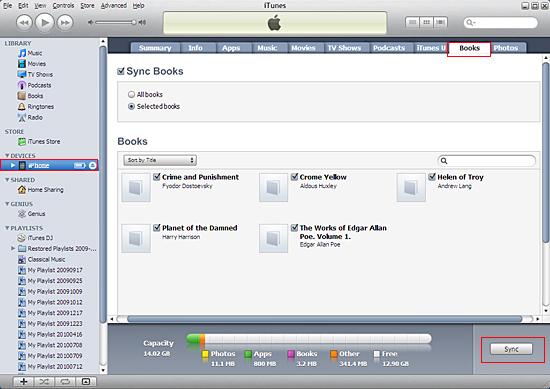
So now launch your iTunes and connect iPhone with computer with Apple USB cable, you will see the books have already appeared on "Books" of iTunes library list, and iPhone also can be detected and the icon is shown on iTunes list. Now just sync books from iTunes to iPhone with easy clicks.
|
Hot Tags: |
||||
 Buy 3herosoft iPod to Computer Transfer $25.oo
 Download 3herosoft iPod to Computer Transfer 5.77MB
