


Windows Products
- iPod / iPhone Tools
-
- iPod to Computer Transfer

- iPad to Computer Transfer

- iPhone to Computer Transfer
- iPhone Ringtone Maker
- iPhone SMS Transfer
- iPhone Contact Transfer
- iPhone Call List Transfer
- iPhone iBooks Transfer
- iPhone Photo Transfer
- iPod Mate
- iPhone Mate
- iPad Mate
- DVD to iPod Converter
- DVD to iPhone Converter
- DVD to iPad Converter
- iPod Movie Converter
- iPhone Video Converter
- iPad Video Converter
- More iPod and iPhone Tools ...
- iPod to Computer Transfer
- DVD Cloner Tools
- DVD Creator Tools
- Video Converter Tools
-
- Video Converter
- BlackBerry Video Converter
- Mobile Phone Video Converter
- PS3 Video Converter
- WMV Video Converter
- 3GP Video Converter
- Apple TV Video Converter
- AVI MPEG Converter
- FLV Converter
- iPhone Video Converter
- iPod Movie Converter
- MOV Converter
- MP4 Video Converter
- PSP Video Converter
- RM Converter
- Video to Audio Converter
- Zune Video Converter
- iPad Video Converter
- More Video Converter Tools ...
- Video Converter
- DVD Ripper Tools
-
- DVD Ripper Platinum
- DVD to BlackBerry Converter
- DVD to Mobile Phone Converter
- DVD to PS3 Converter
- DVD to WMV Converter
- DVD to 3GP Converter
- DVD to Apple TV Converter
- DVD Audio Ripper
- DVD to AVI Converter
- DVD to DivX Converter
- DVD to iPhone Converter
- DVD to iPod Converter
- DVD to MP4 Converter
- DVD to Pocket PC Ripper
- DVD to PSP Converter
- DVD Ripper
- DVD to Zune Converter
- DVD to iPad Converter
- More DVD Ripper Tools ...
- DVD Ripper Platinum
- Audio Tools
- PDF Tools
- Suite Tools
-
- Media Toolkit Ultimate

- DVD Ripper Platinum Suite
- DVD to BlackBerry Suite
- DVD to Mobile Phone Suite
- DVD to PS3 Suite
- DVD to WMV Suite
- DVD to 3GP Suite
- DVD to Apple TV Suite
- DVD to Audio Suite
- DVD to AVI Suite
- DVD to iPhone Suite
- DVD to iPod Suite
- DVD to iPad Suite
- DVD to MP4 Suite
- DVD to PSP Suite
- DVD to Zune Suite
- DVD Maker Suite
- iPod Mate
- iPhone Mate
- iPad Mate
- More Suites ...
- Media Toolkit Ultimate
Mac Products
- iPod / iPhone Tools
-
- iPod to Computer Transfer
- iPhone to Computer Transfer
- iPad to Computer Transfer
- iPhone Ringtone Maker
- iPhone SMS Transfer
- iPhone Contact Transfer
- iPhone Call List Transfer
- iPhone iBooks Transfer
- iPhone Photo Transfer
- iPod Mate for Mac
- iPhone Mate for Mac
- iPad Mate for Mac
- DVD to iPod Converter for Mac
- DVD to iPhone Converter for Mac
- DVD to iPad Converter for Mac
- iPod Video Converter for Mac
- iPhone Video Converter for Mac
- iPad Video Converter for Mac
- More iPod / iPhone Tools ...
- iPod to Computer Transfer
- DVD Cloner / Creator Tools
- Video Converter Tools
-
- Video Converter for Mac
- iPod Video Converter for Mac
- iPhone Video Converter for Mac
- MP4 Converter for Mac
- Apple TV Video Converter for Mac
- Video to Audio Converter for Mac
- BlackBerry Converter for Mac
- FLV Converter for Mac
- Mobile Phone Converter for Mac
- PSP Video Converter for Mac
- iPad Video Converter for Mac
- More Video Converter Tools ...
- DVD Ripper Tools
-
- DVD Ripper for Mac
- DVD to iPod Converter for Mac
- DVD to iPhone Converter for Mac
- DVD to MP4 Converter for Mac
- DVD to Apple TV for Mac
- DVD Audio Ripper for Mac
- DVD to BlackBerry for Mac
- DVD to FLV Converter for Mac
- DVD to Mobile Phone for Mac
- DVD to PSP Converter for Mac
- DVD to iPad for Mac
- More DVD Ripper Tools ...
- DVD Ripper for Mac
- Suite Tools
-
- Mac DVD Toolkit
- iPod Mate for Mac
- iPhone Mate for Mac
- iPad Mate for Mac
- DVD Maker Suite for Mac
- DVD Ripper Suite for Mac
- DVD to iPod Suite for Mac
- DVD to iPhone Suite for Mac
- DVD to iPad Suite for Mac
- DVD to MP4 Suite for Mac
- DVD to Apple TV Suite for Mac
- DVD to Audio Suite for Mac
- DVD to BlackBerry Suite for Mac
- DVD to FLV Suite for Mac
- DVD to Mobile Phone Suite Mac
- DVD to PSP Suite for Mac
- More Suite Tools ...
- Mac DVD Toolkit
3herosoft iPhone to Computer Transfer


"Having an iPod or iPhone is great because you can carry your favorite music anywhere. The problem comes when you want to copy any of those songs from the Apple device onto your computer: iTunes simply doesn’t let you do it. So here I was, with tons of cool music from my computer loaded into my brand new iPhone and totally unable to save it to the office computer!" Finally you can come up with a solution-3herosoft iPhone to Computer Transfer that can help you transfer songs from iPhone to the computer. It’s fast, easy and best of all.
 Transfer songs from iPhone to computer for backup
-
Transfer songs from computer to iPhone without using iTunes
-
Sync iPhone audio and video to iTunes library (iTunes 10 supported now)




This tutorial is mainly talk about how to transfer iPhone songs to computer. With help of 3herosoft iPhone to Computer Transfer, you can recover any lost or missing music and back up and restore all of your iPhone, iPhone 3G, iPhone 3GS, iPod content onto computer including your favorite songs, videos, photos, playlists and more.
 Step1: Run 3herosoft iPhone to Computer Transfer after your installation.
 Free download iPhone to Computer Transfer, install and run it. Once you connect iPhone to computer with USB cable, and all info about iPhone device itself and iPhone library folder will be shown in the main interface. You can easily and clearly check all iPhone folder files just by clicking the item icons. With this intuitive and elegant interface, you can manage your iPhone in the good way. If you wanna get full version and buy this iPhone songs transfer software to obtain the licence code to register it.
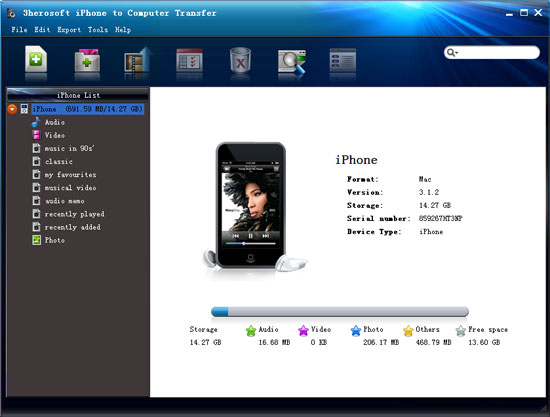 Step2: Transfer iPhone songs to computer
Click "Audio" icon in the iPhone list to open the iPhone music library folder. And you can see all music files you stored in the iPhone in the browser. Find out the music files you wanna transfer to computer for backup, and check them completely without any loss. When it is done, please press "export checked files to local" button to start transferring iPhone songs to computer successfully. And you may notice that after you press "Export..." button, there is a dialog window box pops up, you should firstly select a target folder to save up the exported iPhone songs totally.


|
Hot Tags: |
||||
 Buy 3herosoft iPhone to Computer Transfer $20.oo
 Download 3herosoft iPhone to Computer Transfer 5.82MB
