Windows Products
- iPod / iPhone Tools
-
- iPod to Computer Transfer

- iPad to Computer Transfer

- iPhone to Computer Transfer

- iPhone Ringtone Maker

- iPhone SMS Transfer
- iPhone Contact Transfer
- iPhone Call List Transfer
- iPhone iBooks Transfer
- iPhone Photo Transfer
- iPod Mate
- iPhone Mate
- iPad Mate

- DVD to iPod Converter
- DVD to iPhone Converter
- DVD to iPad Converter

- iPod Movie Converter
- iPhone Video Converter
- iPad Video Converter

- iPod to Computer Transfer
- DVD Cloner Tools
- DVD Creator Tools
- Video Converter Tools
-
- Video Converter

- iPod Movie Converter
- iPhone Video Converter
- iPad Video Converter

- Apple TV Video Converter
- Video to Audio Converter
- AVI MPEG Converter
- MP4 Video Converter
- PS3 Video Converter
- PSP Video Converter
- WMV Video Converter
- 3GP Video Converter
- FLV Converter
- MOV Converter
- RM Converter
- Zune Video Converter
- BlackBerry Video Converter
- Mobile Phone Video Converter
- Video Converter
- DVD Ripper Tools
-
- DVD Ripper Platinum

- DVD to iPod Converter
- DVD to iPhone Converter
- DVD to iPad Converter

- DVD to Apple TV Converter
- DVD Audio Ripper
- DVD to MP4 Converter
- DVD to PS3 Converter
- DVD to PSP Converter
- DVD to WMV Converter
- DVD to 3GP Converter
- DVD to AVI Converter
- DVD to DivX Converter
- DVD to Pocket PC Ripper
- DVD to Zune Converter
- DVD to BlackBerry Converter
- DVD to Mobile Phone Converter
- DVD Ripper
- DVD Ripper Platinum
- Audio Tools
- PDF Tools
- Suite Tools
-
- Media Toolkit Ultimate

- DVD Ripper Platinum Suite
- DVD Maker Suite
- iPod Mate
- iPhone Mate
- iPad Mate

- DVD to iPod Suite
- DVD to iPhone Suite
- DVD to iPad Suite

- DVD to Apple TV Suite
- DVD to Audio Suite
- DVD to MP4 Suite
- DVD to AVI Suite
- DVD to PS3 Suite
- DVD to PSP Suite
- DVD to WMV Suite
- DVD to 3GP Suite
- DVD to Zune Suite
- DVD to BlackBerry Suite
- DVD to Mobile Phone Suite
- Media Toolkit Ultimate
Mac Products
- iPod / iPhone Tools
-
- iPod to Computer Transfer

- iPhone to Computer Transfer

- iPad to Computer Transfer

- iPhone Ringtone Maker

- iPhone SMS Transfer
- iPhone Contact Transfer
- iPhone Call List Transfer
- iPhone iBooks Transfer
- iPhone Photo Transfer
- iPod Mate for Mac
- iPhone Mate for Mac
- iPad Mate for Mac
- DVD to iPod Converter for Mac
- DVD to iPhone Converter for Mac
- DVD to iPad Converter for Mac
- iPod Video Converter for Mac
- iPhone Video Converter for Mac
- iPad Video Converter for Mac
- iPod to Computer Transfer
- DVD Cloner / Creator Tools
- Video Converter Tools
-
- Video Converter for Mac
- iPod Video Converter for Mac
- iPhone Video Converter for Mac
- iPad Video Converter for Mac

- Apple TV Video Converter for Mac
- Video to Audio Converter for Mac
- MP4 Converter for Mac
- FLV Converter for Mac
- PSP Video Converter for Mac
- BlackBerry Converter for Mac
- Mobile Phone Converter for Mac
- DVD Ripper Tools
- PDF Tools
- Suite Tools
-
- Mac DVD Toolkit

- DVD Ripper Suite for Mac
- DVD Maker Suite for Mac
- iPod Mate for Mac
- iPhone Mate for Mac
- iPad Mate for Mac

- DVD to iPod Suite for Mac
- DVD to iPhone Suite for Mac
- DVD to iPad Suite for Mac

- DVD to Apple TV Suite for Mac
- DVD to Audio Suite for Mac
- DVD to MP4 Suite for Mac
- DVD to FLV Suite for Mac
- DVD to PSP Suite for Mac
- DVD to BlackBerry Suite for Mac
- DVD to Mobile Phone Suite Mac
- Mac DVD Toolkit
3herosoft DVD Creator
It is amazing to burn movie or video to DVD for backup. You can watch movie anywhere and anytime just with a DVD at hand. So now you may ask for me how to burn videos to a movie DVD at high speed. For this question you have to need the third party professional application--3herosoft DVD Creator. It has easy way to burn popular video formats such as AVI, MPEG, DivX, DV, VOB, or WMV to a format that is compatible to play with most portable or home DVD players.
Create DVD from AVI, MPEG, WMV, DivX, XviD, MP4, or H.264/AVC
Burn high quality DVD movies, DVD folders or ISO files
Create DVD with custom menu, audio tracks, subtitles and video edit

With 3herosoft DVD Creator, you can create your DVD, VCD, SVCD in your personal creating opinion. It supports all video formats, like WMV, DivX, Xvid, RM, RMVB, ASF, VOB, MPEG-1/2, MOV (Quicktime), MP4, 3GP. This article will tell you how to burn these videos to movie DVD.
Run 3herosoft DVD Creator and click "Add Video File" button on the toolbar or click "File > Add Video File(s)…" option from the main menu to load the video files you want to burn. Or directly dragging files into 3herosoft DVD Creator inferface.
Tip: Click "File > Add Video Folder…" option from the main menu or press "Add Video Folder" to choose a folder and load all the video files in this folder into the file list.
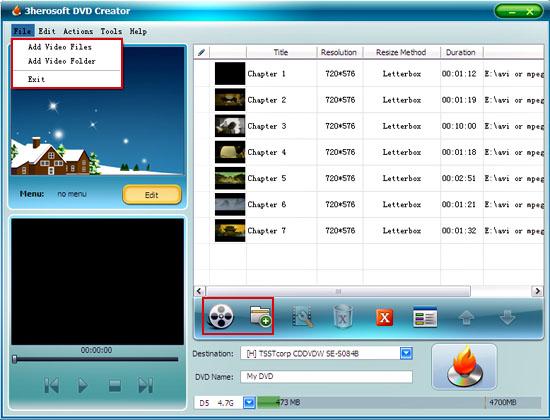

Insert an empty DVD disc, and choose the disc you insert from the "Destination" drop-down list for OK. And enter a name in the "DVD Name" textbox as the output DVD name.
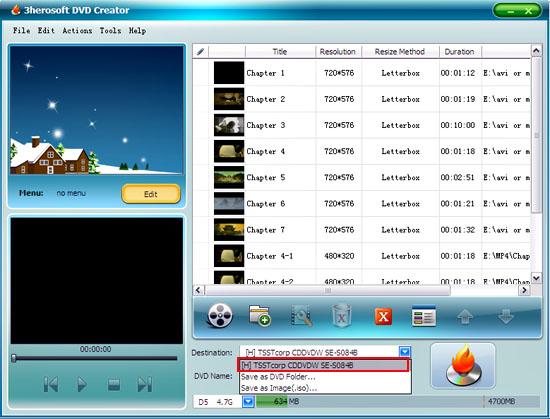

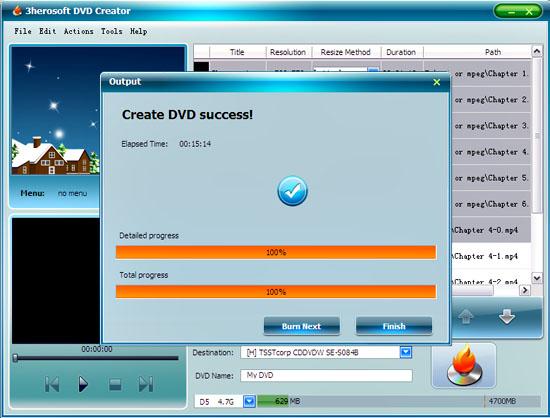
Select the disc type you need and click "Start Burn" button at the right bottom of the file list to start creating.
|
Hot Tags: |
||||