Windows Products
- iPod / iPhone Tools
- DVD Cloner Tools
- DVD Creator Tools
- Video Converter Tools
- DVD Ripper Tools
- Audio Tools
- PDF Tools
- Suite Tools

Mac Products
3herosoft iPhone to Computer Transfer


Price: $20
While iTunes to iPhone is an one-way data transfer solution, 3herosoft iPhone to Computer Transfer
offers a flexible way to transfer music, video, photo, ePub, pdf, Audiobook, Voice memos, Camera Roll (iOS 4 above), ringtone,
Podcast, TV Show, SMS, Contact, Call List from iPhone to Computer for backup in case your multimedia files are lost or damaged. For purchased songs and downloaded books/iTunes U/podcasts, it can also transfer them into Mac local, sync to iTunes library. Even you can add music/videos into iPhone library.
What's more, 3herosoft iPhone to Computer Transfer can get iPhone sync to iTunes directly and fully supports the latest iOS 8 and iTunes 12. Besides, you can even treat your iPhone, iPad or iPod touch as a portable hard disk.
You can easily browse file information, organize playlist, create new playlist, and delete music on iPhone. All types of iPhone/iPod/iPad are supported, especially for iPhone 3, iPhone 4, iPhone 5, iPhone 5S/5C, iPhone 6/6 Plus, iPad 2, the new iPad, iPad 4, iPad mini.
The latest Updates
- Apple iTunes 12 update is supported fully
- Transfer iPhone purchased/downloaded songs/books/podcast/iTunes U to local or iTunes
- Transfer SMS/Call List from iPhone to computer as .txt file
- Transfer Contact from iPhone to computer as .txt and .csv files
- Transfer playlists from iPhone/iPod/iPad to local folder or iTunes
- Transfer ePub/PDF/Photos to iPhone/iPad/iPod touch with iOS 5.0 or above




Price: $56
3herosoft iPhone Mate
Including iPhone to Computer Transfer, DVD to iPhone Converter and iPhone Video Converter. It can rip dvd and convert movie to iPhone, transfer iPhone files to computer. Learn more


- Save $17.00

Price: $59
3herosoft Media Toolkit Ultimate
Including DVD Ripper Platinum, Video Converter, DVD Creator, DVD Cloner and iPod to Computer Transfer. Learn more
- Save $96.00
| Fullsize: | 5.82 MB |
|---|---|
| Language: | English / Chinese |
| Platform: | Win8, Win7, Vista, WinXP |
| License Type: | Free to try, $20.00 to buy. |
| Trial Limitation: | Conversion limitations, Registration will unlock all limitations. |
| Free Support: | Tech support and feedback : support@3herosoft.com |
System Requirements
- Operating system - Win8, Win7, Vista, WinXP;
- Processor - 1000MHz Intel, AMD CPU or above;
- Available HD space - 20MB free hard disk space or more for installation;
- RAM - 512MB RAM or more;
- iTunes 9.0 or above is required;
- Support iOS 5, iTunes 10.5 or above is required.
Main Functions
- Transfer purchased/downloaded files to computer
Allow you to easily transfer purchased songs/book, and free downloaded podcast/iTunes U/Audiobook to Mac local, sync the files to iTunes library on computer. - iPhone to computer transfer
Transfer music, movie, photo, ePub, pdf, audiobook, Voice memo, Camera roll (iOS 4 above), ringtone, Podcast, TV Show, SMS, Contact, Call List from iPhone to computer for backup. - Transfer iBooks to iPhone
Transfer iBooks (ePub, PDF) files to from local folder to iPhone/iPad/iPod touch with iOS 5.0 or above. - Copy iPhone files
Easily transfer music, movie, photo, Podcast and TV Show from computer to iPhone without using iTunes, much easier than iTunes! - Backup iPhone to computer
This iPhone backup software will easily help copy iPhone SMS, iBooks, Contact, Call List and photos to computer. - Transfer iPhone to iTunes
This iPhone to Computer Transfer can copy/rip/put iPhone music and video files to iTunes library in a quick way. - Transfer playlists
Transfer playlists from iPhone/iPod/iPad to local folder or iTunes directly.
Key Features
- All the latest updates are supported
Fully support the latest iOS 8 and iTunes 12. - Mount iPhone as a hard disk
You can open your iPhone/iPhone 3/iPhone 4/iPhone 5/iPhone 6 with Explorer, mount iOS devices as as hard disk. - Quick Search and Filter
With Filter and Quick Search option, you can find and select music, videos, photos files as quickly as possible, the same function as iTunes does. - Different view modes
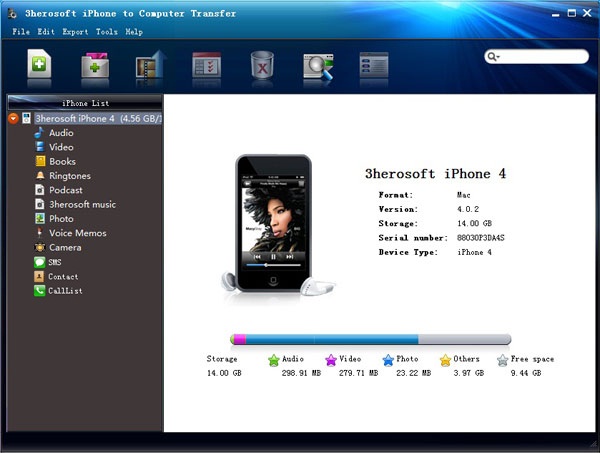
Provides two models for you viewing iPhone files, view your iPhone files in thumbnails like album artwork or list view for easier manage. - Display iPhone/iPod/iPad info
After connecting iPhone/iPod/iPad to computer, the interface of the program will display the device info automatically including the type, capacity (used and available space), version, serial number, and format. - Easy to use
Connect iPhone to computer, only two steps are enough for files transferring: choose the files and click right button for OK. - High transfer speed
Transferring files with fast speed, not to worry about your computer slowing down or conflicting with other running programs.
Tutorials & Guides
- Transfer purchased songs from iPhone to computer local
- How to sync purchased/downloaded songs/podcasts/iTunes U/books/audiobook to iTunes library?
- Transfer song/video to iPhone, if you update iOS 5.0, better way to copy photo/books to iPhone.
- How to use iPhone/iPhone 3/iPhone 4/iPhone 5/iPhone 6 as an external hard drive for managing iPhone content?
- Copy iPhone music/videos/Photo/books to iPhone 4?
- How to transfer iPhone playlist to computer, sync iPhone playlist to iTunes?
- Copy and Backup iMessage files (text message) from iPhone to computer (iPhone 6 and iOS 8 updated)
- How to export iPhone contacts as .CSV files on computer?
Supported Formats
- MP3 (MPEG Audio File)
- M4A (AAC Audio File)
- M4V (MPEG-4 Video File)
- MP4 (MPEG-4 Video File)
- MOV (QuickTime Movie File)
- AAC (Advanced Audio Codec)
- AIF (Audio Interchange File Format)
- WAV (Windows Audio File Format)
- BMP, JPEG, GIF, PNG