Mac Products
- iPod/iPad/iPhone Tools
- DVD Cloner / Creator Tools
- Video Converter Tools
- DVD Ripper Tools
- PDF Tools
- Suite Tools

Windows Products
iPhone to Computer Transfer for Mac


Price: $25
As versatile iPhone to Mac Transfer software, iPhone to Computer Transfer for Mac makes it possible to
transfer Music, Movie, Photo, ePub, PDF, Audiobook, Voice Memo, Camera Roll (iOS 4 above), Ringtone, Podcast, TV Show, SMS, contact, Call List
from iPhone to Mac and transfer files from iPhone to iTunes directly.
What's more, it can transfer purchased books, podcast, songs, video, iTunes U from iPhone to Mac/iTunes directly.
And fully supports the latest iOS 8 and iTunes 12.
Besides, you can even treat your iPhone, iPad or iPod touch as a portable hard disk.
It is also a great iPhone Manager tool. With it, you can browse file information, organize playlist and digital
collection in iPhone, such as create new playlisT, delete music and rename the certain files. And all types of iPhone
including iPad, iPad 2, the new iPad, iPad 4, iPad mini, iPhone 3, iPhone 4, iPhone 5, iPhone 5S/5C, iPhone 6/6 Plus are supported and especially for iPhone and iPod.
The latest functions
- Apple iOS 8 and iTunes 12 updates are supported fully
- Transfer SMS/Call List from iPhone to Mac as .txt file
- Transfer Contact from iPhone to Mac as .txt and .csv files
- Transfer photos to iPhone/iPad/iPod touch with iOS 5.0 or above
- Transfer ePub, pdf files to iPhone/iPad/iPod touch with iOS 5.0 or above




Price: $52
3herosoft iPhone Mate for Mac
Including 3herosoft iPhone to Computer Transfer for Mac, 3herosoft DVD to iPhone Converter for Mac and 3herosoft iPhone Video Converter for Mac. It can rip DVD and convert movie to iPhone, and transfer iPhone files to Mac. Learn more


- Save $26.00

Price: $59
3herosoft Mac DVD Toolkit
Including
DVD Ripper for Mac,
Video Converter for Mac, DVD Creator for Mac,
DVD Cloner for Mac and
iPod to Computer Transfer for Mac.
Learn more
- Save $80.00
| Fullsize: | 5.50 MB |
|---|---|
| Language: | English / Chinese |
| Platform: | Mac OS X v10.5 - 10.10 Yosemite |
| License Type: | Free to try, $25.00 to buy. |
| Trial Limitation: | Conversion limitations, Registration will unlock all limitations. |
| Free Support: | Tech support and feedback : support@3herosoft.com |
System Requirements
- Mac OS X v10.5 - 10.10 Yosemite;
- Intel® processor;
- RAM 512MB RAM;
- 30MB free hard disk space for installation;
- Super VGA (800x600) resolution, 16-bit graphics card or higher;
- iTunes 7.4 or later version is needed to support iPhone.
- Support iOS 5, iTunes 10.5 or above is required.
Main Functions
- Transfer iPhone to Mac for backup
Fast and easily transfer music, movie, photo, ePub, pdf, audiobook, Voice memo, Camera roll (iOS 4 above), ringtone, Podcast, TV Show, SMS, Contact, Call LIst from iPhone to Mac with ease. - Transfer iPhone purchased to Mac
Easily transfer iPhone purchased files (songs/books) or free downloaded podcasts/iTunes U to Mac local, and even fast sync them to iTunes library. - Mac to iPhone transfer (now support iOS 8 and iTunes 12)
Directly add music, movie, Podcast and TV Show you prefer from Mac to iPhone, easier and quicker than iTunes. - Copy iPhone to iTunes (iTunes 12 supported)
Copy music, movies and photos from iPhone to iTunes on Mac to enrich your iTunes library easily. - Manage iPhone as an external hard drive
With this Mac iPhone Transfer, you can open iPhone with Finder and manage it as an external hard drive.
Key Features
- All the latest updates are supported
Fully support the latest iOS 8 and iTunes 12. - Support all types of iPhone/iPod/iPads
Support all types of iPhone/iPod/iPads including iPhone 3, iPhone 4, iPhone 5, iPhone 5S/5C, iPhone 6/6 Plus, iPod nano, iPod nano 5G, iPod nano 6G, iPod classic, iPod touch, iPod touch 4, iPad, iPad 2, the new iPad, iPad 4, iPad mini. - Dispaly iPhone/iPod/iPad info
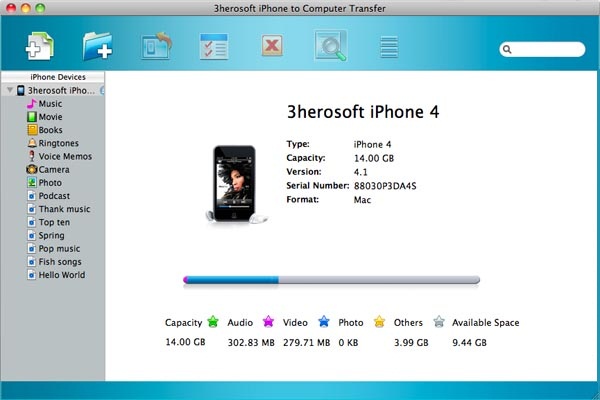
Once iPhone/iPod/iPad is connected, the interface can clearly display iPhone/iPod/iPad info like model, capacity, version, format and serial number. - Create and edit iPhone/iPod/iPad playlist
Delete, create and edit iPhone/iPod/iPad playlists simply with this iPhone to Computer Transfer for Mac. - Support Filter and Quick Search
With Filter and Quick Search options you can find and select music, videos, photos files you want as quickly as possible, the same function as iTunes does. - Provide two view models
Provide you with two view models: list and thumbnail, that is for your locating and checking files easily and you can also add illustration for music/videos in thumbnails mode. - High transfer speed
With the highest speed, file transfer between iPod, iTunes and Mac will all be finished in a wink!
Tutorials & Guides
- Transfer iPhone music, video, photo, ePub, pdf, ringtone, voice memos, etc. to Mac local.
- How to transfer music/movie from iPhone to iTunes?
- How to transfer iPhone contact to Mac as .CSV files, add it to another iPhone easily?
- How to transfer iPhone iMessage to computer on Mac? (updated iOS 5.0)
- How to copy iPhone music/videos to iPhone 4 on Mac?
- If you upgrade iOS 5.0 or above, you can transfer ePub/PDF books to iPhone on Mac.
- How to transfer purchased songs/video/iTunes U/ on iPhone to Mac local?
- How to sync purchased songs/books and free downloaded podcast/iTunes U to iTunes library?
- How to transfer downloaded books/podcasts/iTunes U to Mac computer for backup?
- How to use iPhone as external hard drive on Mac?
Supported devices
- iPad, iPad 2, the new iPad, iPad 4, iPad mini
- iPhone 3, iPhone 4, iPhone 5, iPhone 5S/5C, iPhone 6/6 Plus
- iPod classic, iPod mini, iPod nano, iPod nano 3, iPod nano 5G, iPod nano 6G
- iPod touch, iPod touch 3, iPod touch 4
- iPod shuffle, iPod shuffle2
Supported targets
- MP3 (MPEG Audio File)
- M4A (AAC Audio File)
- M4V (MPEG-4 Video File)
- MP4 (MPEG-4 Video File)
- MOV (QuickTime Movie File)
- AAC (Advanced Audio Codec)
- AIF (Audio Interchange File Format)
- WAV (Windows Audio File Format)
- BMP, JPEG, GIF, PNG