


Windows Products
- iPod / iPhone Tools
- DVD Cloner Tools
- DVD Creator Tools
- Video Converter Tools
- DVD Ripper Tools
- Audio Tools
- PDF Tools
- Suite Tools

Mac Products
3herosoft iPod Video Converter for Mac

As time goes by, iPods has caught heat in the portable mediaplayer market, there are increasing needs of video watching on iPod. But AVI videos are not on iPod's support list of videos; you must convert those AVI to iPod videos before you sync them to your iPod. 3herosoft iPod Video Converter for Mac is a wonderful Mac video conversion utility that can helps you convert many video files to iPod on Mac OS, such as AVI, MPEG, WMV, MP4, MPEG-2, MPEG-4, MOV, M4V, VOB, ASF and more videos to iPod supported video formats.
 Easily convert AVI, MPEG, WMV, DivX, MOV, RM, VOB to iPod video MP4
-
Convert to iPod music MP3, M4A, WAV from WMA, RA, OGG, AAC, AC3, MP2
-
Support iPod touch, iPod nano, iPod classic, and iPhone 3G




As you know, so many video files such as AVI can't be played on your iPod. Now you can easily convert AVI video formats to iPod video, especially the conversion for putting videos to iPod, once you own the powerful 3herosoft iPod Video Converter for Mac. The below tips will tell you how to step by step convert video AVI to iPod MP4 video files.
 Step1: Load Video Files
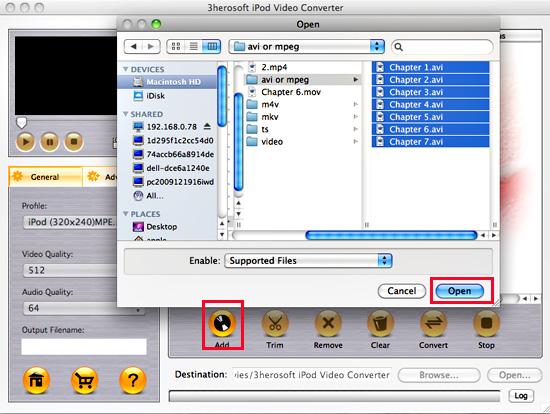
Install and launch 3herosoft iPod Video Converter for Mac. Directly click "Add" button on toolbar to search AVI video files on your Mac, then select the AVI video files and press the "Open" button to load AVI files into this software.
Tips: you can also load other video from Mac by choosing "Add" in the "File" menu.

 Step2: Choose output format
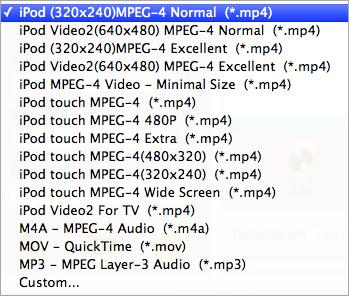
Click "Profile" drop down list and you will see lots of video format for setting, drag down the list and select "iPod (320*240) MPEG-4 Normal(*.mp4)" option for output iPod video files. Tip: If you select iPod format (*.mp4) in "Profile" drop-down menu, the software will output mp4 file playable on your iPod.
 Step3: Set some settings
1)After selecting certain output format, you can choose "General" tab on the right top which will show its general standard. You may set "Video Quality", "Audio Quality", "Output filename" by clicking "General" button.
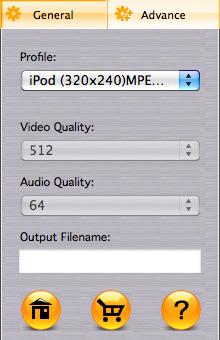
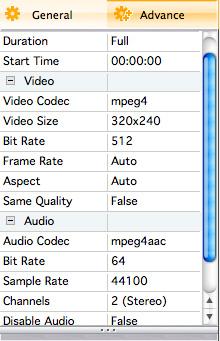
After that, you can also choose "Advance" tab on the right column which will show its advanced standard. You may set "Start Time", "Video Size", "Bit rate" by clicking certain settings.
 Step4: Start to convert
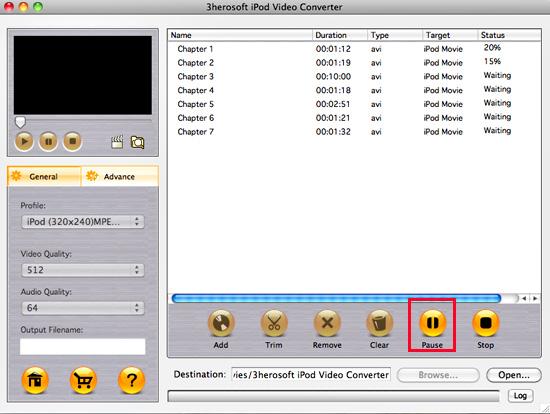
Click the "Browse..." button and choose a target folder for save up the converted MP4 video files or directly enter a path of Mac HD, in "Destination" drop down list box, select the title or chapter you want to convert and start AVI to iPod MP4 conversion by clicking "convert" button.
|
Hot Tags: |
||||
 Buy 3herosoft iPod Video Converter for Mac $25.oo
 Download 3herosoft iPod Video Converter for Mac For Intel For PowerPC 8.87MB
