


Windows Products
- iPod / iPhone Tools
- DVD Cloner Tools
- DVD Creator Tools
- Video Converter Tools
- DVD Ripper Tools
- Audio Tools
- PDF Tools
- Suite Tools

Mac Products
3herosoft DVD to FLV Converter for Mac

Referring to DVD to FLV conversion on Mac, 3herosoft provides users both Freeware and shareware version with totally free DVD to FLV Converter for Mac. And they both can be acted as DVD to flash video converter, DVD to YouTube converter software. As DVD to flash video converter, this DVD FLV Converter is mainly designed to convert DVD to flash video: DVD to FLV, MP4, MOV, 3GP with H.264 encoder, etc. As DVD to YouTube Converter, this DVD to FLV Converter provides YouTube resolution profile for selecting.
 Convert DVD to FLV and SWF format and share your DVD movie on Internet
- Rip DVD sound tracks to MP3, WAV, WMA, AAC, AC3, OGG, RA, SUN AU
- Trim any segment and convert in batch mode




Have you ever been confused about how to convert movie DVD to FLV video files on Mac? In this article, we will show you a step by step guide to complete DVD to FLV conversion with this DVD to FLV Converter for Mac.
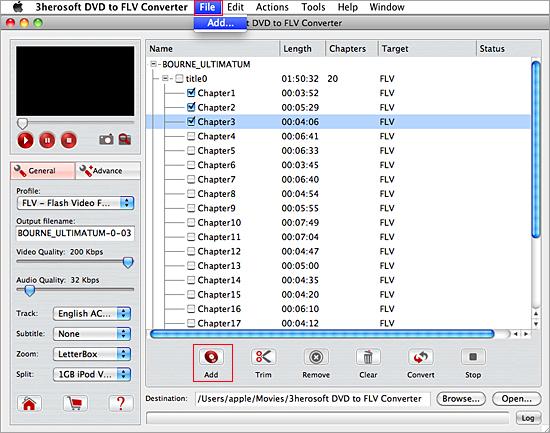
 Step1: Load DVD movie
Download 3herosoft DVD to FLV Converter for Mac and run it. Load your DVD by choosing "Add DVD Folder" in the "File" menu or directly pressing the "Open DVD" button in the main interface, then select your DVD Drive in the pop-up window and press the "Open" button.
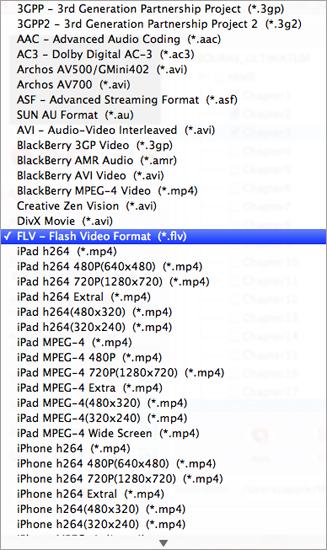
 Step2: Set output files format
In this screen, you choose "FLV-Flash Video Format (*.flv)" option by clicking "Profile" drop-down list box to select output format. The software allows setting various output formats supported by mobile phones.
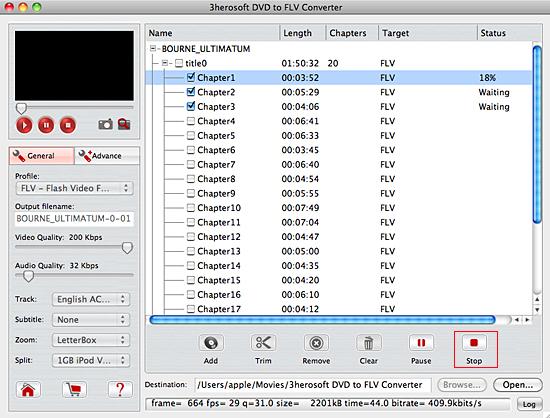
 Step3: Set the destination and start conversion
Click "Browse" button to select a destination folder in the dialog box that opens, and click "OK". After finishing the above settings, check the needed file to rip in the file list, click "Start Ripping" button on the toolbar, to start ripping the selected files. You can view the progress of the ripping process from the progress bar at the bottom of the window.
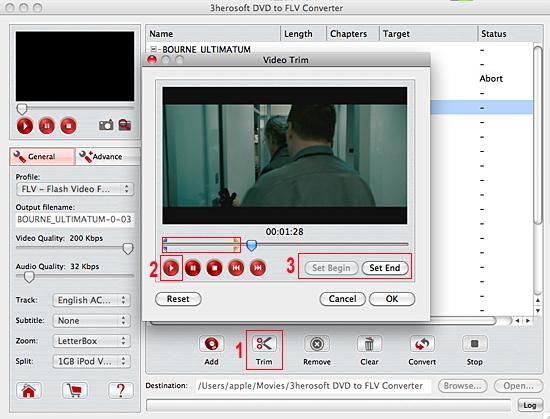
Before converting, you can trim your favorite segments to make a unique video. Select the video, click the "Trim" button on the toolbar and choose the beginning and end of the segment as you wish.
|
Hot Tags: |
||||
 Buy 3herosoft DVD to FLV Converter for Mac $20.oo
 Download 3herosoft DVD to FLV Converter for Mac
For Intel For PowerPC 6.29MB
Download 3herosoft DVD to FLV Converter for Mac
For Intel For PowerPC 6.29MB
