


Windows Products
- iPod / iPhone Tools
- DVD Cloner Tools
- DVD Creator Tools
- Video Converter Tools
- DVD Ripper Tools
- Audio Tools
- PDF Tools
- Suite Tools

Mac Products
3herosoft DVD to iPod Converter for Mac

For DVD movies' fans, the most gratifying thing is that they can watch all DVD movies on the iPod with much better quality. Watching movies, TV shows, and videos is big fun on iPod nano. But as we know, iPod Nano cannot play DVD movies directly, therefore, as long as you can convert DVD to suitable video files for iPod nano without limitations! Many people recommend the 3herosoft DVD to iPod Converter for Mac, it can help you convert your favorite DVD movies to iPod with high output quality and transfer converted files to iPod with iTunes!
 Convert movie DVD to iPod video formats MP4, MPEG-4, H.264
- Extract music or audio from movie DVD and rip to iPod MP3, AAC and M4A
- Keep high compatible with iPad, iPod, iPhone and Apple TV




We can play DVD on iPod device cause it doesn't have DVD driver, so we should consider convert DVD to iPod videos that can be supported by iPod device, that copy these iPod MP4 video files into iPod and watch them on iPod immediately. Now follow the guides listed below you can learn a solution on how to convert movie DVD to iPod MP4 video files step by step with 3herosoft DVD to iPod Converter for Mac.
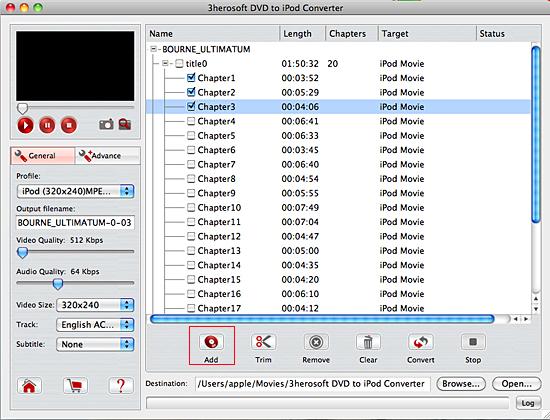
 Step1: Load DVD movie
Download 3herosoft DVD to iPod Converter for Mac and run it. Load your DVD by choosing "Add DVD Folder" in the "File" menu or directly pressing the "Open DVD" button in the main interface, then select your DVD Drive in the pop-up window and press the "Open" button. Or if you insert DVD firstly before you run the software, then while open the software, it will automatically load DVD contents into the software list. If you wanna get full version, buy it right now!
 Step2: Set output files format
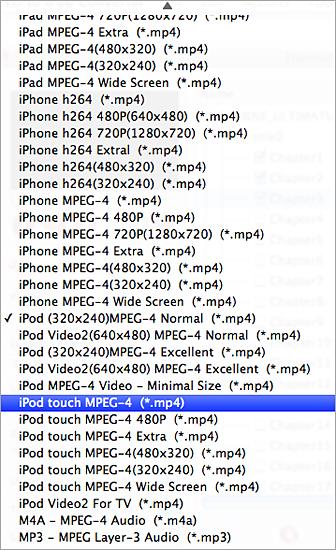
Click the "Profile" drop-down list in the "General" panel in the left. You can see more MP4 video format can be recognized by iPod. Select "iPod touch MPEG-4 (*.mp4)" and set the output DVD video format successfully.
Notice: You can set different video format for different DVD folder (DVD titles, DVD chapters), and output diverse video formats for iPod.
 Step3: Convert DVD to iPod movie
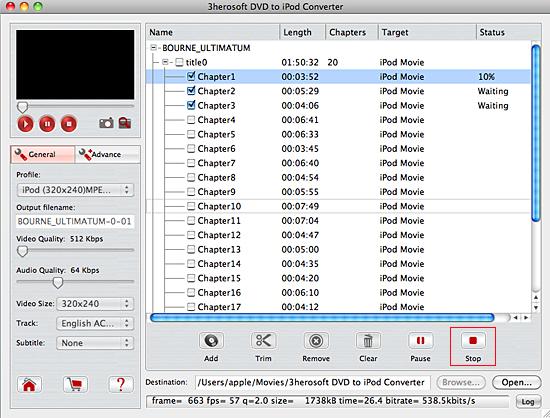
Click "Browse" button to select a destination folder in the dialog box that opens, and click "OK". After finishing the above settings, check the needed file to rip in the file list, click "Start Ripping" button on the toolbar, to start ripping the selected files. You can view the progress of the ripping process from the progress bar at the bottom of the window.
 Step4: Move the converted DVD files to iPod
1) Put movie to iPod
(1) Please click "Open" button in the software interface after the conversion is completed.
(2) Run the iTunes Find the converted file in the destination folder and pull it to your iTunes library.
"Sync" button to complete MP4 video files to iPod syncing process.
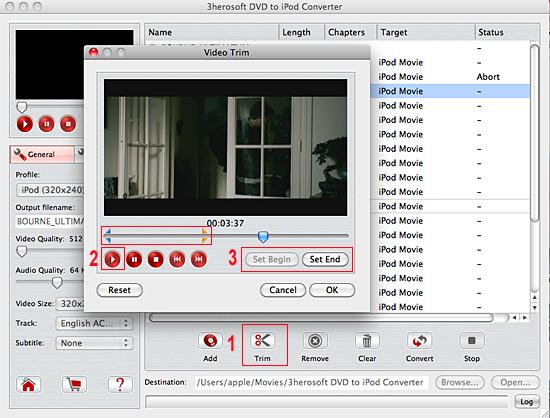
Tip: Trim video segment
Before converting, you can trim your favorite segments to make a unique video. Select the video, click the "Trim" button on the toolbar and choose the beginning and end of the segment as you wish.
|
Hot Tags: |
||||
 Buy 3herosoft DVD to iPod Converter for Mac $28.oo
 Download 3herosoft DVD to iPod Converter for Mac For Intel For PowerPC 6.30MB
