


Windows Products
- iPod / iPhone Tools
- DVD Cloner Tools
- DVD Creator Tools
- Video Converter Tools
- DVD Ripper Tools
- Audio Tools
- PDF Tools
- Suite Tools

Mac Products
3herosoft DVD to PSP Converter

You have a Sony PSP and would like to watch your favorite home video using it? But you do not know how to convert your files into PSP compatible format? The easiest way to accomplish the conversion is to spend a few dollars on software to do the work for you. Currently, 3herosoft DVD to PSP Converter is the most comprehensive solution I've found for converting DVDs for PSP playback. Download DVD to PSP Converter and get started converting now or read on for the much more complicated method.
 Rip and convert DVDs to PSP MP4, H.264/MPEG-4 AVC video
 - Convert DVD to PS3 MP4, H.264/MPEG-4 AVC video
- Extract audios from DVD movies to PSP audio MP3, M4A for PSP and PS3




Watch DVD on PSP player will save up your many time when you are on the bus, or train, metro of some spare time. Put DVD movie onto PSP you should use our 3herosoft DVD to PSP Video Converter which can allow you easily convert DVD files into PSP MP4 video files without any loss.
 Step1: Load DVD
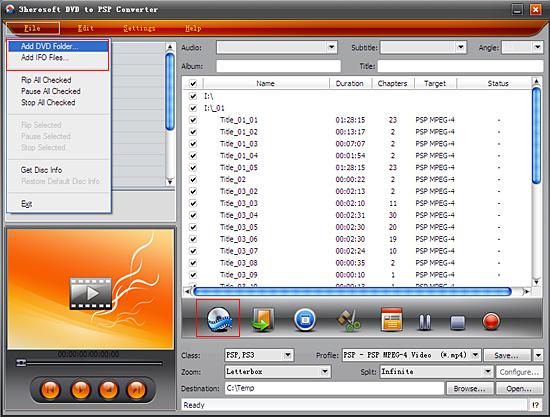
 Run 3herosoft DVD to PSP Converter, and click "Open DVD" button to select a DVD (or DVD Folder, ISO file, IFO file) in the dialog box that opens. Or choose “Add DVD folder..." or "Add IFO files..." option in the "File" top menu to load DVD. The loaded DVD’s information, such as chapter, title, Duration, etc., will be shown in the file list.
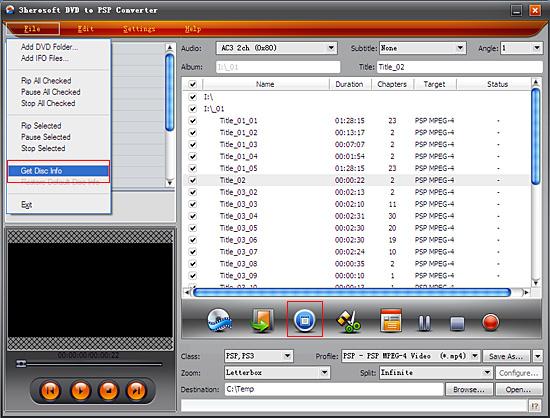
After loading DVD, if the network is connected, click "Get Disc info" button in the toolbar, or click File "Get Disc Info" in the top menu, the software will retrieve loaded DVD information from Web database, and display the information in the file list, such as title name and chapter name.
 Step2: Specify output format
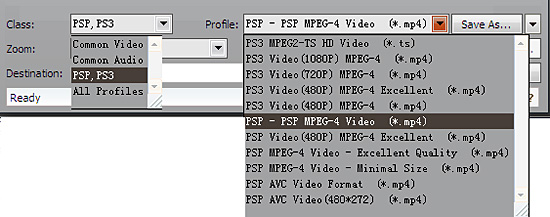
Select "PSP, PS3" option in the "Class" ComboBox, and then click "Profile" drop-down button, select "PSP- PSP MPEG-4 Video (*.mp4) output format for selected files in the drop down list that opens.
 Tip:
Tip:You can edit the info of output files to meet your need, such as Audio, Subtile, Angle, Album and Title. Moreover, To adjust output settings, you can set the detailed parameters of output format in the profile panel of left window.
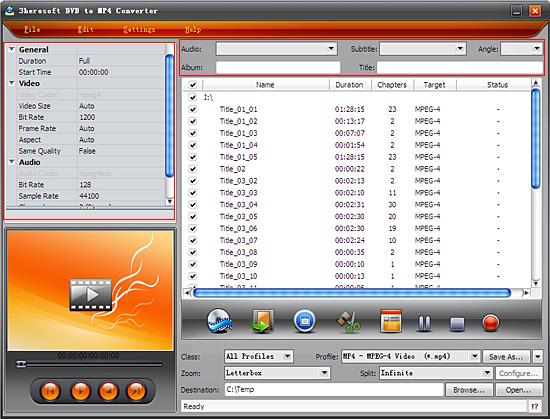 Step3: Set destination and start conversion
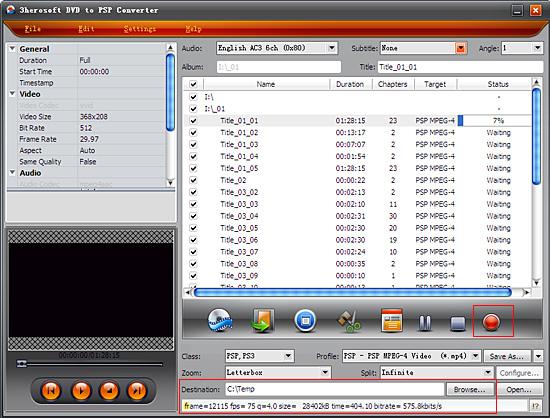
Click "Browse" button to select a destination folder in the dialog box that opens, and click "OK". After finishing the above settings, check the needed file to rip in the file list, click "Convert" button on the toolbar, to start ripping the selected DVD chapters or title files. You can view the progress of the ripping process from the progress bar.
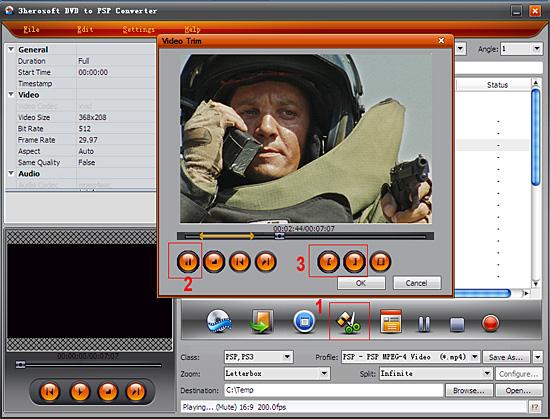
Select a chapter or title in the file list, click "Trim" button in the toolbar to open "Trim" window. You can clip the original video into several parts, then convert and output them separately or as a whole one. Set start point and end point, you get the segment you want to convert and output.
|
Hot Tags: |
||||
 Buy 3herosoft DVD to PSP Converter $28.oo
 Download 3herosoft DVD to PSP Converter 4.97MB
