


Windows Products
- iPod / iPhone Tools
- DVD Cloner Tools
- DVD Creator Tools
- Video Converter Tools
- DVD Ripper Tools
- Audio Tools
- PDF Tools
- Suite Tools

Mac Products
3herosoft DVD Ripper Platinum

"Wanna upload and share your DVD clips across the Internet? Hope everyone can watch your DVD-video on YouTube?" YouTube accepts video files from most digital cameras and camcorders, and cell phones in the .FLV. .AVI, .MOV, and .MPG file formats. And now the FLV video format and MP3 audio format are recommended. So we'll rip the DVD clip and convert it to FLV video or MP3 audio using 3herosoft DVD Ripper Platinum, which resizes your video to these specifications while conversion and your clips would look better on YouTube.
 Rip DVD to AVI, MPEG4, WMV, DivX, MP4, RM, MOV, M4V, 3GP, MKV, FLV
 - Extract audio from DVD to MP3, WMA, WAV, RA, M4A, AAC, AC3, and OGG
- The output files are high compatible with iPod, iPad, iPhone, PSP and Apple TV




Have you ever been confused about how to rip movie DVD to FLV video for uploading to YouTube? In this article, we will show you a step by step guide to complete DVD to FLV files conversion with this DVD Ripper Platinum.
 Step1: Run this software and insert DVD
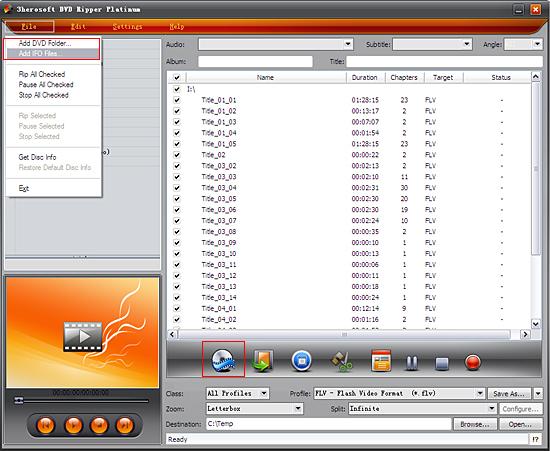
 Run 3herosoft DVD Ripper Platinum, and click "Open DVD" button to select a DVD (or DVD Folder, ISO file, IFO file) in the dialog box that opens. Or choose “Add DVD folder..." or "Add IFO files..." option in the "File" top menu to load DVD. The Loaded DVD’s information, such as chapter, title, Duration, etc., will be shown in the file list.
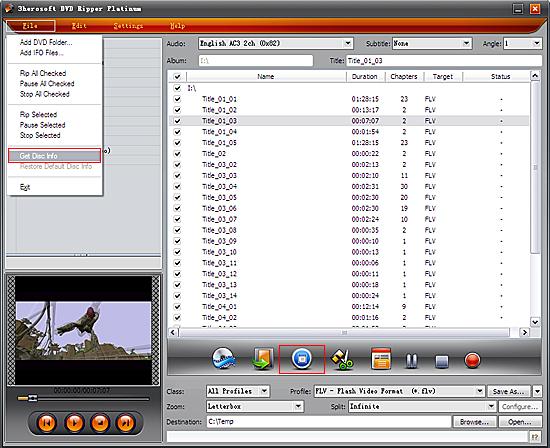
After loading DVD, if the network is connected, click Get Disc info button in the toolbar, or click File>Get Disc Info in the top menu, the software will retrieve loaded DVD information from Web database, and display the information in the file list, such as title name and chapter name.
 Step2: Specify output format
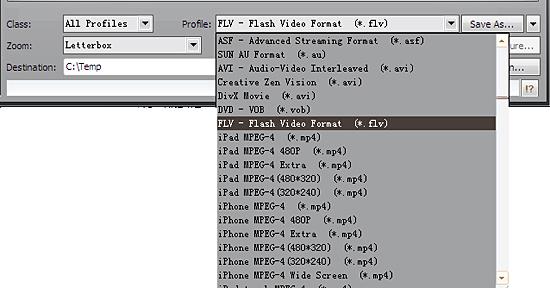
Select "All Profiles" option in the "Class" ComboBox, and then click "Profile" drop-down button, select "FLV-Flash Video Format (*.flv)" output format for selected files in the drop down list that opens.
 Tip:
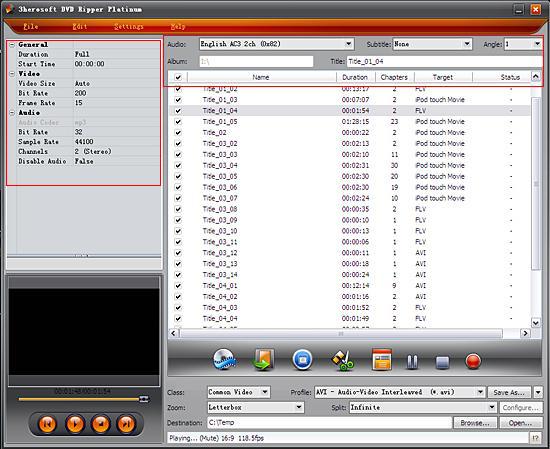
Tip: You can edit the info of output files to meet your need, such as Audio, Subtile, Angle, Album and Title. Moreover, To adjust output settings, you can set the detailed parameters of output format in the profile panel of left window.
 Step3: Set destination and start ripping
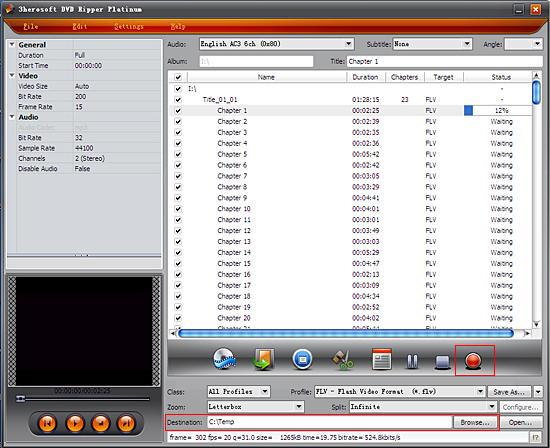
Click "Browse" button to select a destination folder in the dialog box that opens, and click "OK". After finishing the above settings, check the needed file to rip in the file list, click "Start Ripping" button on the toolbar, to start ripping the selected files. You can view the progress of the ripping process from the progress bar at the bottom of the window.
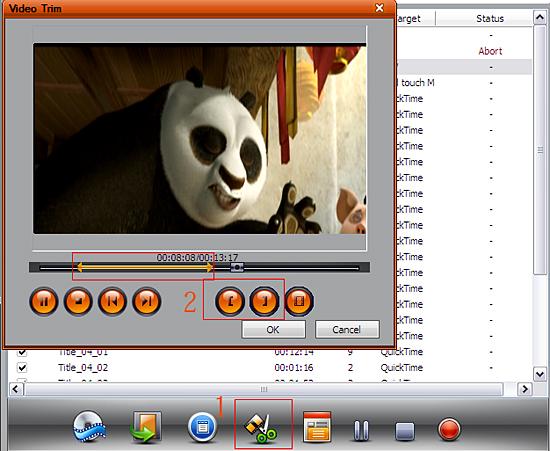
Select a chapter or title in the file list, click "Trim" button in the toolbar to open "Trim" window. You can clip the original video into several parts, then convert and output them separately or as a whole one.Set start point and end point, you get the segment you want to convert and output.
|
Hot Tags: |
||||
 Buy 3herosoft DVD Ripper Platinum $38.oo
 Download 3herosoft DVD Ripper Platinum 13.79MB
