


Windows Products
- iPod / iPhone Tools
- DVD Cloner Tools
- DVD Creator Tools
- Video Converter Tools
- DVD Ripper Tools
- Audio Tools
- PDF Tools
- Suite Tools

Mac Products
3herosoft iPad Video Converter for Mac

"That's a good new, Apple released new iPad--iPad 2 yesterday. I am Apple fan. In the first time, lining up and brought the iPad 2 with low price. Now I confront with a bad problem, how to watch any videos on my iPad 2, imagine watching videos on iPad 2 which can be excited things to do." For you situation we will introduce you a best iPad 2 Converter for Mac named 3herosoft iPad Video Converter for Mac which can help you easily convert videos to iPad 2 MP4 files, play any videos on iPad 2. Best tool you can focus on.
 Convert AVI, MPEG, WMV, DivX, MOV, RM, VOB to iPad 2 MP4 video
-
Convert to iPad music MP3, M4A, WAV from WMA, RA, OGG, AAC, AC3, MP2
-
Support iPad, iPad 2, iPods, iPhone 3GS, iPhone 4, iPhone 4S, iPhone 5




Watch videos on iPad 2 and save so many large videos/movies on iPad 2 for entertainment. But you also know iPad just only recongizes some certain video formats, so if you wanna watch any videos on iPad 2, firstly use 3herosoft iPad Video Converter for Mac to convert videos to iPad MP4 videos, and then transfer these MP4 videos into iPad 2. Refer to the below tutorials:
 Step1: Load Video Files
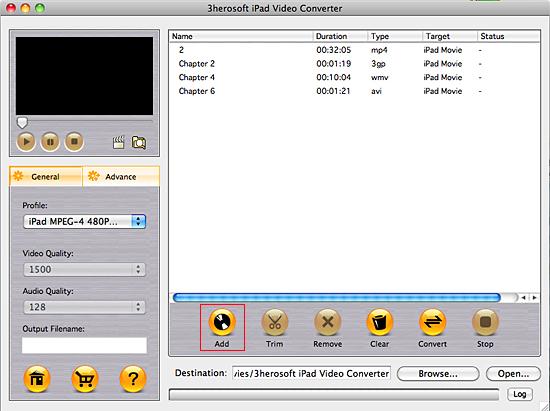
Install and launch 3herosoft iPad Video Converter for Mac. Directly click "Add" button on toolbar to search video files on your Mac, then select the video files and press the "Open" button to load files into this software.
Tips: you can also load video from Mac by choosing "Add" in the "File" menu.

 Step2: Choose output format
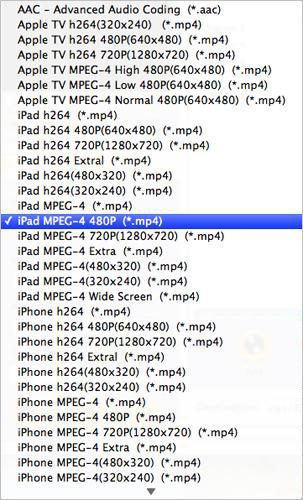
In "Profile" drop-down menu, you may select output format. The software allows setting different output formats according to different files. If you select iPad format iPad MPEG4 Video (*.mp4) in "Profile" drop-down menu, the software will output mp4 file playable on your iPad.
 Step3: Set some settings
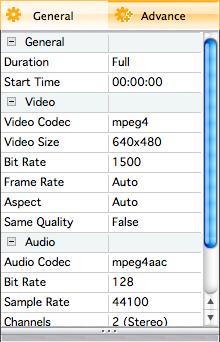
1)After selecting certain output format, you can choose "General" tab on the right top which will show its general standard. You may set "Video Quality", "Audio Quality", "Output filename" by clicking "General" button.
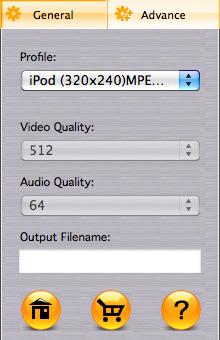
After that, you can also choose "Advance" tab on the right column which will show its advanced standard. You may set "Start Time", "Video Size", "Bit rate" by clicking certain settings.
 Step4: Start to convert
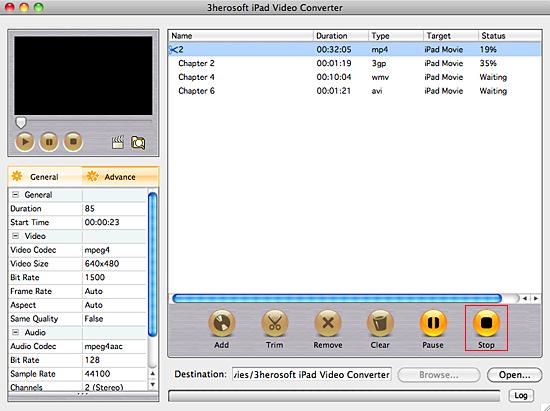
Clicking the "Browse..." button or directly enter a path of Mac HD, in "Destination" drop down list box, select the title or chapter you want to convert and start conversion by clicking "convert" button.
 Step5: Transfer videos to iPad 2
(1) Please click "Open" button in the software interface after the conversion is completed.
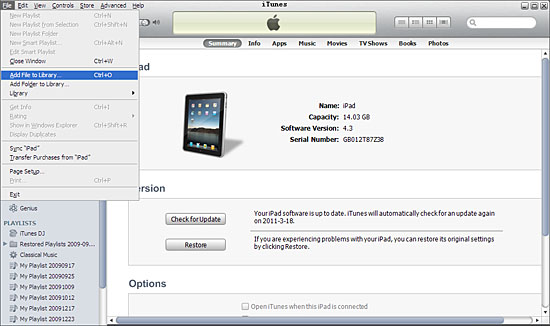
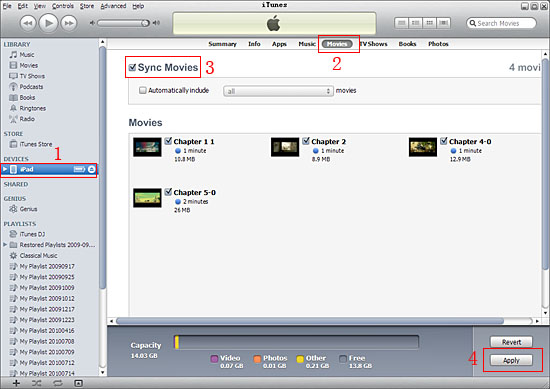
(2) Connect iPad to Mac and run iTunes now, first add the converted videos to iTunes, (iTunes 10.1 or above version) click the top "File" menu and choose "Add File to Library" or "Add Folder to Library" option from Mac local to start transfer videos to iTunes. And then click "iPad" icon in the left list, on the right panel, click "Movie" item and "Sync Movies" to select the added movies, when it is done, press "Apply" button to finish the video to iPad sync.
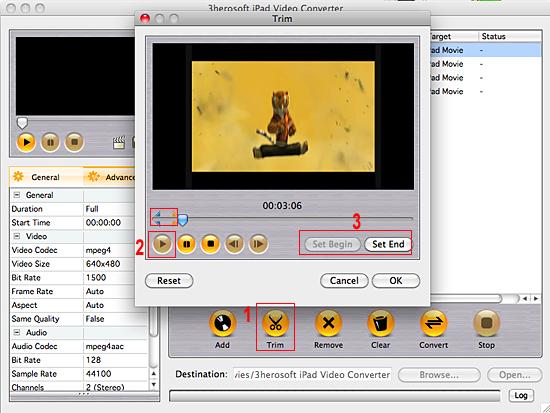
Before converting, you can trim your favorite segments to make a unique video. Select the video, click the "Trim" button on the toolbar and choose the beginning and end of the segment as you wish.
|
Hot Tags: |
||||
 Buy 3herosoft iPad Video Converter for Mac $25.oo
 Download 3herosoft iPad Video Converter for Mac For Intel For PowerPC 8.87MB
