

Windows Products
- iPod / iPhone Tools
- DVD Cloner Tools
- DVD Creator Tools
- Video Converter Tools
- DVD Ripper Tools
- Audio Tools
- iPod / iPhone Tools
- DVD Cloner Tools
- DVD Creator Tools
- Video Converter Tools
- DVD Ripper Tools
- Audio Tools
- PDF Tools
- Suite Tools
 Easily convert video to iPod, such as AVI, WMV, FLV, 3GP, MOV, MKV, etc.
-
Extract audio of video and convert to iPod music MP3, M4A, WAV
-
Support iPod touch, iPod nano, iPod classic, iPod nano 5, iPod nano 6G





Easily convert video to iPod MP4/MPEG-4 videos on Mac.
Windows Products
Mac Products
3herosoft iPod Video Converter for Mac


You might have some funny videos in WMV, FLV, AVI, etc. format. If you want to put these videos to iPod or to extract audios from video to iPod audio, you need to convert videos to some certain video or audio formats that compatible with iPod. 3herosoft iPod Video Converter for Mac will help you easily convert video to iPod MP4 and iPod MP3 files, simply enjoy the videos on your iPod touch wherever you go. This is a tutorial on how to convert video to iPod video and iPod audio on Mac (Tiger, Leopard, Snow Leopard, Lion).

Playing any video on iPod touch is very best choice to kill the time. But iPod touch can not support all video formats, so we you firstly use our 3herosoft iPod Video Converter for Mac to convert video to iPod MP4. The below tip will step by step teach you how to convert video to iPod.
 Step1: Load Video Files
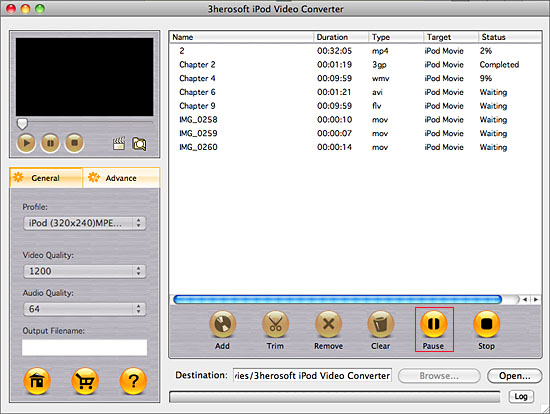
Install and launch 3herosoft iPod Video Converter for Mac. Directly click "Add" button on toolbar to search AVI video files on your Mac, then select the AVI video files and press the "Open" button to load AVI files into this software.
Tips: you can also load other video from Mac by choosing "Add" in the "File" menu.

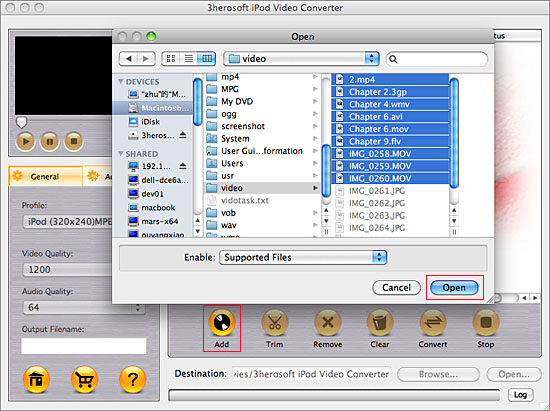 Step2: Choose output format
Click "Profile" drop down list and you will see lots of video format for setting, drag down the list and select "iPod (320*240) MPEG-4 Normal(*.mp4)" option for output iPod video files. Tip: If you select iPod format (*.mp4) in "Profile" drop-down menu, the software will output mp4 file playable on your iPod.
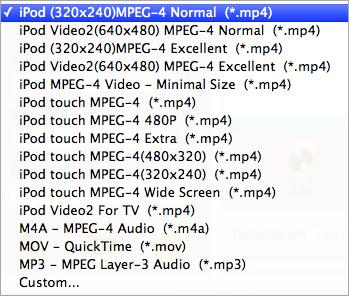 Step3: Set some settings
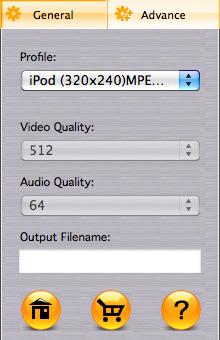
1)After selecting certain output format, you can choose "General" tab on the right top which will show its general standard. You may set "Video Quality", "Audio Quality", "Output filename" by clicking "General" button.
After that, you can also choose "Advance" tab on the right column which will show its advanced standard. You may set "Start Time", "Video Size", "Bit rate" by clicking certain settings.
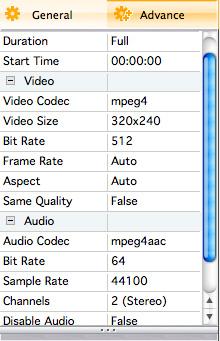 Step4: Convert Video to iPod
Click the "Browse..." button and choose a target folder for save up the converted MP4 video files or directly enter a path of Mac HD, in "Destination" drop down list box, select the title or chapter you want to convert and start video to iPod MP4 conversion by clicking "convert" button.
|
Hot Tags: |
||||
 Buy 3herosoft iPod Video Converter for Mac $25.oo
 Download 3herosoft iPod Video Converter for Mac For Intel For PowerPC 8.87MB

Copyright © 3herosoft Software Studio, All rights reserved.