


Windows Products
- iPod / iPhone Tools
- DVD Cloner Tools
- DVD Creator Tools
- Video Converter Tools
- DVD Ripper Tools
- Audio Tools
- PDF Tools
- Suite Tools

Mac Products
3herosoft iPhone to Computer Transfer for Mac

"I’ve just brought a new iPhone 4 but have loads of music on my old iPhone 3GS. I was wondering to know how to get music off my old iPhone 3GS and then put music to the new iPhone 4. Is there a way to transfer music from iPhone to new iPhone 4? ?Natalie?If you are one of the apple fans, you may come across the similar trouble. Now don’t worry about how to transfer iPhone to iPhone 4. Here I recommend you to use a third party appliance ?a href="iphone-to-computer-transfer-mac.html"> 3herosoft iPhone to computer transfer for Mac, which can do you a favor.
 Copy iPhone music/videos to iPhone 4, iPhone to iPhone transfer
-
Transfer music/videos to iPhone, backup iPhone files on Mac
-
Support iPhone, iPhone 3GS, iPhone 4 (iOS 6 and iTunes 11)




The following guide will show how to copy iPhone music/videos to iPhone 4 on Mac with 3herosoft iPhone to computer Transfer for Mac. Focus on this guide step by step, you will easily copy music/videos to iPhone 4.
 Step1: Connect iPhone to Mac
Launch 3herosoft iPhone to computer Transfer for Mac, and connect iPhone to Mac. And all info about iPhone device and all iPhone library will be shown in the left list. iPhone device info includes Type, Capacity, Version, Serial Number, Format and iPhone library will show the music, movie books, ringtones, photo, voice memos, sms, call list, contacts, and other playlist. You can easily view and open any iPad files in the right panel.
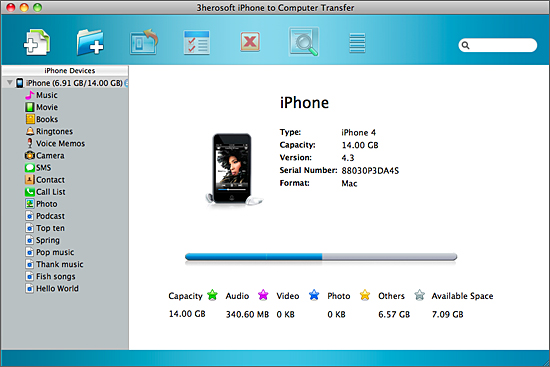 Step2: Transfer iPhone music/videos to iTunes library
1)Open "music" or "video" iPhone library, and all music/videos files are displayed on the interface.
2)Locate the music or movie files and check them without any loss. And then click "Add checked files to iTunes library" button in the toolbar, or in the top "export" menu, select "export files to iTunes" option to start iPhone music/video to iTunes library transferring.
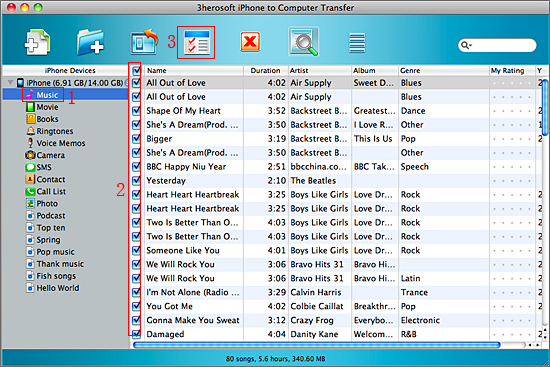
 Step3: Transfer music/videos to iPhone 4
1) Run the iTunes, and all transferred music/videos files are in the iTunes library, you can easily search for them and view that music/videos are played normally or not.
2) Connect iPhone 4 to Mac, in iTunes list you will see iPhone icon has been appeared, please click iPad icon and open the "music" or "movie" item and check "Sync music files" or "Sync video files" option. Then press "Apply" button to start music/movies to iPhone 4 sync.
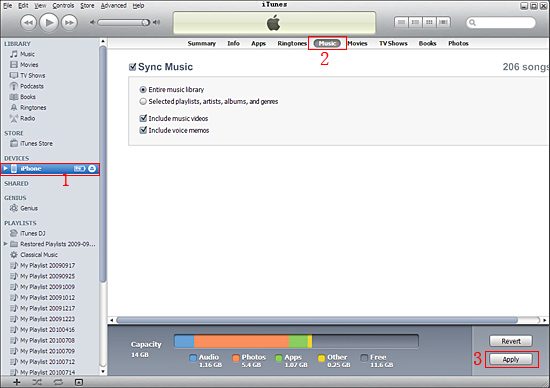
|
Hot Tags: |
||||
 Buy 3herosoft iPhone to Computer Transfer for Mac $25.oo
 Download 3herosoft iPhone to Computer Transfer for Mac 5.50MB
