


Windows Products
- iPod / iPhone Tools
-
- iPod to Computer Transfer

- iPad to Computer Transfer

- iPhone to Computer Transfer
- iPhone Ringtone Maker
- iPhone SMS Transfer
- iPhone Contact Transfer
- iPhone Call List Transfer
- iPhone iBooks Transfer
- iPhone Photo Transfer
- iPod Mate
- iPhone Mate
- iPad Mate
- DVD to iPod Converter
- DVD to iPhone Converter
- DVD to iPad Converter
- iPod Movie Converter
- iPhone Video Converter
- iPad Video Converter
- iPod to Computer Transfer
- DVD Cloner Tools
- DVD Creator Tools
- Video Converter Tools
-
- Video Converter
- iPod Movie Converter
- iPhone Video Converter
- iPad Video Converter
- Apple TV Video Converter
- Video to Audio Converter
- AVI MPEG Converter
- MP4 Video Converter
- PS3 Video Converter
- PSP Video Converter
- WMV Video Converter
- 3GP Video Converter
- FLV Converter
- MOV Converter
- RM Converter
- Zune Video Converter
- BlackBerry Video Converter
- Mobile Phone Video Converter
- Video Converter
- DVD Ripper Tools
-
- DVD Ripper Platinum
- DVD to iPod Converter
- DVD to iPhone Converter
- DVD to iPad Converter
- DVD to Apple TV Converter
- DVD Audio Ripper
- DVD to MP4 Converter
- DVD to PS3 Converter
- DVD to PSP Converter
- DVD to WMV Converter
- DVD to 3GP Converter
- DVD to AVI Converter
- DVD to DivX Converter
- DVD to Pocket PC Ripper
- DVD to Zune Converter
- DVD to BlackBerry Converter
- DVD to Mobile Phone Converter
- DVD Ripper
- DVD Ripper Platinum
- Audio Tools
- PDF Tools
- Suite Tools
-
- Media Toolkit Ultimate

- DVD Ripper Platinum Suite
- DVD Maker Suite
- iPod Mate
- iPhone Mate
- iPad Mate
- DVD to iPod Suite
- DVD to iPhone Suite
- DVD to iPad Suite
- DVD to Apple TV Suite
- DVD to Audio Suite
- DVD to MP4 Suite
- DVD to AVI Suite
- DVD to PS3 Suite
- DVD to PSP Suite
- DVD to WMV Suite
- DVD to 3GP Suite
- DVD to Zune Suite
- DVD to BlackBerry Suite
- DVD to Mobile Phone Suite
- Media Toolkit Ultimate
Mac Products
- iPod / iPhone Tools
-
- iPod to Computer Transfer
- iPhone to Computer Transfer
- iPad to Computer Transfer
- iPhone Ringtone Maker
- iPhone SMS Transfer
- iPhone Contact Transfer
- iPhone Call List Transfer
- iPhone iBooks Transfer
- iPhone Photo Transfer
- iPod Mate for Mac
- iPhone Mate for Mac
- iPad Mate for Mac
- DVD to iPod Converter for Mac
- DVD to iPhone Converter for Mac
- DVD to iPad Converter for Mac
- iPod Video Converter for Mac
- iPhone Video Converter for Mac
- iPad Video Converter for Mac
- iPod to Computer Transfer
- DVD Cloner / Creator Tools
- Video Converter Tools
-
- Video Converter for Mac
- iPod Video Converter for Mac
- iPhone Video Converter for Mac
- iPad Video Converter for Mac
- Apple TV Video Converter for Mac
- Video to Audio Converter for Mac
- MP4 Converter for Mac
- FLV Converter for Mac
- PSP Video Converter for Mac
- BlackBerry Converter for Mac
- Mobile Phone Converter for Mac
- DVD Ripper Tools
- PDF Tools
- Suite Tools
-
- Mac DVD Toolkit
- DVD Ripper Suite for Mac
- DVD Maker Suite for Mac
- iPod Mate for Mac
- iPhone Mate for Mac
- iPad Mate for Mac
- DVD to iPod Suite for Mac
- DVD to iPhone Suite for Mac
- DVD to iPad Suite for Mac
- DVD to Apple TV Suite for Mac
- DVD to Audio Suite for Mac
- DVD to MP4 Suite for Mac
- DVD to FLV Suite for Mac
- DVD to PSP Suite for Mac
- DVD to BlackBerry Suite for Mac
- DVD to Mobile Phone Suite Mac
- Mac DVD Toolkit
3herosoft iPod to Computer Transfer


"In case your iPod touch doesn't work, and you should export audio books from iPod touch to computer for backup. Or you wanna to transfer audio books from iPod touch to iPhone/iPad, and the first you must keep audio books files on your computer. So now we recommend a professional program called 3herosoft iPod to Computer Transfer can help you out of this trouble completely. It can allow you to export audio books from iPod to computer, or transfer them to iTunes library, and then you can sync these audio files to iPhone and iPad with your iTunes (iTunes 10 or above) in an easy way."
 Export audio books from iPod to computer for backup
 -
Transfer audio books from computer to iTunes library
-
Sync iPod audio books to iTunes ( iTunes 10.6 supported now)




You can export audio books from iPod to computer for backup with 3herosoft iPod to Computer Transfer, when you lost your iTunes library, send your iPod for repair or system crashed. Even it can transfer iPod audio books to iTunes library completely. And the following guidance will tell how to easily export audio books from iPod to computer.
 Step1: Download the software and run it
Free download 3herosft iPod to Computer Transfer and run it. Once you connect iPod touch to computer, you will see all information about your iPod, such as Type, Capacity, Version, Serial Number, and Format that be shown on the main interface. And other info about the percentage of capacity that iPod contents take up can also be displayed.
Tip: All functions for iPod are applicable to iPhone as well except for the photo management.
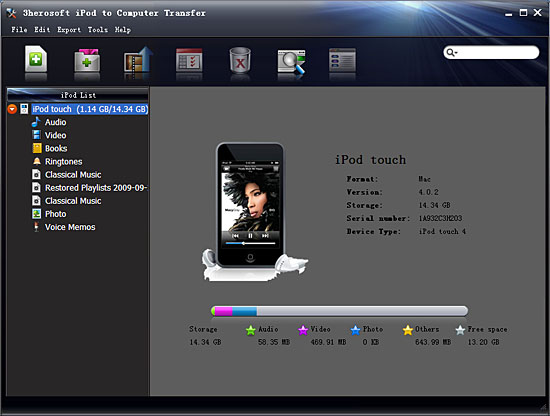 Step2: Export audio books from iPod to computer
1)Click "Books" icon under iPod list that you want to transfer. All these audio book files are shown in file browser.
2)Locate the files you want to transfer and check them for ready to export.
3)Click the "Export->Export to local" on the top-menu, or directly click the highlighted button (show as picture below) to export. And select the directory folder to save the iPod files in the pop-up dialog window. Then you will see the copy progress in the pop-up dialogbox.
4)After a few minutes, the selected audio books can be transferred successfully from iPod to computer.


|
Hot Tags: |
||||
 Buy 3herosoft iPod to Computer Transfer $25.oo
 Download 3herosoft iPod to Computer Transfer 5.77MB
