


Windows Products
- iPod / iPhone Tools
-
- iPod to Computer Transfer

- iPad to Computer Transfer

- iPhone to Computer Transfer
- iPhone Ringtone Maker
- iPhone SMS Transfer
- iPhone Contact Transfer
- iPhone Call List Transfer
- iPhone iBooks Transfer
- iPhone Photo Transfer
- iPod Mate
- iPhone Mate
- iPad Mate
- DVD to iPod Converter
- DVD to iPhone Converter
- DVD to iPad Converter
- iPod Movie Converter
- iPhone Video Converter
- iPad Video Converter
- iPod to Computer Transfer
- DVD Cloner Tools
- DVD Creator Tools
- Video Converter Tools
-
- Video Converter
- iPod Movie Converter
- iPhone Video Converter
- iPad Video Converter
- Apple TV Video Converter
- Video to Audio Converter
- AVI MPEG Converter
- MP4 Video Converter
- PS3 Video Converter
- PSP Video Converter
- WMV Video Converter
- 3GP Video Converter
- FLV Converter
- MOV Converter
- RM Converter
- Zune Video Converter
- BlackBerry Video Converter
- Mobile Phone Video Converter
- Video Converter
- DVD Ripper Tools
-
- DVD Ripper Platinum
- DVD to iPod Converter
- DVD to iPhone Converter
- DVD to iPad Converter
- DVD to Apple TV Converter
- DVD Audio Ripper
- DVD to MP4 Converter
- DVD to PS3 Converter
- DVD to PSP Converter
- DVD to WMV Converter
- DVD to 3GP Converter
- DVD to AVI Converter
- DVD to DivX Converter
- DVD to Pocket PC Ripper
- DVD to Zune Converter
- DVD to BlackBerry Converter
- DVD to Mobile Phone Converter
- DVD Ripper
- DVD Ripper Platinum
- Audio Tools
- PDF Tools
- Suite Tools
-
- Media Toolkit Ultimate

- DVD Ripper Platinum Suite
- DVD Maker Suite
- iPod Mate
- iPhone Mate
- iPad Mate
- DVD to iPod Suite
- DVD to iPhone Suite
- DVD to iPad Suite
- DVD to Apple TV Suite
- DVD to Audio Suite
- DVD to MP4 Suite
- DVD to AVI Suite
- DVD to PS3 Suite
- DVD to PSP Suite
- DVD to WMV Suite
- DVD to 3GP Suite
- DVD to Zune Suite
- DVD to BlackBerry Suite
- DVD to Mobile Phone Suite
- Media Toolkit Ultimate
Mac Products
- iPod / iPhone Tools
-
- iPod to Computer Transfer
- iPhone to Computer Transfer
- iPad to Computer Transfer
- iPhone Ringtone Maker
- iPhone SMS Transfer
- iPhone Contact Transfer
- iPhone Call List Transfer
- iPhone iBooks Transfer
- iPhone Photo Transfer
- iPod Mate for Mac
- iPhone Mate for Mac
- iPad Mate for Mac
- DVD to iPod Converter for Mac
- DVD to iPhone Converter for Mac
- DVD to iPad Converter for Mac
- iPod Video Converter for Mac
- iPhone Video Converter for Mac
- iPad Video Converter for Mac
- iPod to Computer Transfer
- DVD Cloner / Creator Tools
- Video Converter Tools
-
- Video Converter for Mac
- iPod Video Converter for Mac
- iPhone Video Converter for Mac
- iPad Video Converter for Mac
- Apple TV Video Converter for Mac
- Video to Audio Converter for Mac
- MP4 Converter for Mac
- FLV Converter for Mac
- PSP Video Converter for Mac
- BlackBerry Converter for Mac
- Mobile Phone Converter for Mac
- DVD Ripper Tools
- PDF Tools
- Suite Tools
-
- Mac DVD Toolkit
- DVD Ripper Suite for Mac
- DVD Maker Suite for Mac
- iPod Mate for Mac
- iPhone Mate for Mac
- iPad Mate for Mac
- DVD to iPod Suite for Mac
- DVD to iPhone Suite for Mac
- DVD to iPad Suite for Mac
- DVD to Apple TV Suite for Mac
- DVD to Audio Suite for Mac
- DVD to MP4 Suite for Mac
- DVD to FLV Suite for Mac
- DVD to PSP Suite for Mac
- DVD to BlackBerry Suite for Mac
- DVD to Mobile Phone Suite Mac
- Mac DVD Toolkit
3herosoft iPod to Computer Transfer for Mac

“I've bought a few songs from iTunes with my iPod. How do I make the songs backup to my MacBook to avoid crash of iPod? I have the auto sync turned off so that I can manage which songs I port over to my iPod and I usually just drag and drop what I want to move. iTunes won't allow me to drag from the iPod library back over to the computer (or I can't figure out how to do it). I'm afraid to sync my purchased playlist because I do not want my MacBook to write over what's on my iPod and cause me to lose my songs. What should I do? Please??/p>
I am sure there are many iPod users have met such a problem. To tell you the truth, to transfer iPod-purchased files to Mac, all your need is just one tool-3herosoft iPod to Computer Transfer for Mac. Besides the basic functions to transfer songs, podcasts, iTunes , audio books, videos and playlists from iPod to computer/iTunes library, 3herosoft iPod to Computer Transfer for Mac is recently updated to make users easily backup files purchased via iPod to MacBook or iTunes library. Take songs for example; let me show you how to get iPod-Purchased songs/videos onto computer for backup step by step.
 Transfer music/video/podcast/photo between all sorts of iPod/iPhone and Mac
 -
Transfer, copy media files from iPod/iPhone to iTunes
-
Support all Mac OS, iPod, iPhone, even iOS 5 and iTunes 10.6



How to get iPod-purchased songs and videos to Mac for backup?
Preparation: Free download 3herosoft iPod to Computer Transfer for Mac. Launch it to your MacBook.
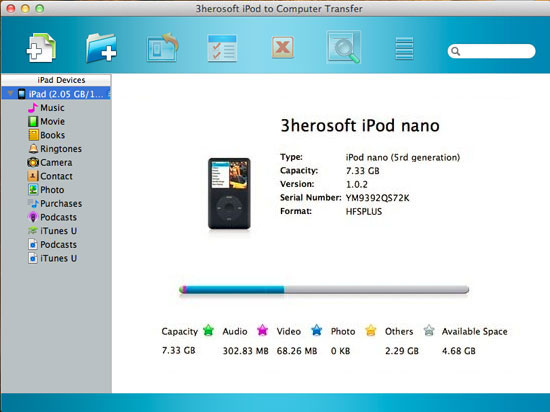
 Step1: Connect iPod to Mac via a USB cable. The iPod playlists on your iPod will be listed on the left part of window. Open “Purchases?item, you will find all the songs/videos you have purchased.
Step2: Check the songs/movies which you want to backup from iPod to MacBook, then click “Export checked files to local?button.

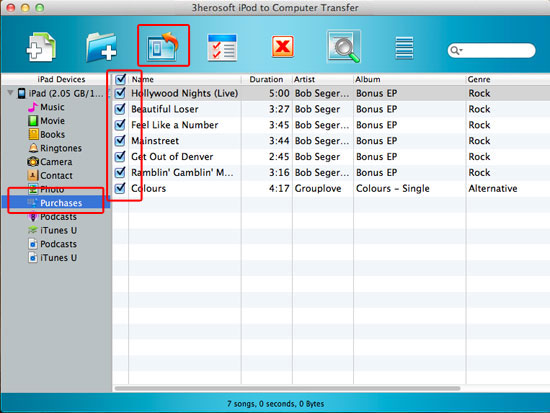
Step3: You will be asked to choose target folder, set an output folder on hard driver to save exported songs. The program will start to transfer iPod-Purchased songs/movies onto Mac with superfast speed.
|
Hot Tags: |
||||
 Buy 3herosoft iPod to Computer Transfer for Mac $28.oo
 Download 3herosoft iPod to Computer Transfer for Mac 5.40MB
