


Windows Products
- iPod / iPhone Tools
- DVD Cloner Tools
- DVD Creator Tools
- Video Converter Tools
- DVD Ripper Tools
- Audio Tools
- PDF Tools
- Suite Tools

Mac Products
3herosoft iPod to Computer Transfer for Mac


"iPod player, my favourite pet, it can bring me a lot of digital enjoyment ! Now I buy one computer which is installed Mac OS, as I have never used Mac system, If I transfer music from iPod to Mac computer, there may be little difficulty. " Yeah, I agree with you, iPod itself does not have function of transferring. Don't worry, I deem that 3herosoft iPod to Computer Transfer for Mac is helpful Mac software, it can let you transfer music from iPod to Mac easily. And it also can make you transfer iPod music to Mac iTunes.
 Transfer music/video/podcast/photo from iPod to Mac
 -
Transfer iPod media files to iTunes
-
Add music/video/photo/books to iPod library (iOS 7 supported)




With this professional iPod to Mac Transfer software, you can not only easily copy back your songs from Mac to iPod when you lost your iTunes library, but also smoothly back up your iPod music to Mac when you need to send your iPod for repair or system crashed.
 Step1: Install and launch the software
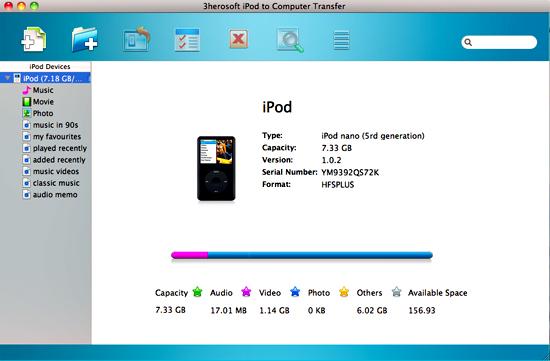
Download and run this iPod to computer Transfer for Mac software and connect your iPod to Mac. Then you can see your iPod on the desktop -- an iPod icon with your iPod's name under it. All information about your iPod, such as type, capacity, version, serial number, and format, will be shown on the main interface. And all iPod library folders will be displayed on left panel in iPod list. If you wanna get full version, purchase iPod to Mac Transfer right now.
 Step2: Transfer music from iPod to Mac
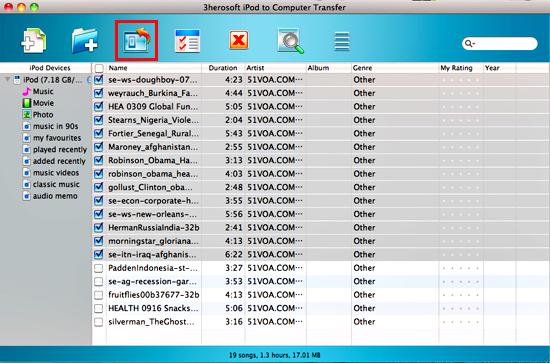
1)Open the "Music" library that you want to transfer. All music files are shown in file browser.
2)Find the files you want to transfer and check them. Make sure tick appeared that is shown in the picture below.
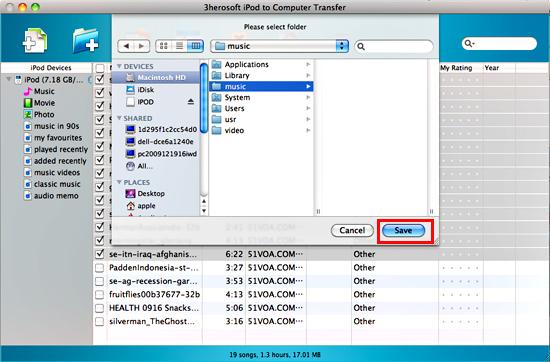
3)Click the "Export->Export to local" on the top-menu, or directly click the highlighted button (show as picture below) to export. And select the directory folder to save the iPod files on Mac. Press "Save" button to start transferring music from iPod to Mac for backup. Then you will see the copy progress in the pop-up dialogbox.
4)After a few minutes, the selected music can be transferred successfully from iPod to your Mac without any files lost.
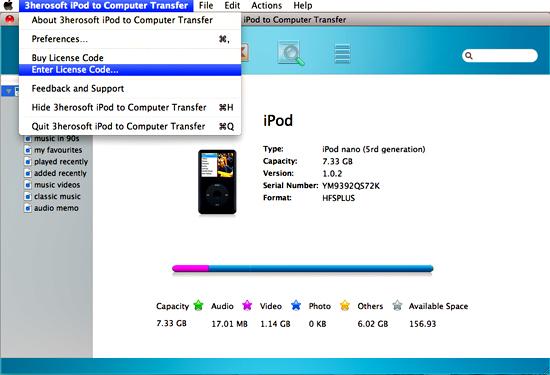
 Tip: method of entering license code
1) If you order and use our product in the first time, the dialogbox of entering license code will automatically pop up after you install and run this iPod to Mac Transfer.
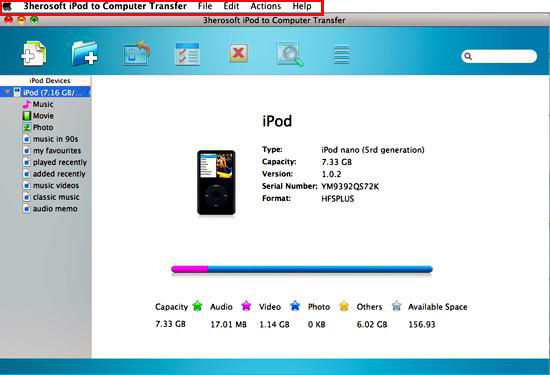
2) If you don't register the product and have a trial version, you can enter the license code following below ways while buying the key code. Firstly click the anywhere of product interface for activating, now Mac top menu tool will change for operation this iPod to Computer Transfer software. Then click the option of "3herosoft iPod to Computer Transfer" for searching the item of code entering.
|
Hot Tags: |
||||
 Buy 3herosoft iPod to Computer Transfer for Mac $28.oo
 Download 3herosoft iPod to Computer Transfer for Mac 5.40MB
