


Windows Products
- iPod / iPhone Tools
- DVD Cloner Tools
- DVD Creator Tools
- Video Converter Tools
- DVD Ripper Tools
- Audio Tools
- PDF Tools
- Suite Tools

Mac Products
3herosoft DVD Cloner for Mac

"I have lots of DVD movie collections, and some of them are very old. Whether there exist software that can make a copy of DVD movies on Mac?"---From Yahoo Answer. 3herosoft DVD Cloner for Mac provides an active and effective way to solve above problem. It can make a copy of DVD movies on Mac by creating ISO image of DVD disc with few clicks. What's more, it has the ability to copy full DVD Disc to new disc, or saved in DVD folder, or DVD image ISO from DVD, DVD folder or DVD image ISO.
 Copy DVD from DVD-9 to DVD-9, DVD-9 to DVD-5, DVD-5 to DVD-5
-
Back up DVD movie to ISO file or DVD folder and copy DVD on Mac
-
Clone new DVD from ISO file or DVD folder fast and easily




3herosoft DVD Cloner for Mac is so easy-to-handle DVD cloner software to copy DVD movie to a blank one on Mac at fast speed. Follow this guide step by step and learn how to make a copy of DVD movie on Mac.
 Step1: Load DVD movie
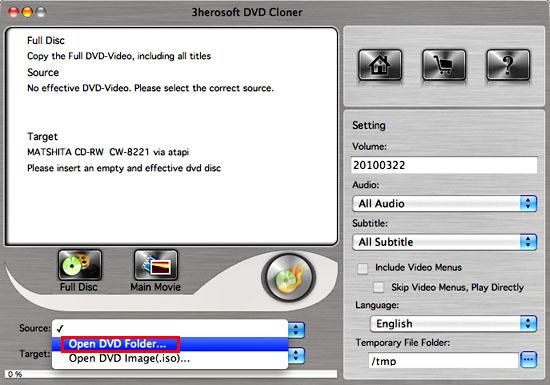
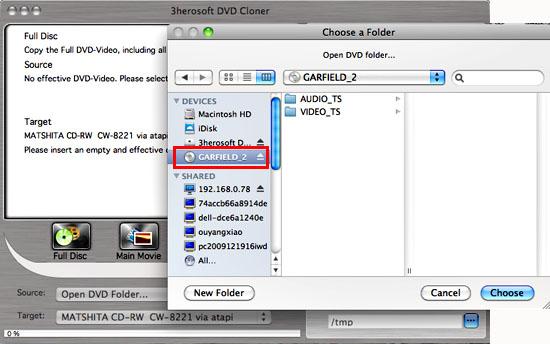
Run 3herosoft DVD Cloner for Mac and insert movie DVD to the DVD drive, and click the "Source ComboBox" and choose "Open DVD Folder" option. Then choose your own movie DVD in the "Open" window for loading DVD movie as source files completely.
 Step2: Specify destination
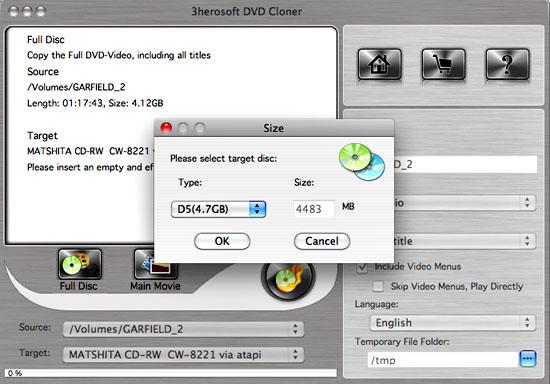
Next specify DVD movie output mode by selecting from the "Target ComboBox", specify target drive in "Destinationt" combo box. Then it will pop up a message box reminding you to select target disc type. There are three options (D5, D9, Custom ) to select.
Tip: You may have only one DVD ROM. Just select the same DVD Drive as the " Source" and "Destinationt ".
 Step3: Copy DVD to Temporary File Folder
In this step, 3herosoft DVD Cloner for Mac will copy the source DVD to your Mac computer temporary file folder. When copying, it will display the copying progress in main interface.
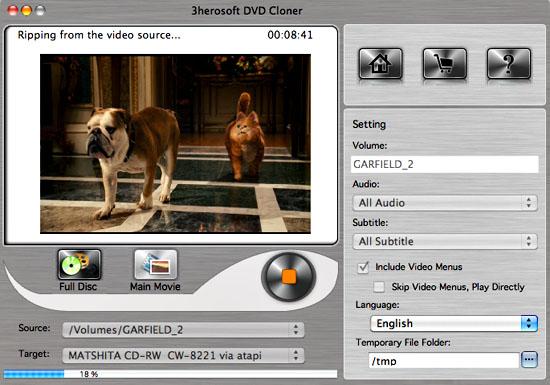 Step4: Copy to the "Destination"
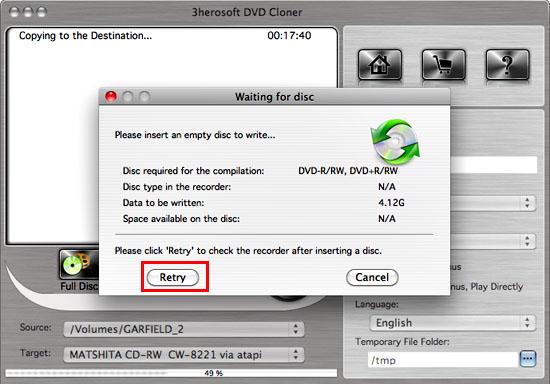
After the source DVD is copied to temporary file folder in your hard disk, it will begin to copy the temporary file to your target blank DVD on Mac.
Note: Here, it will pop up a message box telling you "Please insert an empty disc to write to...". At the same time your DVD RW Drive will be ejected. Insert a blank DVD, then click " Retry" button.
 Step5: Complete copy
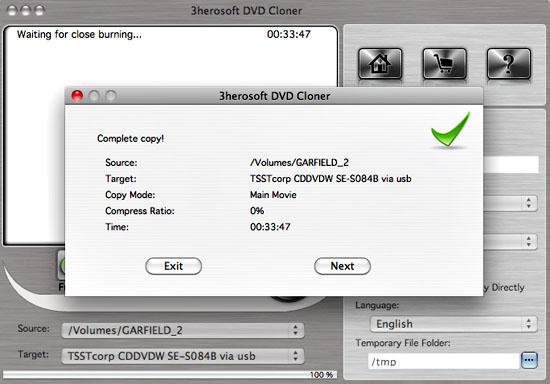
Once copying completed, 3herosoft DVD Cloner for Mac will pop up a message box showing copy information including "Source", "Destination", "Copy mode", "Compress ratio" and "Time".
|
Hot Tags: |
||||
 Buy 3herosoft DVD Cloner for Mac $32.oo
 Download 3herosoft DVD Cloner for Mac For Intel For PowerPC 2.73MB
