Windows Products
- iPod / iPhone Tools
-
- iPod to Computer Transfer

- iPad to Computer Transfer

- iPhone to Computer Transfer

- iPhone Ringtone Maker

- iPhone SMS Transfer
- iPhone Contact Transfer
- iPhone Call List Transfer
- iPhone iBooks Transfer
- iPhone Photo Transfer
- iPod Mate
- iPhone Mate
- iPad Mate

- DVD to iPod Converter
- DVD to iPhone Converter
- DVD to iPad Converter

- iPod Movie Converter
- iPhone Video Converter
- iPad Video Converter

- iPod to Computer Transfer
- DVD Cloner Tools
- DVD Creator Tools
- Video Converter Tools
-
- Video Converter

- iPod Movie Converter
- iPhone Video Converter
- iPad Video Converter

- Apple TV Video Converter
- Video to Audio Converter
- AVI MPEG Converter
- MP4 Video Converter
- PS3 Video Converter
- PSP Video Converter
- WMV Video Converter
- 3GP Video Converter
- FLV Converter
- MOV Converter
- RM Converter
- Zune Video Converter
- BlackBerry Video Converter
- Mobile Phone Video Converter
- Video Converter
- DVD Ripper Tools
-
- DVD Ripper Platinum

- DVD to iPod Converter
- DVD to iPhone Converter
- DVD to iPad Converter

- DVD to Apple TV Converter
- DVD Audio Ripper
- DVD to MP4 Converter
- DVD to PS3 Converter
- DVD to PSP Converter
- DVD to WMV Converter
- DVD to 3GP Converter
- DVD to AVI Converter
- DVD to DivX Converter
- DVD to Pocket PC Ripper
- DVD to Zune Converter
- DVD to BlackBerry Converter
- DVD to Mobile Phone Converter
- DVD Ripper
- DVD Ripper Platinum
- Audio Tools
- PDF Tools
- Suite Tools
-
- Media Toolkit Ultimate

- DVD Ripper Platinum Suite
- DVD Maker Suite
- iPod Mate
- iPhone Mate
- iPad Mate

- DVD to iPod Suite
- DVD to iPhone Suite
- DVD to iPad Suite

- DVD to Apple TV Suite
- DVD to Audio Suite
- DVD to MP4 Suite
- DVD to AVI Suite
- DVD to PS3 Suite
- DVD to PSP Suite
- DVD to WMV Suite
- DVD to 3GP Suite
- DVD to Zune Suite
- DVD to BlackBerry Suite
- DVD to Mobile Phone Suite
- Media Toolkit Ultimate
Mac Products
- iPod / iPhone Tools
-
- iPod to Computer Transfer

- iPhone to Computer Transfer

- iPad to Computer Transfer

- iPhone Ringtone Maker

- iPhone SMS Transfer
- iPhone Contact Transfer
- iPhone Call List Transfer
- iPhone iBooks Transfer
- iPhone Photo Transfer
- iPod Mate for Mac
- iPhone Mate for Mac
- iPad Mate for Mac
- DVD to iPod Converter for Mac
- DVD to iPhone Converter for Mac
- DVD to iPad Converter for Mac
- iPod Video Converter for Mac
- iPhone Video Converter for Mac
- iPad Video Converter for Mac
- iPod to Computer Transfer
- DVD Cloner / Creator Tools
- Video Converter Tools
-
- Video Converter for Mac
- iPod Video Converter for Mac
- iPhone Video Converter for Mac
- iPad Video Converter for Mac

- Apple TV Video Converter for Mac
- Video to Audio Converter for Mac
- MP4 Converter for Mac
- FLV Converter for Mac
- PSP Video Converter for Mac
- BlackBerry Converter for Mac
- Mobile Phone Converter for Mac
- DVD Ripper Tools
- PDF Tools
- Suite Tools
-
- Mac DVD Toolkit

- DVD Ripper Suite for Mac
- DVD Maker Suite for Mac
- iPod Mate for Mac
- iPhone Mate for Mac
- iPad Mate for Mac

- DVD to iPod Suite for Mac
- DVD to iPhone Suite for Mac
- DVD to iPad Suite for Mac

- DVD to Apple TV Suite for Mac
- DVD to Audio Suite for Mac
- DVD to MP4 Suite for Mac
- DVD to FLV Suite for Mac
- DVD to PSP Suite for Mac
- DVD to BlackBerry Suite for Mac
- DVD to Mobile Phone Suite Mac
- Mac DVD Toolkit
3herosoft DVD Cloner for Mac
With 3herosoft DVD Cloner for Mac, It is optional for you to clone DVD full disc with all the special features, intros, trailer and ads, or to copy main movie only with these omitted to maximize backup DVD quality and disc space usage. And audio tracks, subtitles, whether to include menu and skip menu, are all optional to assist you to create a DVD backup of your own.
Copy DVD from DVD-9 to DVD-9, DVD-9 to DVD-5, DVD-5 to DVD-5
Back up DVD movie to ISO file or DVD folder and copy DVD on Mac
Clone new DVD from ISO file or DVD folder fast and easily

Beside the function of DVD copying, some useful settings can make your DVD be out of the common. 3herosoft DVD Cloner for Mac allows you to remove DVD menus, select subtitles and audio tracks, or clone main movie separately to create customized DVD. This article will teach you how to manage your DVD collection on Mac.
There are two modes – Full Disk and Main Movie.
1)Full Disk mode: You can select the mode by clicking "Full Disk" button. It will copy the Full DVD including all titles.
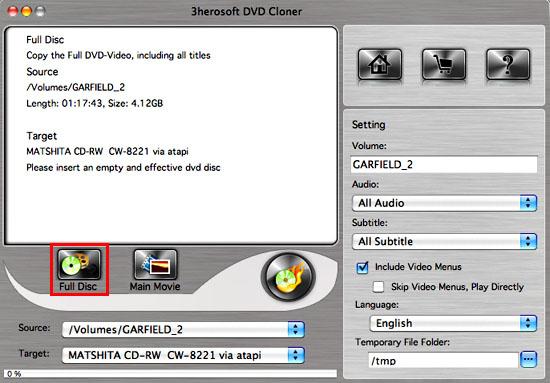
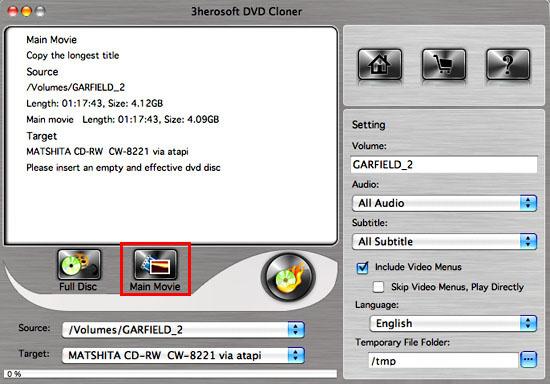

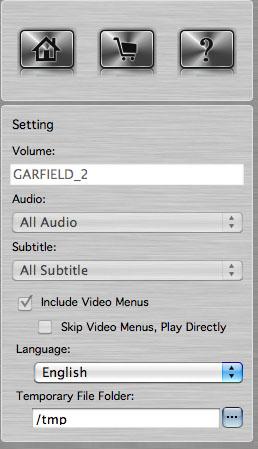
You may do some advanced settings in the "Setting Panel" on the right of the main interface. It allows you to change Temporary file folder, DVD volume, Audio track, Subtitle.
Note: The disc of temporary file folder needed 4.2G free space.
|
Hot Tags: |
||||