


Windows Products
- iPod / iPhone Tools
-
- iPod to Computer Transfer

- iPad to Computer Transfer

- iPhone to Computer Transfer
- iPhone Ringtone Maker
- iPhone SMS Transfer
- iPhone Contact Transfer
- iPhone Call List Transfer
- iPhone iBooks Transfer
- iPhone Photo Transfer
- iPod Mate
- iPhone Mate
- iPad Mate
- DVD to iPod Converter
- DVD to iPhone Converter
- DVD to iPad Converter
- iPod Movie Converter
- iPhone Video Converter
- iPad Video Converter
- iPod to Computer Transfer
- DVD Cloner Tools
- DVD Creator Tools
- Video Converter Tools
-
- Video Converter
- iPod Movie Converter
- iPhone Video Converter
- iPad Video Converter
- Apple TV Video Converter
- Video to Audio Converter
- AVI MPEG Converter
- MP4 Video Converter
- PS3 Video Converter
- PSP Video Converter
- WMV Video Converter
- 3GP Video Converter
- FLV Converter
- MOV Converter
- RM Converter
- Zune Video Converter
- BlackBerry Video Converter
- Mobile Phone Video Converter
- Video Converter
- DVD Ripper Tools
-
- DVD Ripper Platinum
- DVD to iPod Converter
- DVD to iPhone Converter
- DVD to iPad Converter
- DVD to Apple TV Converter
- DVD Audio Ripper
- DVD to MP4 Converter
- DVD to PS3 Converter
- DVD to PSP Converter
- DVD to WMV Converter
- DVD to 3GP Converter
- DVD to AVI Converter
- DVD to DivX Converter
- DVD to Pocket PC Ripper
- DVD to Zune Converter
- DVD to BlackBerry Converter
- DVD to Mobile Phone Converter
- DVD Ripper
- DVD Ripper Platinum
- Audio Tools
- PDF Tools
- Suite Tools
-
- Media Toolkit Ultimate

- DVD Ripper Platinum Suite
- DVD Maker Suite
- iPod Mate
- iPhone Mate
- iPad Mate
- DVD to iPod Suite
- DVD to iPhone Suite
- DVD to iPad Suite
- DVD to Apple TV Suite
- DVD to Audio Suite
- DVD to MP4 Suite
- DVD to AVI Suite
- DVD to PS3 Suite
- DVD to PSP Suite
- DVD to WMV Suite
- DVD to 3GP Suite
- DVD to Zune Suite
- DVD to BlackBerry Suite
- DVD to Mobile Phone Suite
- Media Toolkit Ultimate
Mac Products
- iPod / iPhone Tools
-
- iPod to Computer Transfer
- iPhone to Computer Transfer
- iPad to Computer Transfer
- iPhone Ringtone Maker
- iPhone SMS Transfer
- iPhone Contact Transfer
- iPhone Call List Transfer
- iPhone iBooks Transfer
- iPhone Photo Transfer
- iPod Mate for Mac
- iPhone Mate for Mac
- iPad Mate for Mac
- DVD to iPod Converter for Mac
- DVD to iPhone Converter for Mac
- DVD to iPad Converter for Mac
- iPod Video Converter for Mac
- iPhone Video Converter for Mac
- iPad Video Converter for Mac
- iPod to Computer Transfer
- DVD Cloner / Creator Tools
- Video Converter Tools
-
- Video Converter for Mac
- iPod Video Converter for Mac
- iPhone Video Converter for Mac
- iPad Video Converter for Mac
- Apple TV Video Converter for Mac
- Video to Audio Converter for Mac
- MP4 Converter for Mac
- FLV Converter for Mac
- PSP Video Converter for Mac
- BlackBerry Converter for Mac
- Mobile Phone Converter for Mac
- DVD Ripper Tools
- PDF Tools
- Suite Tools
-
- Mac DVD Toolkit
- DVD Ripper Suite for Mac
- DVD Maker Suite for Mac
- iPod Mate for Mac
- iPhone Mate for Mac
- iPad Mate for Mac
- DVD to iPod Suite for Mac
- DVD to iPhone Suite for Mac
- DVD to iPad Suite for Mac
- DVD to Apple TV Suite for Mac
- DVD to Audio Suite for Mac
- DVD to MP4 Suite for Mac
- DVD to FLV Suite for Mac
- DVD to PSP Suite for Mac
- DVD to BlackBerry Suite for Mac
- DVD to Mobile Phone Suite Mac
- Mac DVD Toolkit
3herosoft iPod to Computer Transfer for Mac

3herosoft iPod to Computer for Mac is a professional software which is specially designed for iPod and Mac users. It is powerful enough to back up all kinds of multimedia files from iPod/iPad/iPhone. You know when using an iPod, we are often worried about it getting crashed and losing all the files; therefore it is necessary for us to backup files to computer or iTunes library. 3hersoft iPod to Computer for Mac is the best solution to solve the problem.
Recently 3herosoft iPod to Computer Transfer for Mac is updated to its new version, new functions was added to make users easily transfer podcast/iTunes U/books directly purchased via iPod Touch to MacBook. If you have just bought some podcast/iTunes U/books in iTunes store on iPod Touch, and do not want lose your files due to your MacBook writes over what's on my iPod Touch. Choose this 3herosoft iPod to Computer Transfer for Mac; it is one of the most efficient programs for iPod users to sync books purchased via iPod Touch to Mac. Follow me to learn how to sync iPod Touch purchases to MacBook.
 Transfer music/video/podcast/photo between all sorts of iPod/iPhone and Mac
 -
Transfer, copy media files from iPod/iPhone to iTunes
-
Support all Mac OS, iPod, iPhone, even iOS 5 and iTunes 10.6



How to get iPod-purchased songs and videos onto mac for backup?
Preparation: Free download iPod to Computer Transfer for Mac and launch it. Double click the icon to run the program.
 Step1: Connect your iPod Touch to mac via a USB cable. 3herosoft iPod to Computer for Mac will detect your files on iPod Touch automatically, and will show the iPod playlist on the left pane.
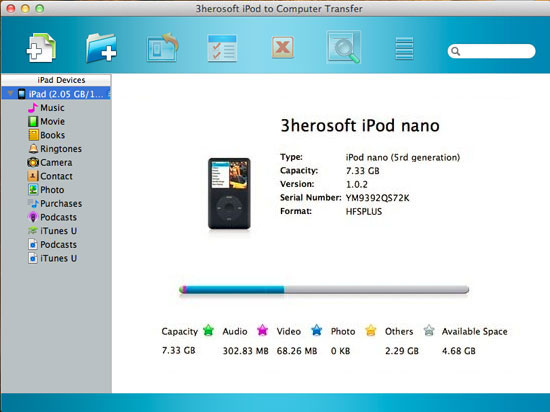
Step2: Open the “books?item, find and check the purchased books which you want to sync to your MacBook, and then click “export checked file to local?button.


Step3: Select a folder from local hard driver to save the exported files. Then 3herosoft iPod to Computer Transfer for Mac will start to sync books purchased via iPod Touch to Mac.
A moment later, the program will finish its process of transferring iPod Touch purchases, and there will be a small window pop up to tell you how many files were synced. The whole process can only take you less than one minute. What a powerful tool it is!
|
Hot Tags: |
||||
 Buy 3herosoft iPod to Computer Transfer for Mac $28.oo
 Download 3herosoft iPod to Computer Transfer for Mac 5.40MB
