


Windows Products
- iPod / iPhone Tools
- DVD Cloner Tools
- DVD Creator Tools
- Video Converter Tools
- DVD Ripper Tools
- Audio Tools
- PDF Tools
- Suite Tools

Mac Products
3herosoft iPad to Computer Transfer for Mac


The Podcast, iTunes U and books you can free download on iPad device in its "iTunes Store" app. And you know all the purchased files are stored on the iPad playlist for viewing, books in iBooks library and songs in the iPod library. For iPad novice, it is very important to sync all downloaded files on iTunes library for backup on Mac local. Here 3herosoft iPad to Computer Transfer for Mac program will allow you to easily sync the downloaded files to iTunes library, you can check them on iTunes list without connect to iPad.
 Transfer podcasts/iTunes U/Books on iPad to Mac
-
Sync the downloaded files from iPad to iTunes library
-
Support all Mac OS, iPad, iPods, iPhone, even iOS 5 and iTunes 10.6




The free downloaded podcasts/iTunes U files on iPad, it will take up mass capacity of iPad space. Sometimes you should transfer those files into iTunes library on Mac for backup. And 3herosoft iPad to Computer Transfer for Mac will read all podcast and iTunes U in the list. And help you easily sync downloaded podcast/iTunes U to iTunes, you can easily sync podcast, iTunes U files to other Apple Devices (iPod, iPhone, iPad). And the following article will help you easily sync downloaded podcasts/iTunes U on iPad to iTunes library.
 Step1: Install and launch the software
Download and launch 3herosoft iPad to Computer Transfer for Mac. Once connect your iPad to Mac computer, you can see all iPad items are listed in the left panel, such as Music, Movie, Podcast, Photos, playlists, Ringtones, Contact, Books, Camera, Purchased, iTunes U, etc. Hope you purchase this powerful iPad to Mac Transfer software and use the full version without any limitations.
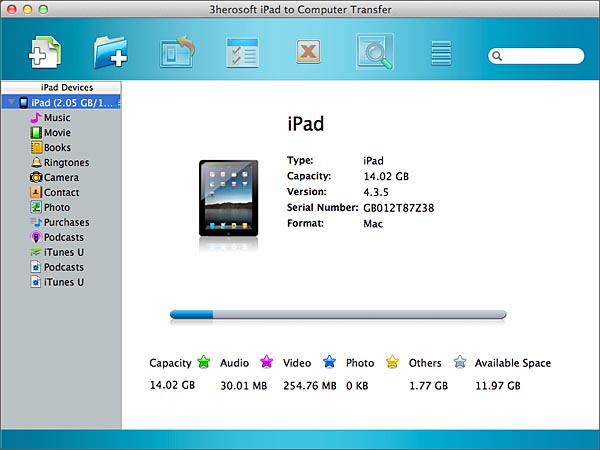 Step2: Sync downloaded files to iTunes library
1) In the iPad list, the free downloaded files will saved on iPad "Podcast" and "iTunes U" items, when you open all podcast and iTunes U, all free downloaded files are displayed on the list.
2) You wanna sync the downloaded files to iTune, select and check the podcast and iTunes U files, turn to the top toolbar, and you will find out "Export checked files to iTunes library" button to start sync downloaded iPad files onto iTunes library.
3) Open iTunes library and you will see the all free downloaded podcast and iTunes U are in the iTunes library. Here you can sync this downloaded files to other Apple Devices (iPod, iPhone, iPad) fast and easily.

|
Hot Tags: |
||||

 Buy 3herosoft iPad to Computer Transfer for Mac $25.oo
 Download 3herosoft iPad to Computer Transfer for Mac 5.40MB
