


Windows Products
- iPod / iPhone Tools
- DVD Cloner Tools
- DVD Creator Tools
- Video Converter Tools
- DVD Ripper Tools
- Audio Tools
- PDF Tools
- Suite Tools

Mac Products
3herosoft DVD to iPad Converter
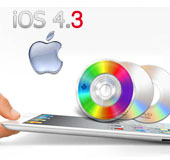

"But I don't see any built-in DVD-ROM or DVD player in iPad 2 that can work with DVD and play DVD directly. I guess you guys don't really wanna miss the opportunity to watch DVD on iPad, which is essentially one big screen, do you?" The program 3herosoft DVD to iPad 2 Converter will help you easily rip movie DVD and transfer DVD to iPad 2. And it can always catch up with the latest DVD copy protection variant.
 Rip DVD to iPad 2 and transfer DVD to iPad 2
-
Convert movie DVDs to MP3, AAC and M4A for iPad 2
-
Keep high compatible with iPod, iPad 2, iPhone and Apple TV




The new iPad is thinner - 33 per cent thinner. It looks incredible and has the expected front-facing camera (as well as one on the back). It's also a bit lighter, which is welcome. With the same low power as the Apple A4 processor, the iPad 2 utilizes an all-new Apple A5 processor, presumably based on ARM's Cortex-A9 design.
To rip movie DVD to iPad 2 and transfer DVD to iPad 2 as you need to download the 3herosoft DVD to iPad Converter. So are you all set? Let's start the process now.
 Step1: Load DVD movie
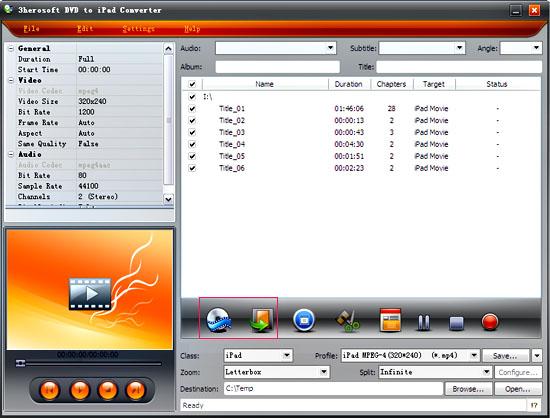
First open the DVD to iPad 2 converter.
Add DVD files.
If the DVD movie you need to convert is on your disc drive, click on the "Open DVD" button.
In case you have saved it in a hard drive, click the Add video button and locate the folder.
Locate the path of the folders VIDEO_TS and AUDIO_TS. the .vob files appear. Select the .vob files and click OK.
 Step2: Set output files format
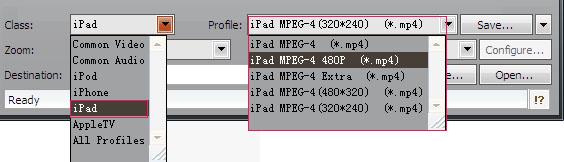
To choose the proper profiles look for the drop-down list of "Profile" option on the right. Choose the profile that suits you best. Like for instance if you want to play the video in MPEG-4 choose the iPad MPEG-4 Video (*.mp4) from the list of profiles.
 Step3: Rip DVD to iPad 2
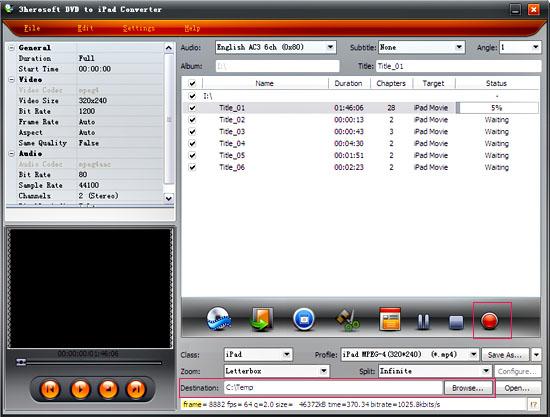
After you set the saving destination by clicking "Browse" button, select the title or chapter you want to convert and start conversion by clicking "Start Ripping" button.
 Step4: Transfer DVD to iPad 2
1)Put movie to iPad 2
(1) Please click "Open" button in the software interface after the conversion is completed.
(2) Find the converted file in the destination folder and pull it to your iTunes.
(3) Connect iPad 2 to computer, and in iTunes, drag the file onto the iPad logo in the iTunes and then release the mouse when "+" appears around the cursor. The file will be transferred to iPad 2 automatically.
|
Hot Tags: |
||||
 Buy 3herosoft DVD to iPad Converter $28.oo
 Download 3herosoft DVD to iPad Converter 5.83MB
