


Windows Products
- iPod / iPhone Tools
- DVD Cloner Tools
- DVD Creator Tools
- Video Converter Tools
- DVD Ripper Tools
- Audio Tools
- PDF Tools
- Suite Tools

Mac Products
3herosoft DVD to iPhone Converter

As is known to all, Apple iPhone has no CD-ROM. So if you wanna watch DVD on your iPhone 4, beside purchasing movies via iTunes directly, you could also rip the movie DVDs rented or purchased to iTunes. Many people think this is complex, in fact that was not the case. The key-point is a suitable DVD to iPhone 4 Converter. And 3herosoft DVD to iPhone Converter is such an ideal choice and does do a great job of ripping any DVD video to iPhone 4.
 Convert DVD to iPhone MP4 videos, transfe DVD to iPhone 4
-
Rip movie DVD to iPhone MP3, M4A, etc. audio files
-
Save time by converting two or more files simultaneously




The iPhone 4 is the fourth generation of iPhone, and successor to the iPhone 3GS. It is the first device to support FaceTime, Apple's video calling application. It has an Apple A4 processor, 512 MB of eDRAM, a 3.5 inches (89 mm) LED backlit liquid crystal display with 960-by-640 pixel resolution, and the iOS 4 operating system.
The following steps shows you how to rip DVD to iPhone 4 and transfer DVD to iPhone 4 using 3herosoft DVD to iPhone 4 Converter:
1. Download the latest version of DVD to iPhone 4 Converter. Install and run it.
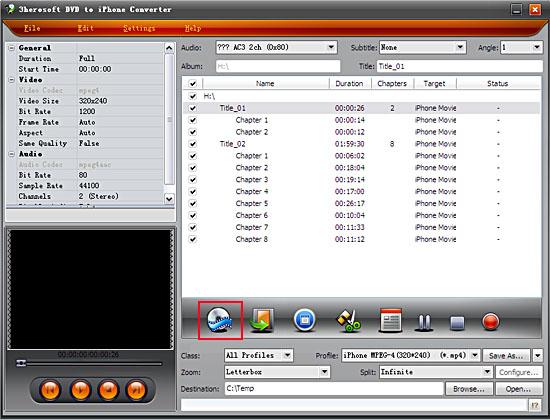
2. Click the "Open DVD" button to load the DVD movie. Alternatively, you can click "File -> Open DVD..." to import the DVD disc. After the DVD is imported, there will be a list of DVD titles showing in the program.
3. Tick the longest DVD title from the list. Double click this title and you will preview the movie in the program.
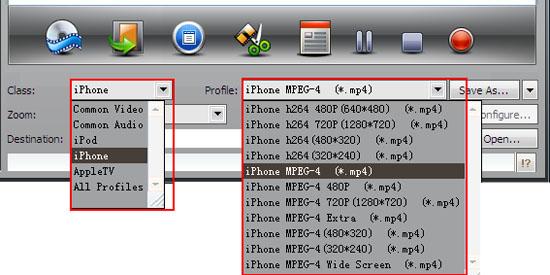
 Step2: Set output files format
From the "Profile" drop-down list, navigate to the "Apple iPhone" category and choose "iPhone MPEG-4(*.mp4)" as the output format. Note: You can also customize a specific profile to meet your needs. Learn about how to customize profile.
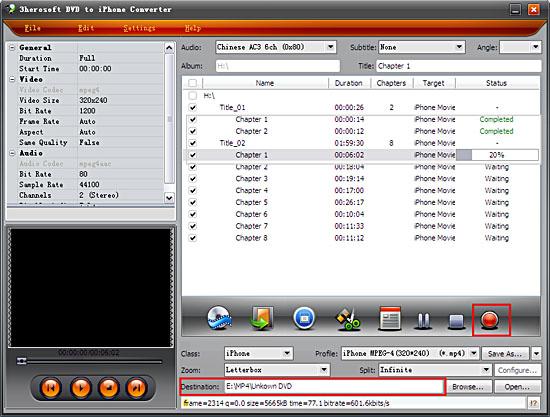
 Step3: Rip DVD to iPhone
 After you set the saving destination by clicking "Browse" button, select the title or chapter you want to convert and start conversion by clicking "Start ripping" button.
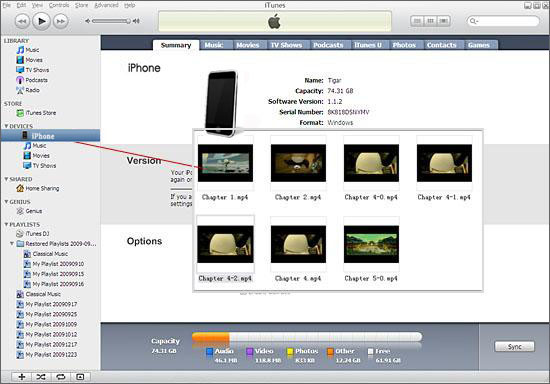
 Step4: Transfer DVD to iPhone
First, launch iTunes 10, click File option on menu, and import your converted DVD files to iTunes library. Then,connect your iPhone 4 to computer via USB cable, iTunes will detect your iPhone 4. After that, click iTunes "File -> Sync iPhone", and the files will be transferred to your iPhone 4 from iTunes library. When updating completed, you will find the DVDs on you iPhone 4.
|
Hot Tags: |
||||
 Buy 3herosoft DVD to iPhone Converter $28.oo
 Download 3herosoft DVD to iPhone Converter 4.87MB
