


Windows Products
- iPod / iPhone Tools
- DVD Cloner Tools
- DVD Creator Tools
- Video Converter Tools
- DVD Ripper Tools
- Audio Tools
- PDF Tools
- Suite Tools

Mac Products
3herosoft iPod to Computer Transfer for Mac


For iPod touch users, and update iTouch version to iOS 5.O, you can easily send or receive SMS or MMS for free. All files such as Video, Photo, Contact, Link, Location, SMS text, etc. are allowed delivered or received by iMessage. Getting iPhone iMessage backups on Mac you can use 3herosoft iPod to Computer Transfer for Mac, it will help you easily transfer iMessage files from iPod touch to Mac local, view and edit them freely on Mac computer.
 Transfer iMessage files from iPod touch to Mac local
 -
Transfer iPod touch iMessage files (video, photo, contact, link, text, location)
-
Update iPod touch to iOS 7 and iTunes 11 supported




The following article offers a best solution on how to transfer iMessage files (SMS text, video, photo, link, contact, voice memos, location, etc.) from iPod to Mac computer local. The program named 3herosoft iPod to Computer transfer for Mac will provide best answer and learn this easy to use guide and get iPod touch iMessage files backup.
 Step1: Install iPod iMessage Transfer
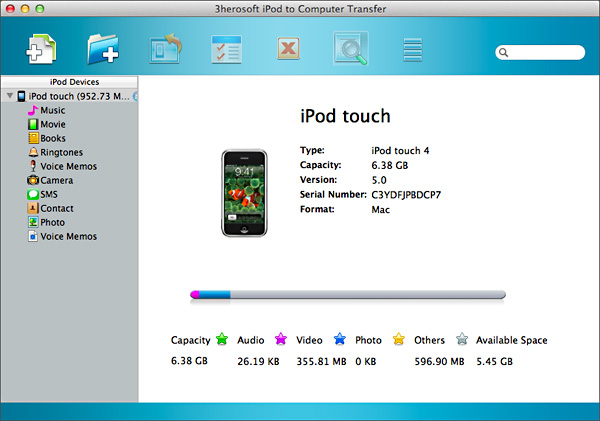
Free download 3herosoft iPod to Computer Transfer for Mac and launch it. Once you connect iPod to computer, all iPod item folders are displayed on the interface, such as Music, Movie, Books, Ringtone, Voice Memos, Camera, Photo, podcast, contact, SMS, playlist, iTunes U, purcahse, etc. If you buy it and get the full version of this iPod iMessages Transfer program, you can enjoy more detail functions we offer to.
 Step2: Transfer iMessage from iPod to Mac
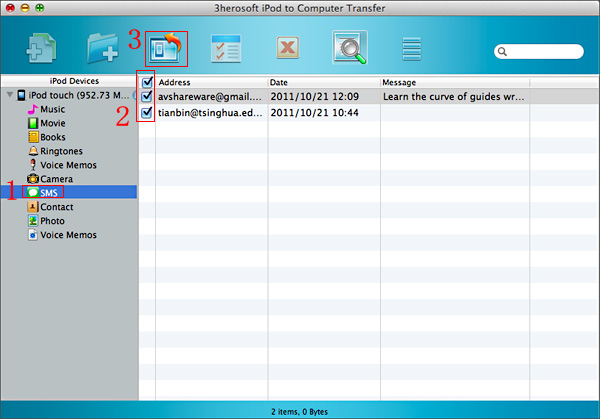
1) Open "SMS" folder in iPod list and all iMessage files such as SMS text, Photo, Video, Contact, Link, etc. are displayed on the interface. Easily open any folder in the list and view.
2) In this screen, select and check iMessage files you wanna transfer and tick them.
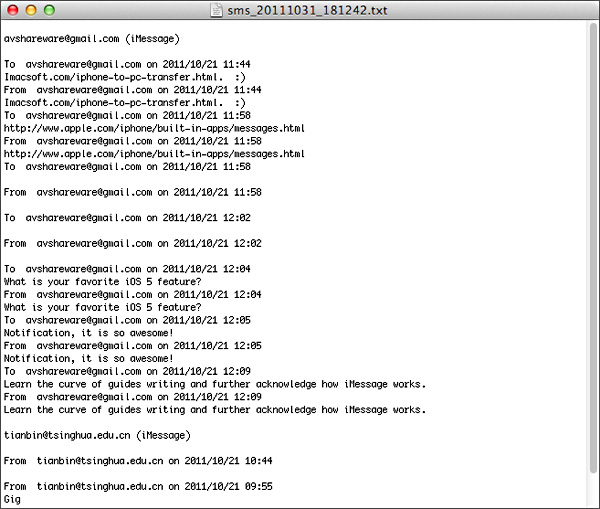
3) After check the iMessage files, turn to the top toolbar and press "export checked files to local" button to start to transfer iPod iMessage files, focus on the pop-up dialog box and select a target folder on Mac to save the iMessage files. Then click "Save" button in the box, minutes later, all iMessage files are transferred from iPod to Mac local, and you can view them on your Mac computer. Open and edit them freely.

|
Hot Tags: |
||||
 Buy 3herosoft iPod to Computer Transfer for Mac $28.oo
 Download 3herosoft iPod to Computer Transfer for Mac 5.40MB
