


Windows Products
- iPod / iPhone Tools
- DVD Cloner Tools
- DVD Creator Tools
- Video Converter Tools
- DVD Ripper Tools
- Audio Tools
- PDF Tools
- Suite Tools

Mac Products
3herosoft iPhone iBooks to Computer Transfer
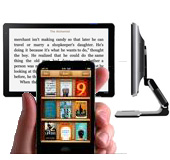

You may know, on iPhone it is very easy to install iBooks app from Apps Store. iBooks is very best place for you to read, edit, purchase books simply. So for all free download or purchased books, they are all displayed in the iBooks library. While for the iPhone users, you will have to consider making iPhone iBooks backup on computer in case of iPhone crashed or purchased books deleted.Here try 3herosoft iPhone iBooks to Computer Transfer and it can easily transfer all purchased/downloaded books on iPhone to computer.
 Transfer iPhone purchased books (ePub, pdf, audiobook) to computer
-
Sync all purchased/downloaded books to iTunes library
-
Export music, video, podcasts, playlist to computer local for backup




For those books downloaded directly on iPhone, commonly iPhone users may consider one solution to get iPhone books backup on computer local in case of iPhone crashed or accidently broken down. But how? iTunes cannot best answer, it doesn't allow to do this. We deem our product created recently 3herosoft iPhone iBooks to Computer Transfer will solve this problem, and all purchased/downloaded books on iPhone can list on the panel, export them completely off iBooks onto computer hard drive for backup. The following article will show you the concrete steps for operating the program.
 Step1: Run the iPhone iBooks Transfer
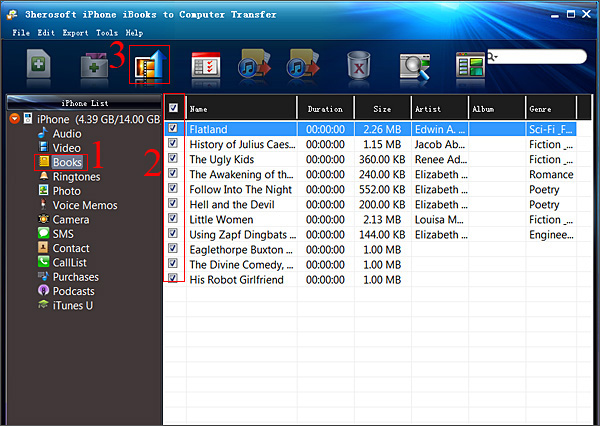
Connect iPhone to computer and then open the program of 3herosoft iPhone iBooks to Computer Transfer, you will see the intuitive and concise interface, so easy and simple to search and operate, all iPhone item folders are listed on the left panel, such as Audio, Video, Books, playlists(podcast, 90's music, my favourites, etc.)
 Step2: Transfer purchased books on iPhone to computer
1: Open "Books" library and all books, no matter synced ones from iTunes or purchased/downloaded on iPhone, they are all displayed on the panel, you can view them complete.
2: Browse the books (epub, pdf, audiobook) on the list, then select and check the ones you wanna transfer, press "export checked files to local" button on the toolbar or choose "export checked files to local" option in the top "Export" menu.
3: Now a window box will pop up and select a target folder to save books files on computer. Press "Save" button to start iPhone books to PC transferring. A few minutes later, all books on iPhone will be saved on your computer hard drive.
Other skills:
1. Transfer iPhone music/video/podcasts/playlist to computer
For iPhone music/video/podcast/playlists, the program 3herosoft iPhone iBooks to Computer Transfer can also backup those files from iPhone to computer.The course of method like iPhone books transferring, open any items you wanna export, and check the files, press "export checked files to local" button for starting.
2. Sync iPhone music/video/playlists/podcast to iTunes library
All item folders in the list will be allowed to sync into iTunes library, in the toolbar, you will see two buttons, one is "export checked files to iTunes", the other is "export playlist to iTunes library", so check the files and press the button to sync music/video/podcast/playlists into iTunes library.
3. Add music/videos into iPhone library
Without any help of iTunes, 3herosoft iPhone iBooks to Computer Transfer also allows you to easily import songs/movies into iPhone library, just convert video/audio into the iPhone video/audio formats they can apply in, then drag the files into the program interface, you will see the copying process on the screen, few minutes later, files will be transferred into iPhone library, you can check them on iPod library in your iPhone.
|
Hot Tags: |
||||
 Buy 3herosoft iPhone iBooks to Computer Transfer $9.98
 Download 3herosoft iPhone iBooks to Computer Transfer 6.67MB
