


Windows Products
- iPod / iPhone Tools
- DVD Cloner Tools
- DVD Creator Tools
- Video Converter Tools
- DVD Ripper Tools
- Audio Tools
- PDF Tools
- Suite Tools

Mac Products
3herosoft iPhone to Computer Transfer for Mac


"I know when iPhone is connected to Mac iTunes, programs could be transferred from iTunes to iPhone, but the transfer is unidirectional. Now I want to read iPhone files through iTunes without data connection, so how to copy music from iPhone to iTunes?" A useful tool, the iPhone to Mac Transfer software-3herosoft iPhone to Computer Transfer for Mac, it could help you to transfer music from iPhone to iTunes easily with a few seconds, which breaks with routine ways, copying iPhone music to iTunes becomes feasible.
 Transfer music/video/podcast/photo between iPod/iPhone and Mac
 -
Transfer, copy media files from iPod/iPhone to iTunes
-
Support all Mac OS, iPods, iPhone, even iOS 7 and iTunes 11




The guide as follows will show you how to transfer music from iPhone to iTunes on Mac with 3herosoft iPhone to Computer Transfer for Mac. Follow the guide step by step, you will learn the iPhone files transferring in fast way!
 Step1: Install and launch the software
Launch this iPhone to Mac Transfer software and connect your iPhone to Mac. Then you can see your iPhone on the desktop -- an iPhone icon with your iPhone's name under it. Then familiarize yourself with its interface. All information about Mac, such as type, capacity, version, serial number and format, will be shown on the main interface.
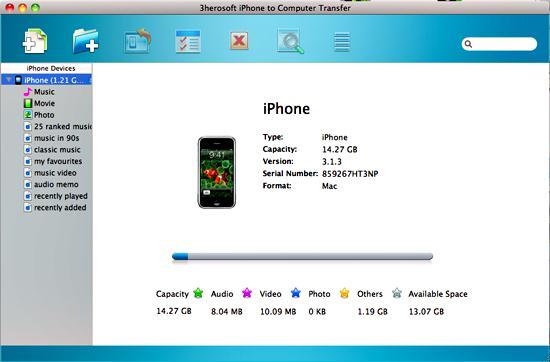 Step2: Transfer iPhone music to iTunes library
1)Open the "library/playlist" that you want to transfer. All these files are shown in file browser.
2)Check songs you want to transfer and check them. Besides music files, it also can be photo, video, podcast or TV program for exporting to iTunes.
3)Choose the "Export->Export to iTunes" option or directly click the "Add checked files to iTunes library" button to sync iPhone music file with iTunes..
Before you transfer iPhone music, please make sure you have already installed the iTunes successfully on your Mac computer. (the latest updated iTunes 9.0 supported)
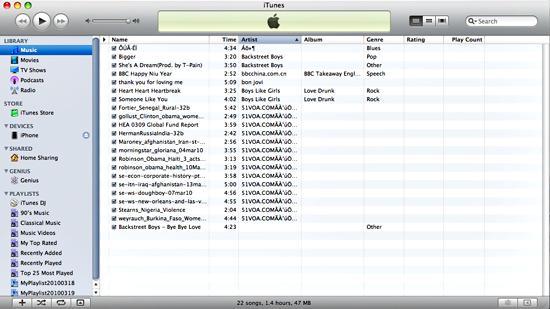
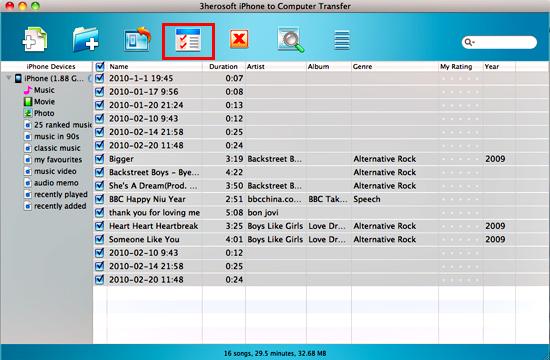 Step3: Check the music in iTunes library
After a few minutes, the music files you select can be transferred successfully from iPhone to iTunes library. What's more, the iTunes can create a new playlist folder named "My playlist" to save these music.
|
Hot Tags: |
||||
Ready to try or buy?
 Buy 3herosoft iPhone to Computer Transfer for Mac $25.oo
 Download 3herosoft iPhone to Computer Transfer for Mac 5.50MB
