


Windows Products
- iPod / iPhone Tools
- DVD Cloner Tools
- DVD Creator Tools
- Video Converter Tools
- DVD Ripper Tools
- Audio Tools
- PDF Tools
- Suite Tools

Mac Products
3herosoft iPhone to Computer Transfer

On iPhone, all songs are stored in iPod library, and you can purchased the songs from iTunes on iPhone, the purchased files will auto-save into iPod library and playlists. But for the purchased songs in iPhone, you have to consider to make iPhone purchased files backups on computer local. I strongly recommend 3herosoft iPhone to Computer Transfer, it will fast and easily transfer the purchased songs from iPhone to Computer.
 Transfer purchased songs on iPhone to computer
 -
Sync the purchased songs to iTunes library
-
Transfer music/video/podcast/playlist to computer or iTunes library




Transfer the purchased songs from iPhone to computer local, a program named 3herosoft iPhone to Computer Transfer will be the best, professional, which can list all iPhone media folders on the program, and allow you to freely and easily transfer them onto your computer for backup.
 Step1: Connect iPhone to computer
Connect iPhone and launch this iPhone Transfer software, all iPhone files are shown up in the interface, such as Audio, Video, Books, Ringtones, playlists, Photo, Voice Memos, Camera, SMS, Contact, Call List, Podcast, Purchases and iTunes U, you can open any item to view the equivalent of files on your iPhone library.
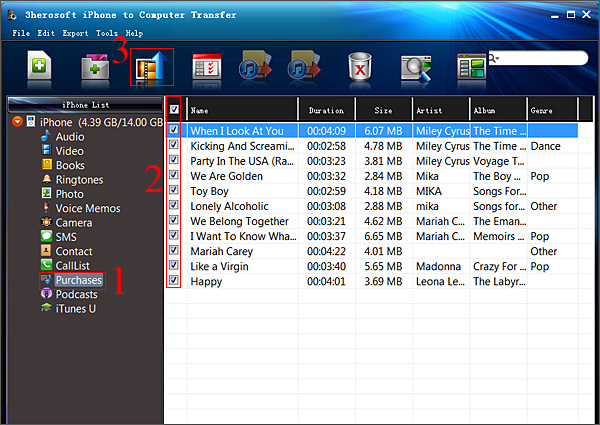 Step2: Transfer purchased songs on iPhone to computer
1) Open the "Purchases" library in the iPhone list of left panel, all songs you bought on iPhone will be displayed totally in the interface.
2) Check the songs you wanna transfer and press "Export checked files to local" button on the toolbar. Or choose "Export->Export checked files to local" option on the top-menu.
3) A dialog box will eject, choose a target folder and save the exported songs on computer local, press "Save" and you will see the copying process of exporting purchased songs from iPhone to computer hard driver. Fast and easy to operate and get the purchased files backups on computer.
Notes:
Maybe you have noticed that other item options in the left panel, check them and freely export off iPhone onto computer, and for iPhone Contact, Call list and SMS backup, you can save them on computer as TXT files, even the .csv contact files onto Windows OutLook or other contact manage apps with the help of iMacsoft iPhone to computer Transfer.
1) Transfer iPhone music/video/podcast/books/photos/voice memos/camera/ringtone/iTunes U, etc. to computer for backup.
2) Sync music/books/videos/podcast/TV Show/Audio Books/iTunes U, etc. to iTunes library on computer.
3) Freely manage sorts of iPhone files, delete any unwanted files, create playlist and rename, view photos thumbnail, etc.
|
Hot Tags: |
||||
 Buy 3herosoft iPhone to Computer Transfer $20.oo
 Download 3herosoft iPhone to Computer Transfer 5.82MB
