


Windows Products
- iPod / iPhone Tools
- DVD Cloner Tools
- DVD Creator Tools
- Video Converter Tools
- DVD Ripper Tools
- Audio Tools
- PDF Tools
- Suite Tools

Mac Products
3herosoft iPhone to Computer Transfer for Mac

Open the iTunes store in your iPhone and search for favourite songs in the newest web via Wifi, when you browse so many files and purchase them with your credit card. And you will see all purchased songs are shown in the iPod library of playlist in iPhone device. You should now make iPhone purchased songs backup on Mac in order to get recovery while incident happens. 3herosoft iPhone to Computer Transfer for Mac wil help you easily transfer purchased songs on iPhone to Mac local.
 Transfer purchased songs on iPhone to Mac
-
Sync the purchased music/albums to iTunes library
-
Export downloaded books/podcasts/iTunes U to Mac or sync to iTunes




Purchased songs on iPhone directly and they are saved on iPod library on iPhone device. Click the icon to open the library and view. But for the above question, how to transfer? one professional software named 3herosoft iPhone to Computer Transfer for Mac will offer a best solution. And the following article will show you the step by step course in transferring purchased songs to Mac local.
 Step1: Run the software and connect iPhone to Mac
Run the 3herosoft iPhone to Computer Transfer for Mac software and turn into its interface, connect iPhone to Mac, you will see all iPhone items are shown as below, such as Music, Video, Photo, Books, Ringtones, Camera, Contact, SMS, Call List, playlist, purchases, Podcasts, iTunes U, etc.
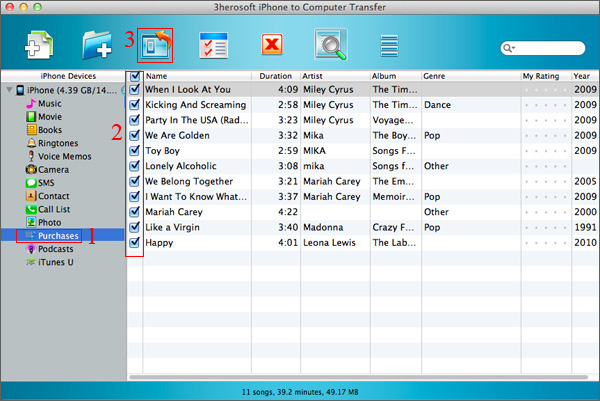 Step2: Transfer songs purchased on iPhone to Mac local
1) Click "Purchases" icon in the left list, open all purchased songs from iPhone that you view them on the interface.
2) Select and check your favourite purchased songs and press "Export checked files to local" button to transfer music files from iPhone to Mac. And a dialog box will eject at once, choose a backup folder on your Mac.
3) Press "Save" button in the pop-up box, you will see all songs you selected on software interface will be copying into Mac. When it finished, check the exported files on Mac and play them for checking the quality.
Other Skills:
1)Transfer iPhone music/video/podcast/playlist/camera/voice memos/ringtones/book/photos to Mac local, you can view them on Mac computer.
2) Sync all listed folders (music,video, podcast, playlist, books, ringtones, TV Show, iTunes U, etc.) to iTunes library.
3) Export iPhone SMS, Call List and Contact files to Mac local, save them as TXT format on computer, but for contact transfer, you can keep contact as .csv files that import contact in OutLook or other Address Book in Mac.
4) Import music/video files from Mac to iPhone library without using iTunes, only for the certain/supportive video/audio formats that work well on iPhone device.
|
Hot Tags: |
||||
 Buy 3herosoft iPhone to Computer Transfer for Mac $25.oo
 Download 3herosoft iPhone to Computer Transfer for Mac 5.50MB
