


Windows Products
- iPod / iPhone Tools
-
- iPod to Computer Transfer

- iPad to Computer Transfer

- iPhone to Computer Transfer
- iPhone Ringtone Maker
- iPhone SMS Transfer
- iPhone Contact Transfer
- iPhone Call List Transfer
- iPhone iBooks Transfer
- iPhone Photo Transfer
- iPod Mate
- iPhone Mate
- iPad Mate
- DVD to iPod Converter
- DVD to iPhone Converter
- DVD to iPad Converter
- iPod Movie Converter
- iPhone Video Converter
- iPad Video Converter
- iPod to Computer Transfer
- DVD Cloner Tools
- DVD Creator Tools
- Video Converter Tools
-
- Video Converter
- iPod Movie Converter
- iPhone Video Converter
- iPad Video Converter
- Apple TV Video Converter
- Video to Audio Converter
- AVI MPEG Converter
- MP4 Video Converter
- PS3 Video Converter
- PSP Video Converter
- WMV Video Converter
- 3GP Video Converter
- FLV Converter
- MOV Converter
- RM Converter
- Zune Video Converter
- BlackBerry Video Converter
- Mobile Phone Video Converter
- Video Converter
- DVD Ripper Tools
-
- DVD Ripper Platinum
- DVD to iPod Converter
- DVD to iPhone Converter
- DVD to iPad Converter
- DVD to Apple TV Converter
- DVD Audio Ripper
- DVD to MP4 Converter
- DVD to PS3 Converter
- DVD to PSP Converter
- DVD to WMV Converter
- DVD to 3GP Converter
- DVD to AVI Converter
- DVD to DivX Converter
- DVD to Pocket PC Ripper
- DVD to Zune Converter
- DVD to BlackBerry Converter
- DVD to Mobile Phone Converter
- DVD Ripper
- DVD Ripper Platinum
- Audio Tools
- PDF Tools
- Suite Tools
-
- Media Toolkit Ultimate

- DVD Ripper Platinum Suite
- DVD Maker Suite
- iPod Mate
- iPhone Mate
- iPad Mate
- DVD to iPod Suite
- DVD to iPhone Suite
- DVD to iPad Suite
- DVD to Apple TV Suite
- DVD to Audio Suite
- DVD to MP4 Suite
- DVD to AVI Suite
- DVD to PS3 Suite
- DVD to PSP Suite
- DVD to WMV Suite
- DVD to 3GP Suite
- DVD to Zune Suite
- DVD to BlackBerry Suite
- DVD to Mobile Phone Suite
- Media Toolkit Ultimate
Mac Products
- iPod / iPhone Tools
-
- iPod to Computer Transfer
- iPhone to Computer Transfer
- iPad to Computer Transfer
- iPhone Ringtone Maker
- iPhone SMS Transfer
- iPhone Contact Transfer
- iPhone Call List Transfer
- iPhone iBooks Transfer
- iPhone Photo Transfer
- iPod Mate for Mac
- iPhone Mate for Mac
- iPad Mate for Mac
- DVD to iPod Converter for Mac
- DVD to iPhone Converter for Mac
- DVD to iPad Converter for Mac
- iPod Video Converter for Mac
- iPhone Video Converter for Mac
- iPad Video Converter for Mac
- iPod to Computer Transfer
- DVD Cloner / Creator Tools
- Video Converter Tools
-
- Video Converter for Mac
- iPod Video Converter for Mac
- iPhone Video Converter for Mac
- iPad Video Converter for Mac
- Apple TV Video Converter for Mac
- Video to Audio Converter for Mac
- MP4 Converter for Mac
- FLV Converter for Mac
- PSP Video Converter for Mac
- BlackBerry Converter for Mac
- Mobile Phone Converter for Mac
- DVD Ripper Tools
- PDF Tools
- Suite Tools
-
- Mac DVD Toolkit
- DVD Ripper Suite for Mac
- DVD Maker Suite for Mac
- iPod Mate for Mac
- iPhone Mate for Mac
- iPad Mate for Mac
- DVD to iPod Suite for Mac
- DVD to iPhone Suite for Mac
- DVD to iPad Suite for Mac
- DVD to Apple TV Suite for Mac
- DVD to Audio Suite for Mac
- DVD to MP4 Suite for Mac
- DVD to FLV Suite for Mac
- DVD to PSP Suite for Mac
- DVD to BlackBerry Suite for Mac
- DVD to Mobile Phone Suite Mac
- Mac DVD Toolkit
3herosoft iPhone to Computer Transfer

"Have you ever been confused by how to transfer video from iPhone to iTunes? And you need professional third party utility to help you to break the limits of iTunes to transfer video from iPhone to iTunes directly. 3herosoft iPhone to Computer Transfer software is strongly recommended by many iPhone users. It provides you a brilliant way to transfer video from iPhone to iTunes with excellent quality and high speed.?/em>
 Transfer video from iPhone to computer for backup
-
Transfer video from computer to iPhone without using iTunes
-
Sync iPhone audio and video to iTunes library (iTunes 10 supported now)




You probably will notice that 3herosoft iPhone to Computer Transfer software is a highly recommended tool that helps you transfer videos from iPhone to iTunes, which is convenient and fast-following interface enables you to sync any kinds of files between iPhone/iPod and iTunes.
What's more, acting as an iPhone transfer tool, 3herosoft iPhone to Computer Transfer can make your iPhone a portable hard disk by opening it with Windows Explorer. Just has it, you will find that transferring video from iPhone to iTunes is so easy!
 Step1: Connect iPhone to computer
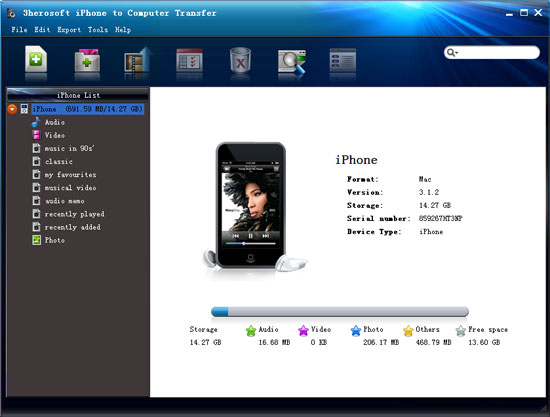
Launch this iPhone transfer software and connect your iPhone to your computer. Then you can see your iPhone on the desktop -- an iPhone icon with your iPhone's name under it. Then familiarize your feelings with its interface. All information about your iPhone, such as Type, Capacity, Version, Serial Number and Format, will be shown on the main interface.
 Step2: Transfer iPhone video to iTunes library
1)Open the library/playlist that you want to transfer. All these files are shown in file browser.
2)Check videos you want to transfer and check them. Besides video files, it also can be photo, songs, podcast or TV program for exporting to iTunes.
3)Choose the "Export->Export to iTunes" option or directly click the "Add checked files to iTunes library" button.
Before you transfer iPhone video, please make sure you have already installed the iTunes successfully on your computer. (the latest updated iTunes 10 supported)
 Step3: Check the video in iTunes library
After a few minutes, the video you select can be transferred successfully from iPhone to iTunes library. What's more, the iTunes can create a new playlist folder named "My playlist" to save these videos.

In this situation, a "Hint-dialogbox" will pop-up, close this dialog box and enter the iTunes interface to set some options rightly!


|
Hot Tags: |
||||
 Buy 3herosoft iPhone to Computer Transfer $20.oo
 Download 3herosoft iPhone to Computer Transfer 5.82MB
