


Windows Products
- iPod / iPhone Tools
- DVD Cloner Tools
- DVD Creator Tools
- Video Converter Tools
- DVD Ripper Tools
- Audio Tools
- PDF Tools
- Suite Tools

Mac Products
3herosoft iPhone to Computer Transfer


"It's lucky and cool to possess your own iPhone/iPhone 4/iPhone 4s/iPhone 5. With iPhone in hand, you can easily and fast make phone calls, listen to your favourite music, watch nice videos and take photos or surf the Web, etc. for enjoyment. Surprisingly, you can also use iPhone as external hard disks to store whatever you want. And 3herosoft iPhone to Computer Transfer will directly provide you with a visible and intuitive window for you managing iPhone contents.
 Use iPhone as an external hard drive to manage your iPhone contents.
-
Transfer files from computer to iPhone and vice versa.
-
Transfer files from iPhone to iTunes directly. (iTunes 10 supported now)




3herosoft iPhone to Computer Transfer is a reliable iPhone Transfer tool for iPhone users. It allows you to use iPhone as an external hard drive by opening it with Windows Explorer, manage, transfer and store your iPhone contents anytime and anywhere. Thus, you don't worry about forgetting to bring your USB disc anymore.
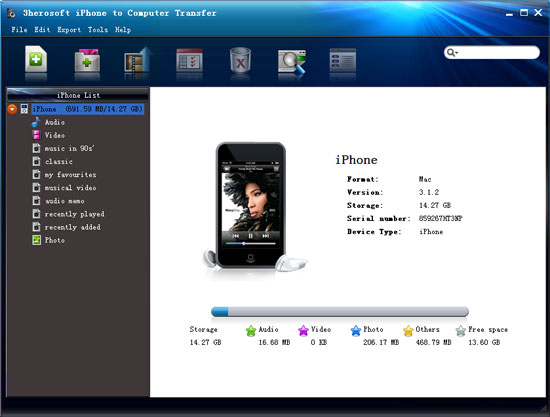
 Step1: Run iPhone Transfer
Connect iPhone/iPhone 4/iPhone 4s/iPhone 5 to computer, then you can see your iPhone on the desktop -- an iPhone icon with your iPhone's name under it. Then familiarize your feelings with its interface. All information about your iPhone, such as type, capacity, version, serial number and format, will be shown on the main interface.
 Step2: Open with Windows Explore to use iPhone as hard disk
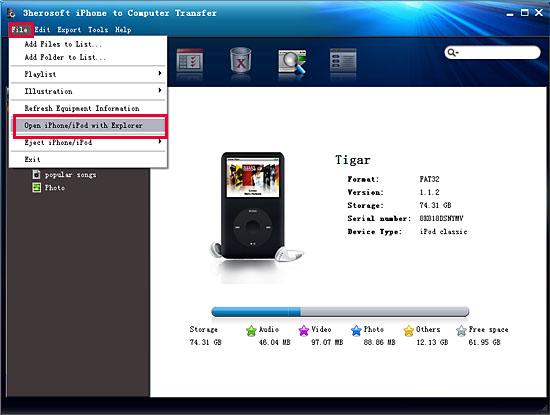
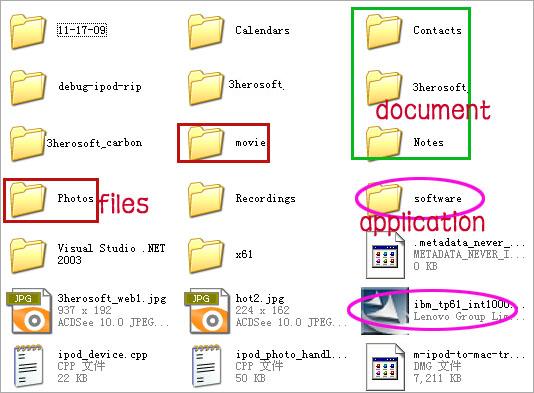
Choose "File > Open iPhone/iPod with Windows Explorer" option, and then you can manage your iPhone as an external hard drive. In this screen, you can transfer iPhone content to you computer for backup, also copy the important document or other files to iPhone for store which includes not only music but software, applications, documents and whatever you want. Just select the certain files to transfer and click with right mouse button to choose relevant options you want.
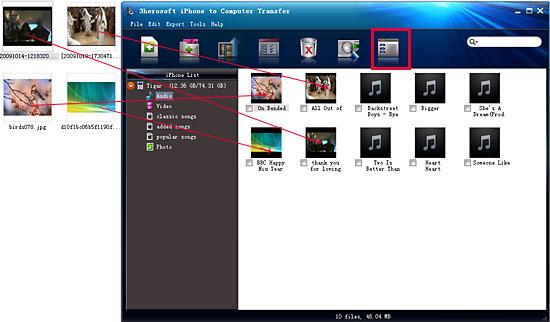
 Step3: Provide two viewing modes to manage iPhone contents
1)List Mode
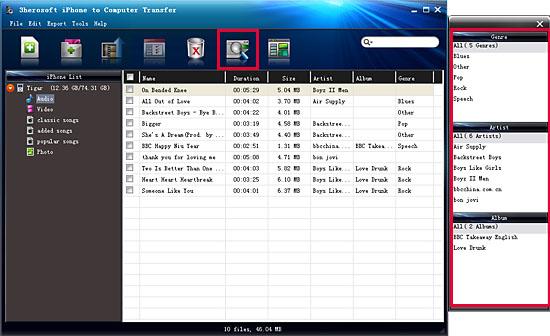
Click the "quickly browse your iPhone library" button, and you can find that the files sorted by Genre, Artist and Album from the right pop-up window. And all info about files can be shown up in list interface, such as "name", "duration", "size" and others.
Click the "view in illustration" button and all files can be displayed with rich covers, even you can add images as file's cover, just directly drag and drop the picture you like to the illustration for OK!
|
Hot Tags: |
||||
 Buy 3herosoft iPhone to Computer Transfer $20.oo
 Download 3herosoft iPhone to Computer Transfer 5.82MB
